Post-Broadcom Migration Math: When Does Moving Off VMware Actually Pay Back?
If you run VMware, you probably know the meeting: the renewal quote lands, and the total is not the number you budgeted for. The per-core floor bills a small CPU as though it had sixteen cores, the quote is for a VCF or VVF bundle that may include more than you use, and the date on the quote is closer than the date on your hardware refresh. Nobody in that room is asking whether to look at alternatives anymore. They are asking whether a move adds up, at what estate size, and by which renewal.
This post is my working answer to that question. It gives you the inputs that move the break-even curve, the migration-cost lines that published TCO models leave out, the technical hard parts that turn a six-month plan into an eighteen-month one, and the cases where I think staying put is the better call. Full disclosure: I work for Nutanix, and AHV is one of the destinations below. That is exactly why every input is in the open, so you can swap in your own numbers and check whether my conclusions survive them.
On this page
The inputs that actually move the curve
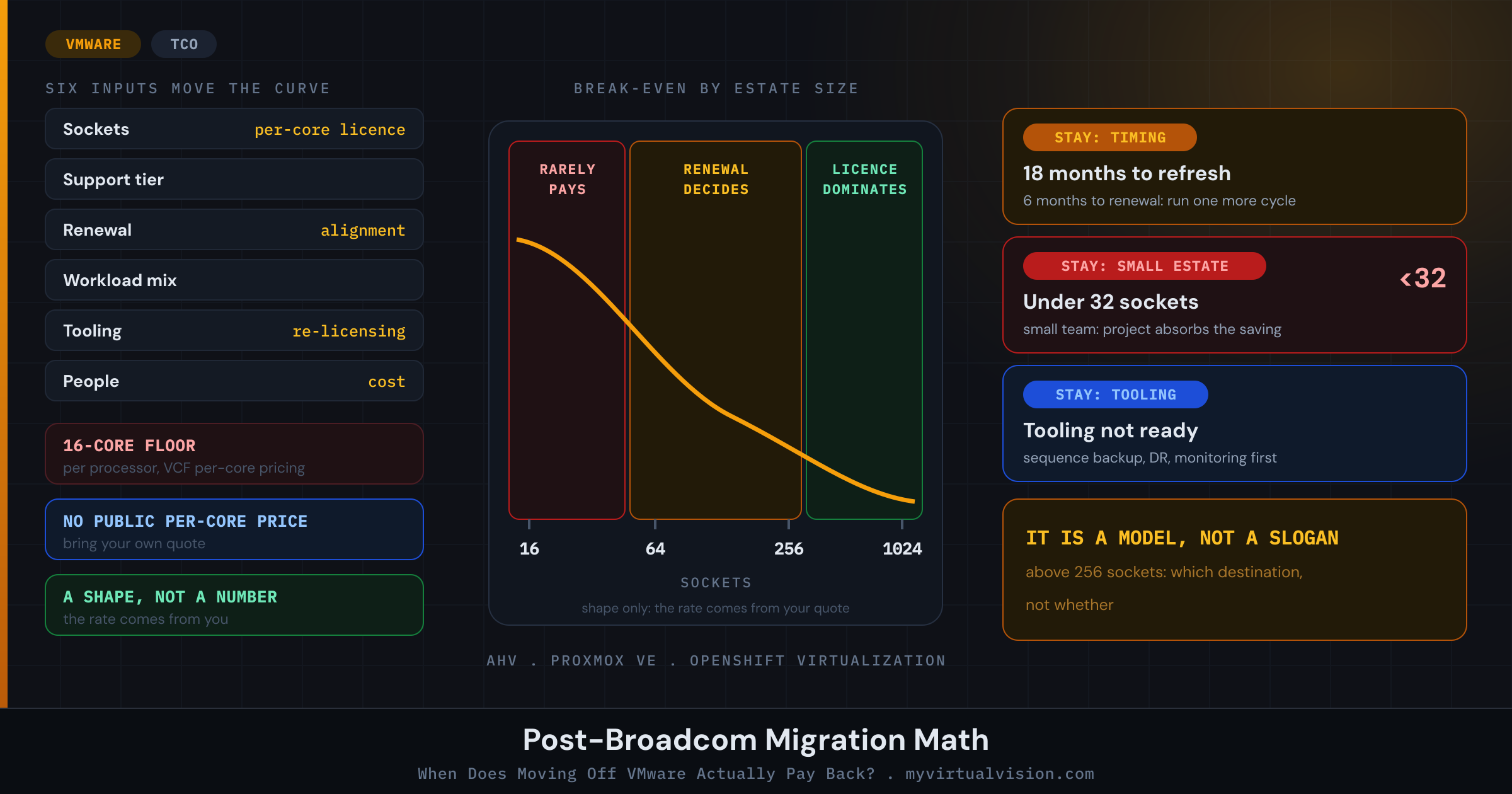
Most TCO models start with licence cost, but it is only one of six inputs that move the break-even curve, and it only dominates at the large end of the range. For smaller estates, the migration-cost lines decide it.
- Socket count and per-core licensing. Broadcom’s VCF and VVF subscriptions are priced per core, with a documented floor of 16 cores per processor, so a low-core-count CPU is billed as though it had sixteen. In March 2025 The Register reported an Arrow email to partners about a 72-core minimum per order line and a 20% penalty for renewals not completed by the anniversary date. Neither appears in Broadcom’s current VCF product description (May 2026) or in the VVF one (June 2026), which state only the 16-core floor, and Broadcom has not confirmed either. heise reported the 72-core minimum withdrawn within days, although some resellers still quote it. Ask your reseller whether they apply to your quote before you build them into the model. Broadcom publishes no public per-core list price; resellers quote estimates, and your number is whatever your renewal negotiation produces, which is precisely why it belongs in the model as an input you can flex rather than a constant.
- Support tier. The gap between Production Support and a premium tier moves the support line on either side. Take the tier names and prices from your own renewal quote, get the equivalent quote from each destination, and flex it.
- Renewal-cycle alignment. A migration started 18 months before renewal has very different economics from one started 18 months after.
- Workload mix. EUC clusters refresh differently from server-VM clusters. A migration plan that treats them as one workload misses the curve.
- Operational tooling re-licensing. Veeam, Rubrik, replacements for VCF Operations (formerly Aria, and before that vRealize), monitoring agents, the third-party licences that ship alongside the hypervisor have their own renewal cycles and their own switching costs.
- People cost. Both during migration (parallel-running window, retraining) and after (the ongoing operational delta between the platforms).
Leave any of them out and the model still produces a number, but it will not hold up once someone checks it against a real quote.
Get new posts by email
One email when a new post goes up. Nothing else.
I only use your address to send new posts, and every email has an unsubscribe link. See the privacy policy.
The shortlist, side by side
For most organisations the candidate shortlist is short. The four below, and the rows of the comparison table, are in alphabetical order, so the order says nothing about preference.
Hyper-V (Microsoft)
The option many Windows-centric estates already own. Windows Server 2025 is licensed per core, and the Datacenter edition carries rights to “unlimited virtual machines, plus one Hyper-V host per license”, against two VMs for Standard. If most of your guests are Windows and you are already buying Datacenter to license them, the hypervisor line in your model is close to zero, and the real cost moves to management tooling, backup and the operational change. The case is weakest in mixed Linux-heavy estates, where you would buy Datacenter for the hypervisor rights alone.
Nutanix AHV
The HCI option: hypervisor, storage and management ship as one stack, licensed per physical CPU core. In the estates I have worked on, AHV environments have run with smaller teams than the vSphere setups they replaced. The cost case is strongest when a hardware refresh is happening anyway and the EUC team sponsors the migration. A recent SAN no longer rules it out: Nutanix Cloud Platform now supports several external arrays, including Dell PowerFlex and Pure Storage FlashArray. Check the support matrix for your array model and price that path separately from an HCI refresh. Citrix support, including Citrix Provisioning, goes back years, while Omnissa Horizon support reached general availability with Horizon 8 2512 in December 2025.
OpenShift Virtualization (Red Hat)
The Kubernetes-native option. Workloads run as VMs inside an OpenShift cluster, with KubeVirt under the hood. The case is strongest in organisations already standardised on OpenShift for container workloads, where the migration consolidates two platforms into one. The case is weakest where OpenShift is not already in production. The operational model is materially different from vSphere, and the implicit training cost is significant. Where it is strong: VMs and containers on one platform, and the Virtualization Engine edition offers “a straightforward, per-node licensing model for bare-metal deployments”, with Red Hat’s included migration services for moving VMs across.
Proxmox VE
The open-source option that has, in the last two years, moved from homelab favourite to a serious enterprise candidate. The licence cost is low. The trade-off is operational maturity: backup, lifecycle management, and enterprise-grade support all exist but require deliberate configuration. The cost case is strongest in mid-sized estates where the team is technical enough to absorb the operational lift. It is weakest where the operational model has historically been “open a ticket with the vendor.” Where it is strong: the subscription is per occupied CPU socket and “the number of CPU cores does not affect the price”, which favours dense, high-core-count hosts, and storage choice runs from ZFS and Ceph to iSCSI and Fibre Channel.
There are other candidates, HPE Morpheus VM Essentials and several smaller commercial hypervisors among them, and they can be credible at specific scales. Check each one’s licence unit, backup ecosystem and ISV certification list the same way. For the central case, these four cover most live conversations.
| Platform | Hypervisor | Licence unit | VMware migration tool | Storage model |
|---|---|---|---|---|
| Hyper-V (Microsoft) | Hyper-V | Per core (Windows Server 2025) | Windows Admin Center VM Conversion (preview), online replication | Storage Spaces Direct (Datacenter editions), or shared SAN over FC, SAS or iSCSI |
| Nutanix AHV | AHV | Per physical CPU core (NCI) | Nutanix Move: pre-seed, then final delta sync | HCI, or supported external arrays |
| OpenShift Virtualization | KubeVirt on OpenShift | Per node on bare metal (Virtualization Engine) | Migration Toolkit for Virtualization (MTV), included | Certified partner storage, incl. OpenShift Data Foundation |
| Proxmox VE | QEMU/KVM (plus LXC) | Per occupied CPU socket; core count does not affect price | Built-in ESXi import wizard, optional live import | ZFS, Ceph RBD, NFS, iSCSI, FC/SAS, LVM |
The migration-cost lines nobody models
A TCO model that compares run-rate licence cost on each side ignores the migration project itself. The lines that get cut from most published models are the ones that decide whether the project happens at all:
- Parallel-running window. The interval between standing up the destination platform and decommissioning the source. Twelve to eighteen months is typical for a mid-sized estate. Both licence stacks are live during this period.
- Retraining. The operations team has to be productive on the new platform before the old one is decommissioned. Budget for formal training plus a productivity dip during the bedding-in period.
- Tooling re-licensing. Backup, monitoring, automation, and DR tools either carry over (if multi-platform), require new licences (if VMware-specific), or have to be replaced (if no destination version exists). Each carries a cost and a project line.
- Application certification. Some ISVs certify only against named hypervisors. Recertification can be a six-month conversation with no actual technical work.
- Storage and network re-platforming. Not always required, but when it is, it is the largest hidden line.
| Cost line | Typical duration / size | Captured in vendor TCO? | Impact on break-even |
|---|---|---|---|
| Parallel-running window | 12 to 18 months for mid-sized estate | Rarely | High |
| Retraining | Formal training + 3 to 6 months ramp | Rarely | Medium |
| Tooling re-licensing | Backup, DR, monitoring, automation | Partial | High |
| Application certification | ISV recertification windows | Rarely | Medium |
| Storage / network re-platform | Hardware-dependent, can be largest line | Rarely | High |
| Run-rate licence delta | Annual, recurring | Yes | High |
The hard parts that stretch the timeline
The cost lines above assume the migration itself goes to plan. These are the technical items that decide whether it does. Each of them is cheap to find in the first week of the project and expensive to find once you are three waves in.
Inventory what cannot move as-is
Before anyone quotes a timeline, run an inventory for the VMs that need special handling. The Proxmox documentation is unusually candid about its importer’s limits, and its list makes a good checklist whatever the destination: the importer cannot migrate vTPM state, cannot import encrypted VM disks (for example disks encrypted through a Storage Policy), and does not work for VMs whose disks sit on vSAN. Add RDMs, shared multi-writer disks (clustered databases) and vendor appliances that only ship as OVAs for ESXi. Every VM on that list becomes a line in the project plan of its own, because it will not move in a batch.
Collapse snapshots first
Long-lived snapshot chains are the most common avoidable delay. The same Proxmox page warns that an import can be significantly slower when the VM has snapshots. Consolidate them, and confirm the backup product is not leaving orphaned ones behind, before the VM goes into a wave. It is a change-window task on the source side, so schedule it like one.
Prepare the guest before you move it
Guest tooling is easier to remove from the platform it was built for. Proxmox advises removing any guest tools that belong to the old hypervisor before the move, because they can be difficult to remove afterwards, and making sure the VirtIO drivers are installed in the guest and loaded in the initramfs before you migrate. Windows needs extra steps to switch the boot disk to VirtIO SCSI drivers, and static network configuration often has to be re-applied on the new virtual NIC. Script this, test it on a clone of each OS build, and budget for the handful of VMs that will not cooperate.
Pick a cutover pattern for each workload
- Pre-seed, then final sync. Nutanix Move can pre-stage data days in advance to shrink the cutover window, then cut over with a final delta sync and an automated switchover. That is the pattern I would use for large VMs with tight downtime windows.
- Live import. Proxmox starts the VM on the target while data is still copying. The downside is spelled out in the docs: “should the import fail, all data written since the start of the import will be lost.” That is acceptable for stateless tiers, and I would think twice before using it for a database.
- Cold migration. Power off, copy, power on. Slowest per VM, simplest to reason about, and often the right answer for everything that can tolerate a maintenance window.
| Pattern | Example | Downtime | Main risk | Best for |
|---|---|---|---|---|
| Pre-seed, final sync | Nutanix Move | Final sync + boot | Long seeding on busy disks | Large VMs, tight windows |
| Live import | Proxmox VE importer | Short, VM off on ESXi | Failed import loses new writes | Stateless tiers |
| Online replication | WAC VM Conversion (preview) | Source powered off at cutover | Preview tooling | Windows/Linux on Hyper-V |
| Cold migration | Any (export / import) | Full copy time | Long maintenance window | Anything that can wait |
HA and fencing set your minimum cluster size
vSphere HA has trained a generation of admins not to think about fencing. Every destination makes you think about it again, and the answer feeds straight into the hardware line. Proxmox HA, for example, needs at least three cluster nodes for a reliable quorum, plus shared storage, and Proxmox gives typical error detection and failover times of about two minutes. A node that loses quorum fences itself, which the docs describe as “basically the same as hitting the reset button on the machine.” That is safe and well understood, but it is not the behaviour your application owners are used to, and a two-node remote site needs a QDevice for a third vote. Model the node count and the failover SLA for each site rather than for the estate as a whole.
Network segmentation is its own workstream
Distributed switch port groups map to VLANs or bridges without much drama. NSX does not. If you use distributed firewall rules or overlay segments, those are a security project with their own owners, change board and audit trail, and they rarely move at the same pace as the VMs. Map every segment and rule set to its target construct before wave one, and keep the firewall migration on its own plan, or it becomes the critical path.
Break-even at four sizes
Break-even is a curve rather than a single number, and its shape depends on the size of the estate. Looking at four representative sizes from the migration engagements behind this post, 16, 64, 256, and 1024 sockets, gives a defensible read on where the migration pays back and where it does not.
Estate size
What dominates the curve
Break-even on licence saving alone
Decision
16 sockets
Migration project cost
Rarely reached; the project absorbs the saving
Stay unless non-cost driver
64 sockets
Renewal alignment
Borderline, decided by where you sit in the cycle
Depends on timing
256 sockets
Licence delta vs project cost
Most destinations inside three years
Migrate, pick destination
1024 sockets
Run-rate licence delta
Comfortably; not migrating needs the business case
Which, not whether
The table gives the shape rather than a number, deliberately. Since Broadcom publishes no per-core list price, any five-year curve I drew here would be built on a rate I had invented, and you would have no way to tell which parts of the chart were data and which were decoration. The shape is the part that transfers between estates; the rate is the part you have to supply from your own quote.
The headline from those engagements: at the small end, the migration is expensive enough that it is rarely worth doing on cost alone. The justification has to come from somewhere else, exit-strategy compliance, platform consolidation, or roadmap alignment. At the large end, the licence-cost delta is so material that not migrating is the position that needs the business case.
A worked example, every input visible
I will not draw a curve on an invented rate, but I can show the arithmetic, so you can see which input moves it. Take an illustrative 64-socket estate with a VMware run-rate of 600 and a destination run-rate of 350 (thousands of euros a year, invented round numbers), so 250 a year of saving once VMware is switched off. Retraining, tooling, services and recertification add 330 one-off. The only thing that changes between the two columns is the parallel run. Run both platforms for 12 months and the one-off bill is 680, with break-even around month 45. Plan the waves so VMware can be switched off at a renewal date after 6 months, and the bill drops to 505, with break-even around month 30. Six months is shorter than the twelve to eighteen I call typical above, and it only works when you plan the waves around the renewal date from day one. Same platforms, same estate, more than a year apart, which is why I treat renewal alignment as one of the six inputs and not as a detail for later.
| Input / result | Long overlap (12-month parallel run) | Short overlap (6-month parallel run) |
|---|---|---|
| Annual VMware run-rate | 600 EUR k | 600 EUR k |
| Annual destination run-rate | 350 EUR k | 350 EUR k |
| Parallel run: destination paid while VMware still live | 350 EUR k | 175 EUR k |
| Retraining and productivity dip | 100 EUR k | 100 EUR k |
| Tooling re-licensing (backup, monitoring) | 80 EUR k | 80 EUR k |
| Migration services and labour | 120 EUR k | 120 EUR k |
| Application recertification | 30 EUR k | 30 EUR k |
| One-off total | 680 EUR k | 505 EUR k |
| Break-even after start | ~45 months | ~30 months |
Open source or commercial: what the licence price leaves out
The licence delta between Proxmox or plain KVM and a commercial platform is easy to see. The operational delta is not, and that is where the comparison is usually lost. With open source you are buying the integration work: patch cadence, storage care if you run Ceph, backup and monitoring integration, and an on-call rota that ends with your own engineers rather than a vendor escalation path. Put that in the model as FTE hours per year, so it carries a cost like every other line.
The commercial options sell that integration back to you, and every one of them, Nutanix included, replaces one vendor dependency with another. I would not pretend otherwise. What you can do is price the exit before you sign: which disk formats the platform uses, what export tooling exists, and what the contract says about renewal increases. If the Broadcom renewal showed anything, it is that the cost of leaving belongs in the TCO from day one.
Three cases where the migration does not pay back
A model that is any use will sometimes tell you to stay where you are, at least for now. These are the three cases where I would expect that answer.
- You are 18 months from a refresh and 6 months from a renewal. Run one more cycle, use the time to test the destination at small scale, and migrate at the next refresh.
- Your estate is under 32 sockets and the team is small. That sits between the 16- and 64-socket rows in the break-even table. The migration project absorbs the licence saving and then some. Unless there is a non-cost driver, do not migrate.
- Your operational tooling does not yet support the destination. If backup, DR, and monitoring would all need replacing simultaneously, the project risk is too concentrated. Sequence the tooling first, then the platform.
A 90-day roadmap to a defensible decision
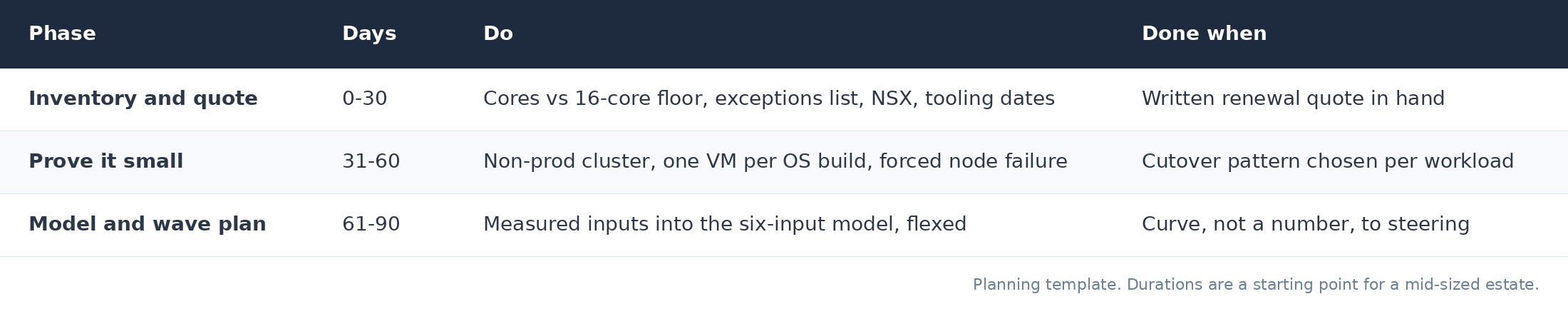
- Days 0-30: inventory and quote. Core counts per host (against the 16-core floor), renewal date, the exceptions list above, snapshot age, NSX usage, and the tooling estate with its own renewal dates. Get the renewal quote in writing.
- Days 31-60: prove it small. One non-production cluster on the leading destination. Migrate a sample from each OS build with the cutover pattern you intend to use, and test a node failure on purpose.
- Days 61-90: build the model and the wave plan. Plug the measured numbers into the six inputs and the migration-cost lines, flex them, and take the curve, not a single number, to the steering committee.
Show every input
Published TCO comparisons rarely survive scrutiny because the inputs are buried in footnotes. The version that actually moves a steering committee is the one with every input visible, so you can change the licence rate, the support tier or the parallel-run length in your own model and watch the answer move.
If your finance team cannot rebuild the curve from the inputs, they are taking the analyst’s word for it, and that rarely survives the first challenge in a steering committee. In my view the extra work of writing down every input and every assumption is what makes the model yours, because the answer then changes when someone changes an input.
FAQ
Can I keep my existing SAN if I leave VMware?
Often, yes, on all four platforms in this post, though the route differs. Hyper-V failover clusters can use “attached shared storage or … SMB 3.0 file shares”, over Fibre Channel, SAS or iSCSI. Nutanix Cloud Platform supports several external arrays (see the Nutanix section above). OpenShift Virtualization works with certified storage partners, among them Dell, Hitachi and NetApp. Proxmox VE can keep VM disks on “shared storage like NFS or iSCSI (NAS, SAN)” and handles Fibre Channel and SAS block storage directly on the host. Whichever you pick, check the support matrix for your exact array model, and model that path separately from a storage refresh.
Is Hyper-V free with Windows Server Datacenter?
The Datacenter licence includes Hyper-V host rights and unlimited virtual machines per licence, so there is no separate hypervisor fee. You still pay for the cores, and for management, backup and the migration itself.
How long does a VMware migration take?
For a mid-sized estate, plan for a parallel-running window of twelve to eighteen months, with both licence stacks live. The exceptions list and the network workstream decide where in that range you land.
The Bottom Line
Whether a move off VMware pays back depends on six inputs and the size of your estate.
The qualitative case for moving off VMware is largely made. The quantitative case is still open, and a single headline number rarely survives a steering committee. The curve moves on six inputs, socket count, support tier, renewal alignment, workload mix, tooling re-licensing, and people cost, and the answer is different at every estate size.
At the small end (under 32 sockets), the migration project cost rarely justifies itself on licence saving alone. From 256 sockets up, the licence delta dominates, and by 1024 sockets the question is which destination rather than whether to move. The middle is where renewal alignment decides the answer, and where the migration-cost lines that get cut from most published models actually matter.
Sometimes the answer is to stay for now: when the refresh is close, the team is small or the tooling is not ready. What you want at the end is the set of inputs, built into a model you own, so you can change them and watch the answer move.
The steering-committee meeting will happen either way, and I would rather walk into it with every input visible than with a single headline number.
If you have built a real TCO model for a VMware migration, which input surprised you most when you flexed it? Drop a comment below or find me on X at @kbaggerman.
Get new posts by email
One email when a new post goes up. Nothing else.
I only use your address to send new posts, and every email has an unsubscribe link. See the privacy policy.