Citrix: Logon Optimization
1 min read
Citrix released another good read on how the logon process and logon optimization in Citrix XenApp and/or XenDesktop works and how to optimize this:
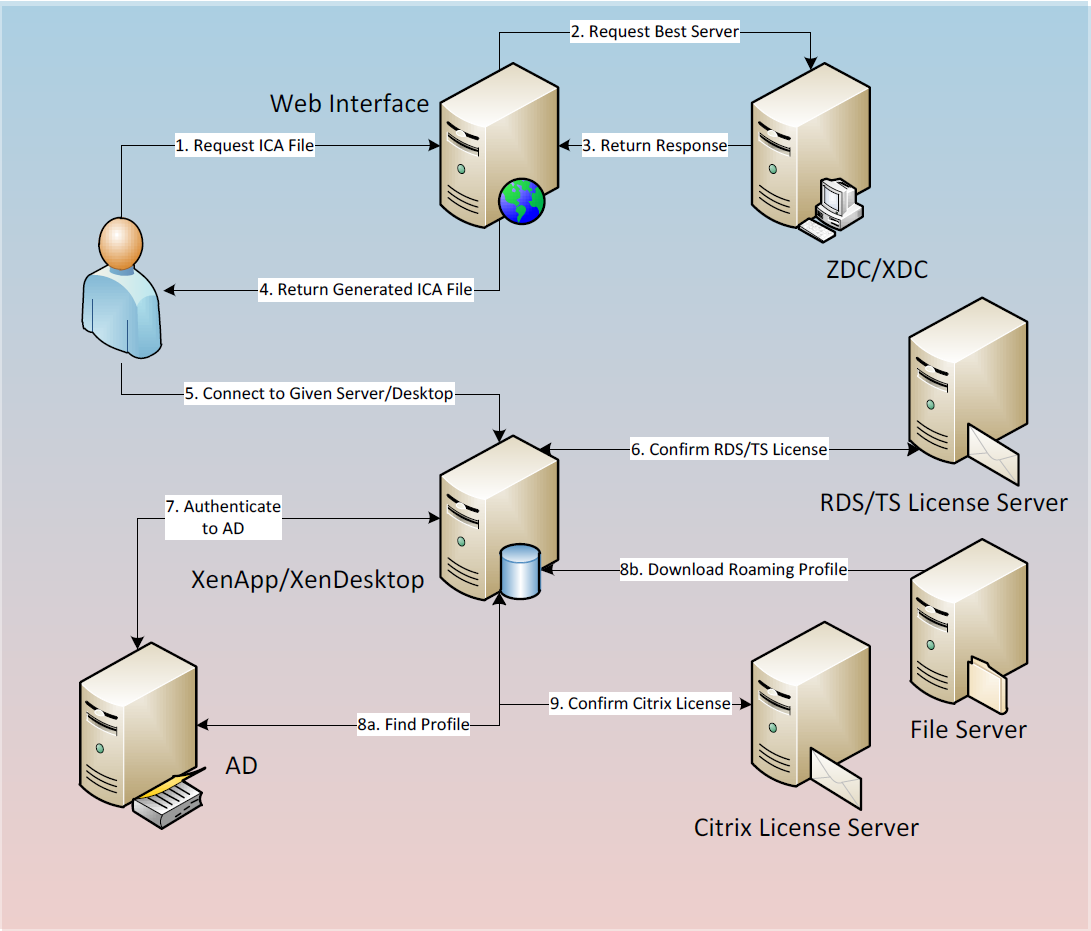
How the Logon Process Works
In order to better understand where time can be shaved from the user logon, we will first review the logon process as shown below: Please note that this diagram focuses on internal users accessing either a XenApp or XenDesktop resource. Additional steps are required based on external access via Access Gateway.
After this the document gives an explanation of the most common causes of logon delays:
- Logon & Authentication
- Profile Access Issues
- GPOs and Startup Procedures
- Networking Issues
- Hardware Overutilization
- Application and Desktop Startup
And it ends with an example of how to monitor this process using Edgesight.
The PDF can be found here
The following two tabs change content below.

Kees Baggerman
Kees Baggerman is Senior Technical Director — Performance & Solutions Engineering R&D at Nutanix, where he leads a global team responsible for defining how enterprise applications are delivered on the Nutanix platform. A former Citrix Technology Professional and NVIDIA Enterprise Platform Advisor, he has spent 15+ years driving EUC strategy and technical direction across architecture, product, and customer success. He has been writing here since 2011 — sharing what he learns at the intersection of platform engineering and enterprise IT.
Latest posts by Kees Baggerman (see all)
- Citrix MCSIO on Nutanix AHV: A Solution to a Problem That Doesn’t Exist - June 10, 2026
- The Cloud Desktop CPU Lottery: What Are You Actually Running On? - June 2, 2026
- Your Cloud Desktop Is Running on Yesterday’s Silicon - May 21, 2026
- When the Orchard Ships Production Software: AI-Augmented Development in the Real World - May 17, 2026
- Nutanix Documentation Script v5.0: Visual Reports, Brand Templates, and Seven Embedded Diagrams - May 15, 2026