Ignite 2026 Day 2 for EUC: Microsoft Went Quiet, Citrix Filled the Gap
Ignite 2026 for EUC, day by day
Day 1: The Plumbing Shipped, the Headlines Are Previews
Day 2: Microsoft Went Quiet, Citrix Filled the Gap (you are here)
Day 3: coming Friday
Day 4: coming Saturday
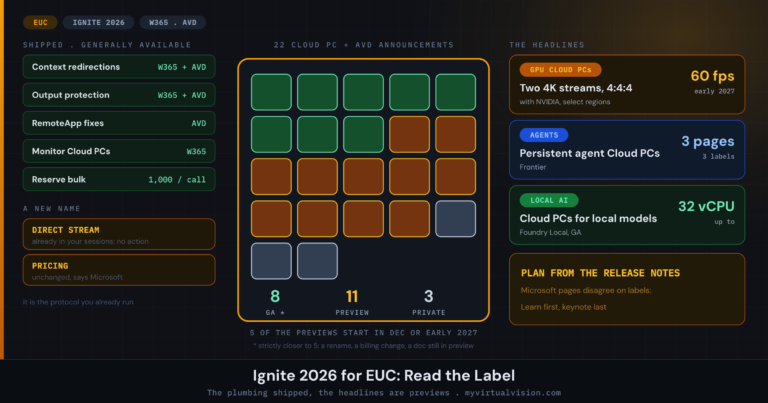
Day 2 of Microsoft Ignite 2026 turned out to be a lot quieter for end-user computing than I expected. On Day 1 I counted 22 Windows 365 and AVD announcements, which I went through in The Plumbing Shipped, the Headlines Are Previews. On Wednesday I went back to the same sources, the Book of News, the Learn release notes for Windows 365 and Azure Virtual Desktop and the AVD blog, and I could not find anything new dated 18 November. The Windows 365 Ignite post does show an 18 November update, but it does not mark any section as changed, so I cannot tell you what moved.
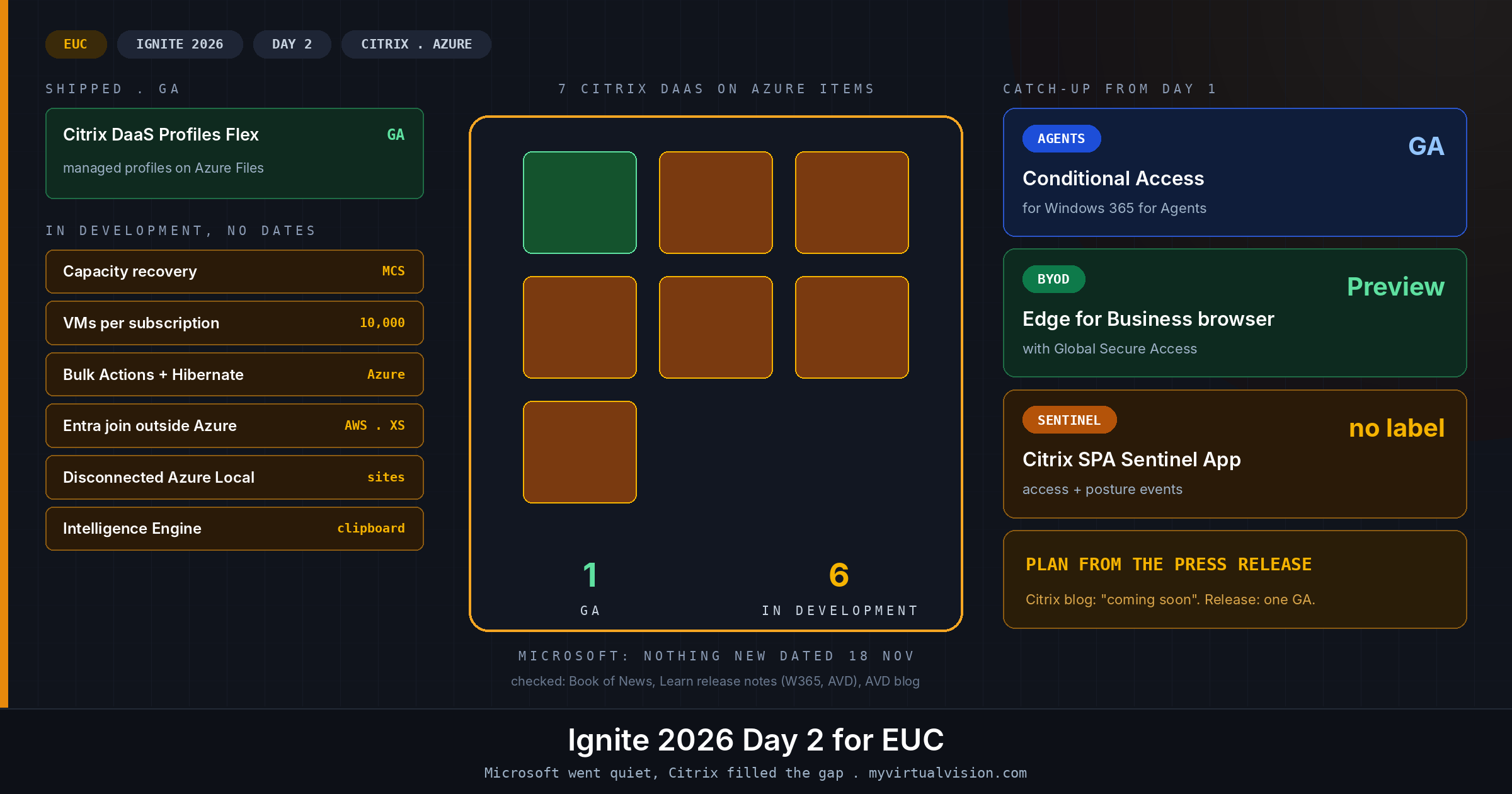
Most of the EUC news on Wednesday came from Citrix. It announced seven capabilities for Citrix DaaS on Azure, of which one is generally available today and six are still in development without a date. I also picked up four items from Day 1 that I missed the first time, because they sit in Microsoft’s identity and security posts and on the Microsoft 365 roadmap, and not in the Windows 365 pages I used for my count. Those two things are what this post covers.
On this page
Citrix DaaS on Azure: the seven announcements
Citrix published the list in two places: a press release on Business Wire and a blog by Shawn Bass, Bigger, tougher, smarter: What’s next for Citrix DaaS on Azure. If you want to know what you can actually use, the press release is the clearer of the two: “Citrix DaaS Profiles Flex is generally available now, while the rest of these capabilities are in development.” The blog starts by saying all seven are coming soon and only puts a GA label on Profiles Flex further down the page. I would plan from the press release. It is a small thing, but it is the same kind of label confusion I ran into across Microsoft’s own pages on Day 1.
Here are the seven, starting with the ones I think matter most if you design or run Citrix on Azure:
- Citrix DaaS Profiles Flex (GA): persistent user profile storage that Citrix manages for you, built with Microsoft on Azure Files, and the only one of the seven you can deploy today.
- Automatic recovery from Azure capacity disruptions (in development): when a VM cannot start in its usual zone, Machine Creation Services tries another zone, another location in the region or a VM size you approved in advance. Citrix says you can switch it on for existing deployments without rebuilding them.
- Twice as many desktops per subscription (in development): up to 10,000 VMs per Azure subscription per region, up from 5,000.
- Bulk Actions, Hibernate and Resume (in development): Azure Bulk Actions to start, deallocate, hibernate or delete thousands of machines in one request.
- Entra ID join outside Azure (in development): machines on AWS and Citrix XenServer join Microsoft Entra without on-premises Active Directory. The blog says VMware, Nutanix, Hyper-V, Google Cloud and others can follow.
- Citrix DaaS on disconnected Azure Local (in development): catalogs, images and the VM lifecycle for sites with no connection to Azure.
- Citrix Intelligence Engine (in development): AI models that run inside your own environment, starting with the clipboard, where it spots sensitive data such as personal information and blocks or redacts it.
If you look at the list as a whole, most of it is about running Citrix on Azure at scale: subscription limits, capacity and power operations. I read that as a fairly honest picture of where large Citrix estates on Azure are struggling today, and Shawn Bass more or less says so in the blog when he describes a customer who had stopped planning their Azure estate around users and started planning it around subscription limits.
Get new posts by email
One email when a new post goes up. Nothing else.
I only use your address to send new posts, and every email has an unsubscribe link. See the privacy policy.
What Profiles Flex means for your profile design
Profiles are where a lot of VDI projects lose their time, so a managed profile store deserves a proper look. With Profiles Flex, the Azure Files share you would normally build, size and back up yourself becomes a service. According to the blog, you select which users need a profile, use a built-in estimator for the storage, and Citrix takes care of provisioning, updates and monitoring, with profile data encrypted by default and stored in a location you choose. It is the same idea I described for Windows 365 Flex on Day 1. Someone else runs the profile store for you, but you still have to think about how your profiles behave.
What neither the press release nor the blog answers are the questions I would ask first. How does Profiles Flex relate to Citrix Profile Management and FSLogix containers, and is there a migration path from either one? Whose subscription does the Azure Files capacity live in, and who pays for it? And what do backup, restore and region failover look like? If you run Citrix on Azure today, I would put those three questions to your Citrix team before you plan a pilot. If the answers are good, it takes away one of the more tedious parts of a Citrix on Azure design.
The capacity and scale items
Of the six items still in development, automatic capacity recovery is the one I would follow most closely, because it deals with a problem most of you will have run into. If you have ever tried to start a few hundred desktops at 08:00 in a busy region, or tried to get GPU VMs at all, you have seen allocation failures, and today you work around them with scripts, spare capacity or a support case. Letting MCS fall back to another zone or to a VM size you approved in advance is a sensible approach, but I would test it properly before relying on it. Decide on the fallback sizes up front, check that your image and any GPU drivers work on them, and make sure your licensing and cost reporting can cope with a desktop that suddenly runs on a different SKU.
The 10,000 VMs per subscription figure is the headline of the press release, but for most environments it changes less than the number suggests. Mainly it means you need fewer subscriptions to split a very large estate across, while Azure quotas, your network design and your own subscription policies still apply. Hibernate and Resume brings Citrix level with native AVD, where hibernation for session hosts in personal host pools is already generally available according to the AVD release notes.
Two of the items cover ground that AVD and Windows 365 do not. Entra join on AWS and XenServer means you no longer need domain controllers next to Citrix workloads outside Azure. Disconnected Azure Local is aimed at sovereign and air-gapped sites, which AVD on Azure Local cannot serve because its control plane runs in Azure. For full disclosure: I work for Nutanix, which is one of the platforms Citrix says can follow for Entra join, and I have not been given a date for it.
The Intelligence Engine is the most interesting idea on the list, and also the one furthest from shipping. It helps to compare it with Microsoft’s context-based redirections, which went GA on Day 1. Those decide whether a user on a given device may use the clipboard at all. Citrix wants to look at what is actually being copied and block or redact the sensitive parts, which is a much harder problem, and because the models run in your own environment it will need compute somewhere. Until there is a preview I have nothing to size it against.
Four items I missed on Day 1
Three of the next four come from Microsoft’s Ignite posts for Entra and Sentinel, and the fourth from the Microsoft 365 roadmap. They sit outside the Windows 365 pages I used for the Day 1 count, which is why they are not in that table.
The first is Conditional Access for Windows 365 for Agents, which the Microsoft Entra Ignite post lists as generally available. The post covers it in a single line, saying Conditional Access “now extends to the Cloud PCs your agents use”, without saying which conditions or grant controls apply, and points to the Learn page on Conditional Access for agent identities for the details. It belongs with the agent items from Day 1: if agents get Cloud PCs of their own, those Cloud PCs need policy as well. What I would sort out now is ownership. Decide whether the EUC team or the identity team owns Conditional Access for non-human identities before the first agent Cloud PC turns up in your sign-in logs.
The second is in the Sentinel connectors post: a Citrix SPA Sentinel App that brings Citrix Secure Private Access and Device Posture events into Microsoft Sentinel, built on the Codeless Connector Framework. The post gives no release label for it, so I would check the Content Hub in your own workspace before planning around it. For mixed Citrix and Microsoft estates, it means the access decisions and posture results for unmanaged devices can end up in the SOC next to your Entra and Defender signals.
The third, from the same Entra post, is not VDI, but it goes after some of the same use cases. A secure enterprise browser for BYOD, which combines Microsoft Edge for Business with Entra Global Secure Access, is in preview. Users sign in to their Edge work profile on a personal device and reach private corporate apps through Global Secure Access.
In a lot of contractor VDI estates, a good share of the users only need a browser to reach a handful of web and SaaS apps. If that sounds like your pool, I would test this preview alongside context-based redirections and see how many of those users really need a full Windows desktop.
The fourth is not in any Ignite blog. On Tuesday Microsoft added Microsoft Teams: New VDI solution for Omnissa on Mac to the Microsoft 365 roadmap. It brings the SlimCore-based media engine for Teams, which Windows endpoints already have, to Mac clients that connect to Omnissa Horizon. The roadmap describes an expanded feature set and better quality, reliability and performance. The item is in development, with a preview listed for December 2026 and general availability for February 2027, for worldwide and GCC tenants.
Roadmap dates tend to move, so I would treat both as targets and not as commitments. If you run Horizon with Mac users, count those clients now and check which Horizon Client versions they run, so you can start testing as soon as the preview opens.
Sessions to watch
Citrix has a session on all of this: Build a secure, AI-ready enterprise workspace with Citrix + Microsoft, with Shawn Bass from Citrix and Igal Figlin from Microsoft. The session page does not show a code or a time, so keep an eye on it for the recording.
For Thursday, the Windows Server team lists two sessions that are relevant if you run RDS or Server-based session hosts. BRK418, What’s new and what’s next for Windows Server, with Neil Hinnant and Elden Christensen at 10:15, is the most likely place for more detail on Windows Server 2028. BRK419, From VMware to Hyper-V: Hyperscale virtualization in your datacenter, with Jeff Woolsey and Davanna White at 13:30, is aimed at anyone planning to move VDI hosts off vSphere. Neither session description mentions RDS or AVD, so I would treat them as background rather than the place where session host news will land.
Partner news: Citrix
Everything in the Citrix sections above comes from Citrix’s own blog and press release. Citrix says it will share more on availability as release plans are finalised, so I expect the dates to come later rather than this week. I did not find anything new from other vendors on Wednesday that I could confirm on their own sites. If something turns up, I will cover it in the Day 3 post.
The Bottom Line
A quiet day for Microsoft EUC, and seven Citrix announcements of which one is GA
I found no new Microsoft EUC announcement dated 18 November. Citrix announced seven capabilities for DaaS on Azure: Profiles Flex is generally available, and the other six are in development without dates.
Four Day 1 items fill in the picture: Conditional Access for Windows 365 for Agents is generally available, the Edge for Business BYOD browser is in preview, the Citrix SPA app for Sentinel has no release label, and the new Teams VDI optimisation for Omnissa on Mac is in development with a preview listed for December.
What I would do this month: if you run Citrix on Azure, ask how Profiles Flex fits with your current profile solution and who pays for the storage. Agree who owns Conditional Access for agent Cloud PCs. And if your contractor pool mostly uses browser apps, test the Edge for Business preview alongside context-based redirections.
Would you hand your profile store to Citrix, or keep running FSLogix on your own Azure Files? Drop a comment below or find me on X at @kbaggerman.
Get new posts by email
One email when a new post goes up. Nothing else.
I only use your address to send new posts, and every email has an unsubscribe link. See the privacy policy.