Using RES Automation Manager to create printers from CSV
2 min read
During one of my projects we had to do a print migration of +500 printers and as this could become a repeating task during other migrations we decided to use RES Automation Manager to get this done. Because the old print server was a Windows Server 2003 and the new print server is a Windows Server 2008 R2 we couldn’t do an export/import. I listed all printers in the following format:
Printserver,Driver,IPAddress,Portname,Sharename,Location,Comment,Printername
I used the following scripts to get this information:
Get-WMIObject -class Win32_Printer -computer $computername | Select name,DriverName,PortName,Sharename,Location,Comment,Name | Export-CS V -path c:\printers.csv
Because I’m using DNS names to configure ports I used the script from Eric Wright to add all DNS records into the DNS based on this CSV file: Update Microsoft DNS records with PowerShell and DNSCMD
So I got the information I needed in this CSV file so I can create a new job in RES Automation Manager to create the printers based on this information:

I’ve created different tasks in one module on which I configured to contintue on error. In this task I used parameters for the following fields:
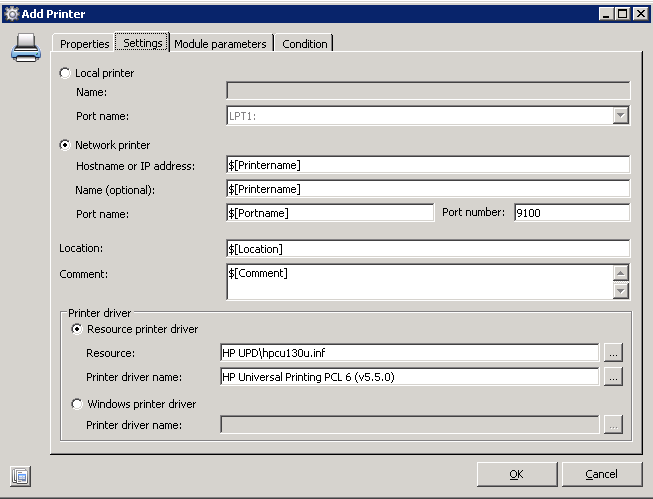
As you can see I’ve used all input from the CSV but I used a condition too, based on the input from the CSV I determined which printer drive should be installed:
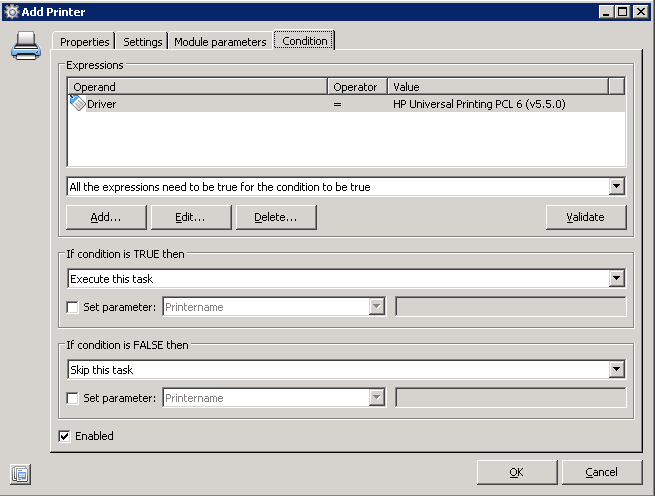
Not all printers where created using this script, printers that where offline couldn’t be reached and couldn’t be installed so I had to run the script 3/4 times before all printers where created.

Kees Baggerman
Latest posts by Kees Baggerman (see all)
- Citrix MCSIO on Nutanix AHV: A Solution to a Problem That Doesn’t Exist - June 10, 2026
- The Cloud Desktop CPU Lottery: What Are You Actually Running On? - June 2, 2026
- Your Cloud Desktop Is Running on Yesterday’s Silicon - May 21, 2026
- When the Orchard Ships Production Software: AI-Augmented Development in the Real World - May 17, 2026
- Nutanix Documentation Script v5.0: Visual Reports, Brand Templates, and Seven Embedded Diagrams - May 15, 2026