
Making sure your Citrix Desktops are utilized in 35 lines of PoSH
3 min read
Earl ier this week one of our SEs asked the following question on an internal Slack channel: “I have a customer that is looking for an automated process to identify VDI VMs that haven’t been used, notify the users, and then ultimately reclaim them if noone has logged on in a certain amount of time”.
PoSH time! One of my first go-to’s was ‘Get-ADComputer‘ and use the ‘LastLogonDate‘ but after fiddling around a bit I noticed that the ‘Get-BrokerDesktop‘ has a value for ‘LastConnectionTime‘ which actually makes more sense as this is the path a regular user would take vs an admin that can login to a desktop via the console and thus creating false positives.
The first piece was pretty straightforward:
<# .SYNOPSIS Gets all desktops that haven't been used within x amount of days (30 days is the default) and emails the end user. .DESCRIPTION Gets all desktops that haven't been used within x amount of days (30 days is the default) and emails the end user. .EXAMPLE PS C:\PSScript > .\desktop_ultil_v1.ps1
.INPUTS
    None.  You cannot pipe objects to this script.
.OUTPUTS
    No objects are output from this script.
    This script creates an email to the end user.
.NOTES
    NAME: desktop_ultil_v1.ps1
    VERSION: 1.0
    AUTHOR: Kees Baggerman
    LASTEDIT: April 2017
#>

# Setting the variables for this script
$DDC = ""
$cred = get-credential
$adminmail = ""

# Making sure the appropriate cmdlets are loaded, Microsoft RSAT and Citrix PoSH Cmdlets need to be installed
Import-Module ActiveDirectory
Add-PSSnapin Citrix*

# Set current date minus 30 days
$logonDate = (get-date).AddDays(-30)

# Get all pre assigned desktops where the last login date is 30 days or longer
$Desktops = Get-BrokerDesktop -maxrecordcount 5000 -adminaddress $DDC | Select-Object HostedMachineName, AssociatedUserNames,LastConnectionTime | where-object {$_.LastConnectionTime -le $logonDate}

# Loop through the results, fetch the corresponding email address of the user account and send out an email with a BCC to an additional email address
foreach($Desktop in $Desktops){
                               $user = Get-ADUser $Desktop.AssociatedUserNames.Split("\")[1] -Properties *
                               $ComputerName = $Desktop.HostedMachineName
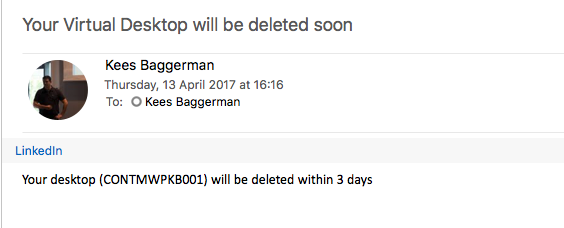
                               $body = “Your desktop ($ComputerName) will be deleted within 3 days”
                               Send-MailMessage -To $user.EmailAddress -bcc $adminmail -from xd-admin@ltd.com -Subject 'Your Virtual Desktop will be deleted soon' -Body $body -BodyAsHtml -smtpserver smtp.office365.com -usessl -Credential $cred -Port 587
                               }
I had to use the Office 365 SMTP servers hence why you’d see the additional parameters for SSL, Creds and ports. This might be different for your own environment, also you need to make sure that the account you’re using to send the email has send-as rights for the alias you’re using for the -from parameter. This piece of script fetches all assigned desktops in a XD site, determines the last logon time and if it’s longer than 30 days it will collect the user assigned to the desktop all while utilizing posh cmdlets. Based on the user AD will be queried and the email address will be fetched to send out an email. So far, so good.. Result!
I’ll be working on the second part of automatically reclaiming the desktops after x period of time when time allows me. For now I got what I wanted, happy scripting!

Kees Baggerman
Latest posts by Kees Baggerman (see all)
- Citrix MCSIO on Nutanix AHV: A Solution to a Problem That Doesn’t Exist - June 10, 2026
- The Cloud Desktop CPU Lottery: What Are You Actually Running On? - June 2, 2026
- Your Cloud Desktop Is Running on Yesterday’s Silicon - May 21, 2026
- When the Orchard Ships Production Software: AI-Augmented Development in the Real World - May 17, 2026
- Nutanix Documentation Script v5.0: Visual Reports, Brand Templates, and Seven Embedded Diagrams - May 15, 2026


2 Comments