The GPU Lottery: Which NVIDIA Silicon Is Behind Your Cloud Workstation?
The CPU lottery has a twin nobody is writing about. When you provision a GPU-enabled cloud workstation, for CAD, for clinical imaging, for Citrix HDX 3D Pro, or for AI inference at the desk, you pick a SKU family on the assumption that the marketing label maps cleanly to a silicon generation. It does not. The mapping between an instance family and an NVIDIA generation is documented in vendor pages most architects never read past the first table, and the generational gap, when you actually land on the wrong end of it, is wider than the CPU one.
This post does the same exercise as the CPU lottery work, but for GPUs. Which silicon is behind which cloud workstation SKU, where the multi-generation traps live, what the practical performance delta looks like, and what to do about it.
On this page
The GPUs that matter in 2026
For VDI, virtual workstations, and inference-at-the-desk, the working set is narrow. The cloud GPU desktop families map to four NVIDIA parts, plus a new generation that has just arrived on all three clouds:
- T4: Turing, launched 2018. The workhorse of an entire generation of cloud VDI. Still in the fleet.
- A10 / A10G: Ampere, announced 2021. Behind AWS G5 and Azure NVads A10 v5.
- L4: Ada Lovelace, 2023. Inference-tilted, lower TDP. AWS positions G6 directly against G4dn.
- L40S: Ada Lovelace, 2023. The high-end workstation and small-model inference part.
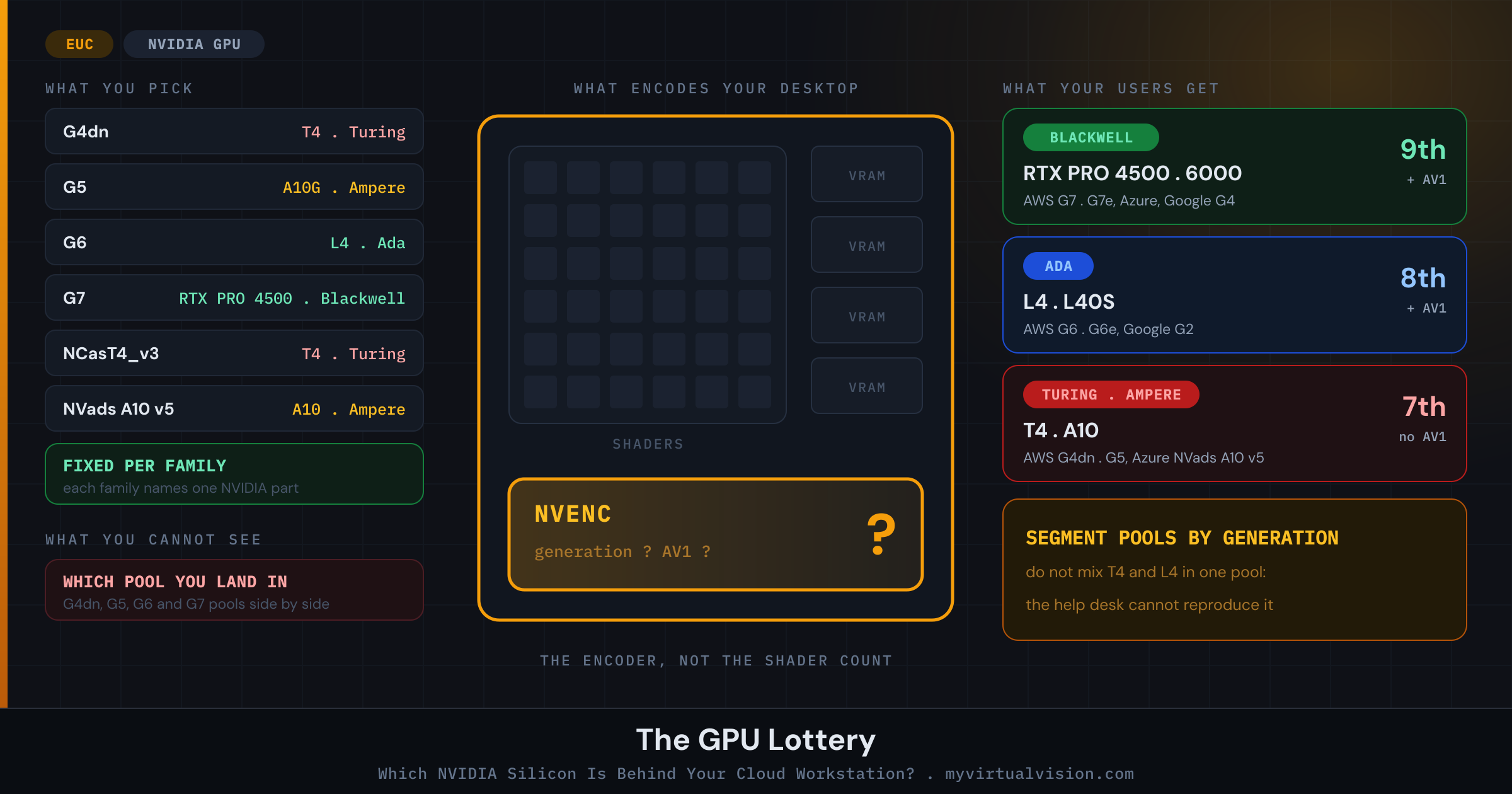
- RTX PRO 6000 / 4500 Blackwell Server Edition: Blackwell, 2025 and 2026. The new top of the range, with 9th-generation NVENC: AWS G7 and G7e, Azure NC RTX PRO 6000 BSE v6, Google Cloud G4.
Almost five years separate the T4 from the L4, and Blackwell adds another step on top. That is three NVENC generations (7th, 8th and 9th), frame buffers from 16 GB to 96 GB per card, and the encoder block that the HDX and AVD display pipelines depend on. Two SKUs that read identically in a procurement document can hand you very different experiences in front of the user.
The per-cloud mapping you actually need
Each hyperscaler advertises GPU SKUs by family letter and generation number. The mapping to physical silicon is documented, but rarely on the page that calculators land on. Working from the current vendor documentation:
- AWS G4dn uses the T4. G5 uses the A10G. G6 uses the L4. G6e uses the L40S. G7 uses the RTX PRO 4500 Blackwell Server Edition and G7e the RTX PRO 6000.
- Azure NVads A10 v5 is the long-running workstation SKU and is fixed to the A10, sold in fractions from 1/6 of a GPU upwards. NC RTX PRO 6000 BSE v6 brings Blackwell, and Microsoft lists “GPU-accelerated desktop virtualization (VDI)” among its uses. The legacy NV-series ran on the Tesla M60 (Maxwell), as did NVv3. NCasT4_v3 is fixed to the T4, the same 2018 Turing part as AWS G4dn, and Microsoft still lists it as a supported AVD session host size. The NVads V710 v5 family introduces AMD Radeon Pro V710 silicon, which is a different lottery entirely and outside the scope of this post.
- GCP G2 uses the L4, and G4 uses the RTX PRO 6000 Blackwell Server Edition, with “virtual desktops” among Google’s listed uses. A2 uses the A100, which has no NVENC encoder at all, so it is a compute part, not a desktop one. Older N1 machine types let you attach a T4, P4 or V100, depending on what the zone offers, with the T4 and P4 both flagged as approaching end of support.
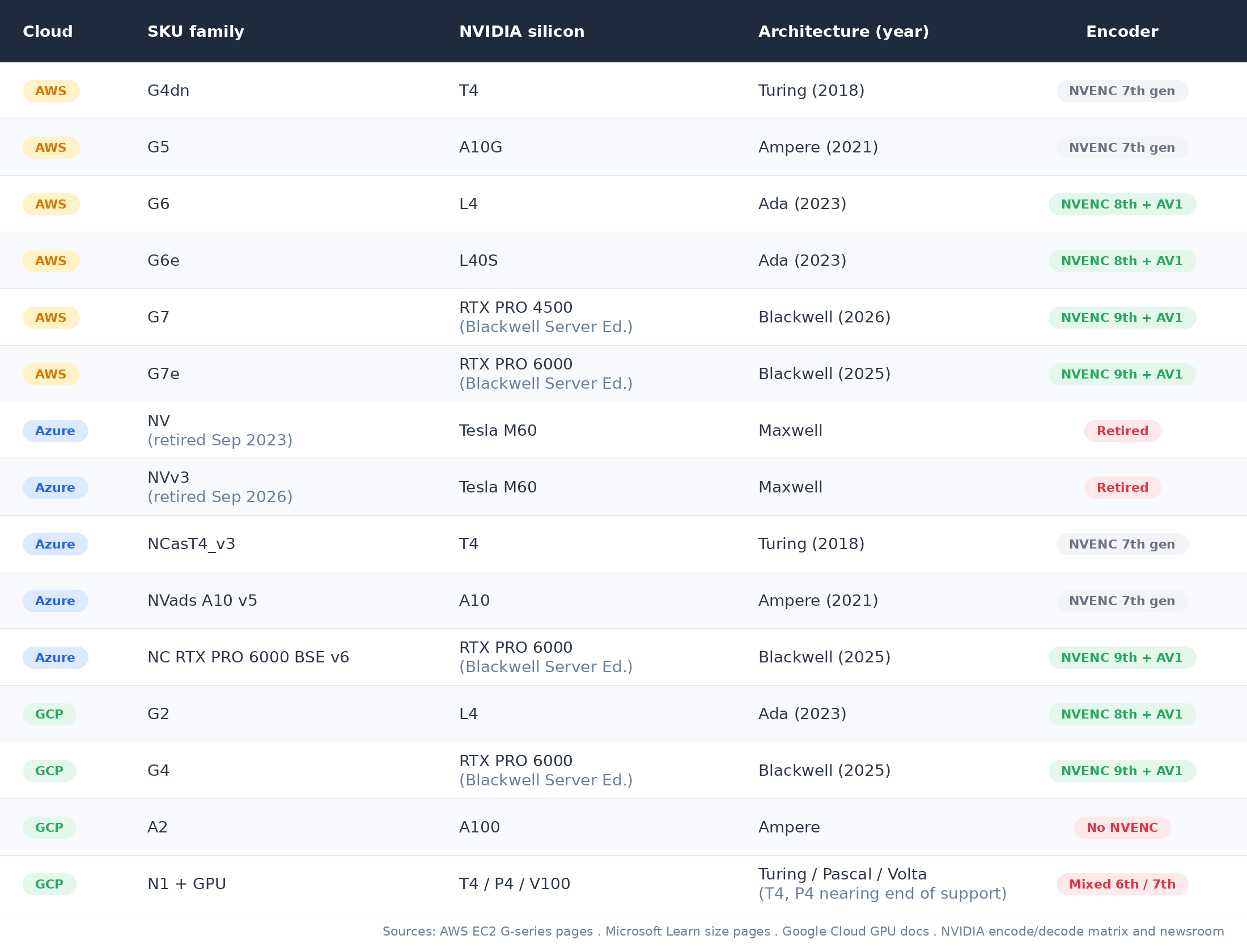
Two things to notice. First, the procurement label and the silicon generation are not the same axis. G4 and G5 look like adjacent SKUs in an AWS calculator. Behind them sit Turing (2018) and Ampere (2021), which is a full architecture step, even though both carry the same 7th-generation encoder. Second, Azure forced the oldest part of this problem off its platform. The original NV-series on Tesla M60 was retired on 6 September 2023, and Microsoft retired the NVv3-series on 30 September 2026, with any remaining VMs set to a deallocated state rather than quietly carried forward. The only extension, for customers in UAE North, runs to 31 January 2027. So outside UAE North no Maxwell-era M60 is still serving Azure desktops. That does not make Azure free of old silicon: NCasT4_v3 runs the same 2018 Turing T4 as AWS G4dn, is still orderable, and is still on Microsoft’s list of supported AVD GPU session hosts. Azure retired its Maxwell fleet by deadline. It did not retire Turing, and neither did AWS.
What the vGPU profile actually buys you
A GPU SKU is only half the story. The other half is whether you get a whole GPU or a slice of one. On the full-GPU sizes of AWS G5, G6, G6e and G7e, AWS hands the card to your VM in pass-through mode, so there is no profile between you and the silicon. The fractional sizes are where the NVIDIA vGPU profile comes in: Azure NVads A10 v5 from 1/6 of an A10, NC RTX PRO 6000 BSE v6 from 1/4 of a card, and AWS g6f from 1/8 of an L4. Profiles slice a physical GPU into fractions (frame buffer, encoder sessions, vWS licensing entitlement), and on those sizes the profile bound to your SKU defines what a user can do inside a session.
Three numbers actually matter at the user’s desk:
- Frame buffer: VRAM available to the session. Drives how many monitors, what resolution, and how big a model fits.
- Encoder sessions: how many concurrent NVENC streams the slice supports. Caps multi-monitor and multi-stream scenarios.
- vWS entitlement: whether the profile carries Virtual Workstation licensing for CAD, DCC, and ISV-certified pro applications.
An Azure NV6ads A10 v5 (1/6 of an A10, 4 GB frame buffer) and an NV36ads A10 v5 (a full A10, 24 GB frame buffer) are the same silicon doing very different jobs. The VM size fixes the slice: to change it, you resize to a different VM size.
The encoder lottery nobody talks about
For a remote desktop, the GPU’s compute throughput is rarely the constraint. The encoder is. Every frame the user sees has been encoded by NVENC, shipped over the wire, and decoded on the endpoint. The capability of the encoder block, not the shader count, is what your users feel.
NVENC generations track loosely with the GPU architecture but not perfectly. Turing and Ampere share the 7th-generation encoder. Ada moved to the 8th generation and added AV1 encode, and Blackwell is on the 9th. Whether that ever reaches your users depends entirely on the remote display stack above it. Citrix HDX has an AV1 path, introduced as a tech preview in CVAD 2305, and it requires an NVIDIA Ada Lovelace or newer GPU: a T4 or A10-backed session cannot use it, an L4, L40S or Blackwell-backed session can. Azure Virtual Desktop does not. Microsoft’s current graphics encoding documentation, which also covers Windows 365 and Dev Box, lists H.264 and HEVC/H.265 only, with HEVC requiring a GPU-enabled VM. Turing already encodes both, so on AVD codec support does not separate the GPUs you can use.
The practical effect, on Citrix: in an environment where some users land on G4dn and others on G6, the AV1 path is available for some and not others, and bandwidth, perceived smoothness, and battery life on the endpoint all diverge. On AVD the split is quieter. Microsoft’s list of supported AVD GPU sizes has no Ada or Blackwell part, so an NVIDIA pool on AVD mixes the T4 and the A10, which share the same 7th-generation encoder. The difference there is frame buffer, 16 GB against 24 GB per card. The user-facing symptom looks like an inconsistent desktop experience and reads on the help desk as “GPU issue, escalate.” The actual cause is the lottery beneath.
I have not benchmarked these parts myself, and AWS’s own claim for G6 over G4dn is “2x better performance for deep learning inference and graphics workloads”. Here is what the six parts are on paper. Everything in the table comes from NVIDIA’s own datasheets and its video encode and decode support matrix, so it is specification data, not measured performance.
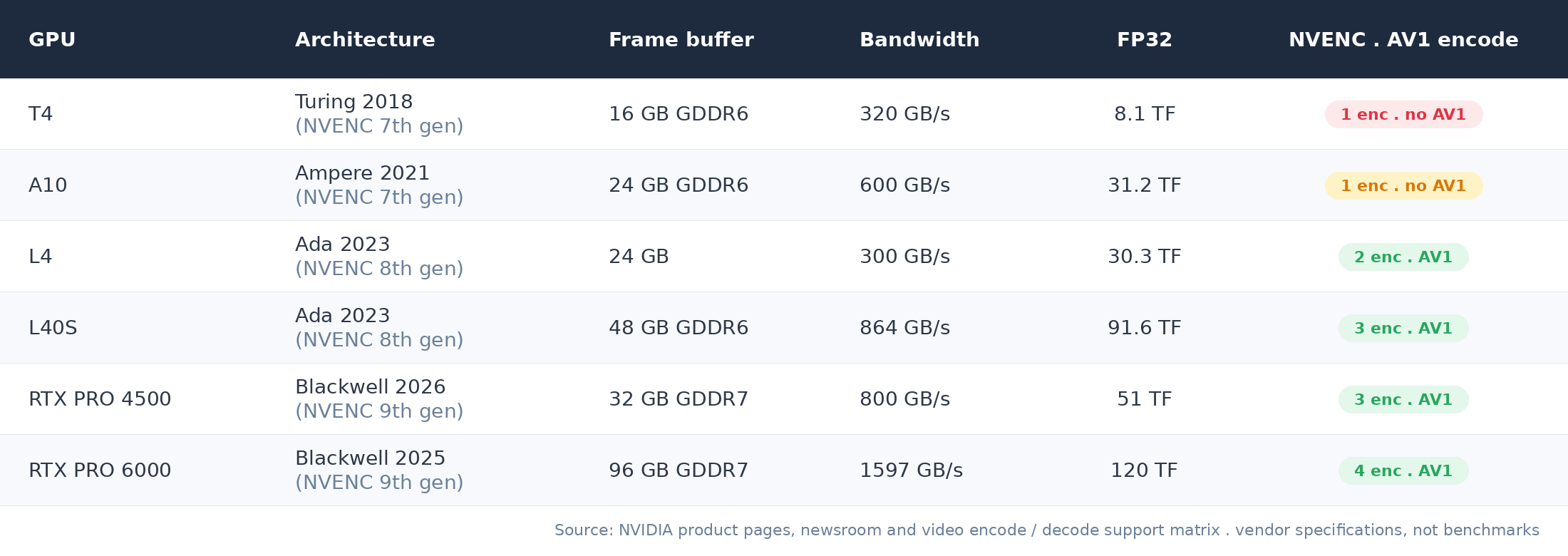
Two things there are worth pausing on. The L4 is a generation newer than the A10 and beats it on encode, 2 NVENC engines against 1 and AV1 in hardware, but it carries half the memory bandwidth, 300 GB/s against 600. For a texture-heavy CAD session that is a downgrade wearing a newer badge. And the card-level frame buffer only matters through the slice you are given: 16 GB on a T4, 48 GB on an L40S, 96 GB on an RTX PRO 6000, which is why the vGPU profile bound to your SKU decides more about what a user can open than the architecture does.
Is your draw stable?
The good news, relative to CPU: within a given GPU SKU family, the silicon is fixed. A G5 is always A10G. A G6 is always L4. A G7 is always an RTX PRO 4500. An NVads A10 v5 is always A10. There is no per-SKU multi-generation spread the way Dv3 hosts six CPU generations under one label.
The lottery, then, is at the procurement and provisioning step rather than at every session start. The risk is not that today’s G4dn user is on Turing and tomorrow’s G4dn user is on Ada. The risk is that a multi-region or multi-team EUC estate ends up with a heterogeneous mix of G4dn, G5, G6 and now G7 host pools. Some were provisioned years ago, some last quarter. The experience your users get depends on which pool their session lands in.
In Citrix terms, this is a delivery-group configuration problem. In AVD terms, this is a host-pool segmentation problem. In WorkSpaces terms, it is a bundle-selection problem. In all three, the right answer is the same: stop mixing GPU generations inside a single user-facing pool, and migrate users between pools as deliberate moves, not as a side effect of a launch policy.
The escape hatch: bare metal with passthrough
The same argument that closed the bare-metal piece applies here. Managed GPU SKUs come with the provider’s choice of vGPU profile, the provider’s NVENC generation, and the provider’s idea of how many users share a card. Bare-metal GPU instances let you bring your own hypervisor, your own vGPU profile catalogue, and your own user-density choices. The catch is the menu: of the GPU families in this post, only G4dn has a metal size you can order today, g4dn.metal, and that is a T4. AWS lists g7.metal, eight RTX PRO 4500 Blackwell GPUs, as “coming soon” in its G7 launch post. When it ships, the menu gets a lot better. AWS says that on the newer G families “the Nitro system provisions the GPUs in a pass-through mode, providing performance comparable to bare-metal”, which gives you the whole GPU but not your own vGPU layer.
For organisations running a unified virtualization stack across on-premises and cloud, bare-metal GPU on the cloud side is the cleanest way to keep the vGPU profile catalogue consistent between sites. Otherwise the on-premises team is sizing for one set of profiles and the cloud team is taking whatever the SKU exposes.
What you can do this quarter
- Inventory the GPU SKUs in production. AWS:
aws ec2 describe-instancesfiltered byinstance-typestarts-withg. Azure: list VMs where the SKU starts withStandard_NVorStandard_NC. GCP: list instances with attachedaccelerators. - Map each SKU to a silicon generation using the table above. If anything in production maps to Maxwell, Pascal, or Volta, you have an upgrade conversation waiting.
- Inside each VM, confirm the actual silicon:
nvidia-smi --query-gpu=name,driver_version,vbios_version --format=csv. Run from a startup script and log centrally. - Segment user-facing pools by GPU generation. Do not mix T4 and A10 sizes in a single AVD host pool, or T4 and L4 hosts in a single Citrix delivery group.
- Confirm the vGPU profile bound to the SKU. The cloud provider documents it, but architects rarely capture it in the deployment record. Capture it.
- If you are on Citrix and AV1 matters to you, draw a hard line: Ada or newer, or none, because the mixed-fleet fallback story is worse than a consistent H.264 story. If you are on AVD there is no AV1 to chase. Confirm instead that HEVC is actually in use, which needs a GPU-enabled VM and a client that can decode it, and treat frame buffer rather than codec support as what separates a T4 pool from an A10 one.
The Bottom Line
The GPU lottery is at the procurement step, not the session step.
Within a given cloud GPU SKU, the silicon is fixed. That is the good news. The bad news is that the procurement label and the silicon generation are different axes, the GPU families you can still order span six NVIDIA architectures, Pascal to Blackwell, and the vGPU profile bound to your SKU is the cloud provider’s choice, not yours.
For EUC, the lottery shows up as a mixed-pool problem: some users on G4dn, some on G5, some on G6, with a help desk that cannot reproduce the inconsistencies because the cause is structural rather than incidental. The fix is segmentation, not optimisation. Pools should be homogeneous by GPU generation; user migrations between pools should be deliberate.
For workloads where the vGPU profile and encoder generation matter (in 2026, anything on a Citrix AV1 path, multi-monitor 4K, or inference-at-the-desk), the managed SKU model gives up too much. Bare-metal GPU with your own vGPU profile catalogue is the cleanest way to keep on-premises and cloud sites running the same user experience, but check the menu first: until g7.metal ships, that mostly means a T4. It is the same argument as the bare-metal piece, applied one layer up.
If you have inventoried the GPU generations in your cloud workstation estate, what did you find? Are you on a homogeneous pool or a mixed fleet? Drop a comment below or find me on X at @kbaggerman.
Get new posts by email
One email when something new goes up. No schedule, nothing else.
Your address is only used to send these notifications. See the privacy policy.