
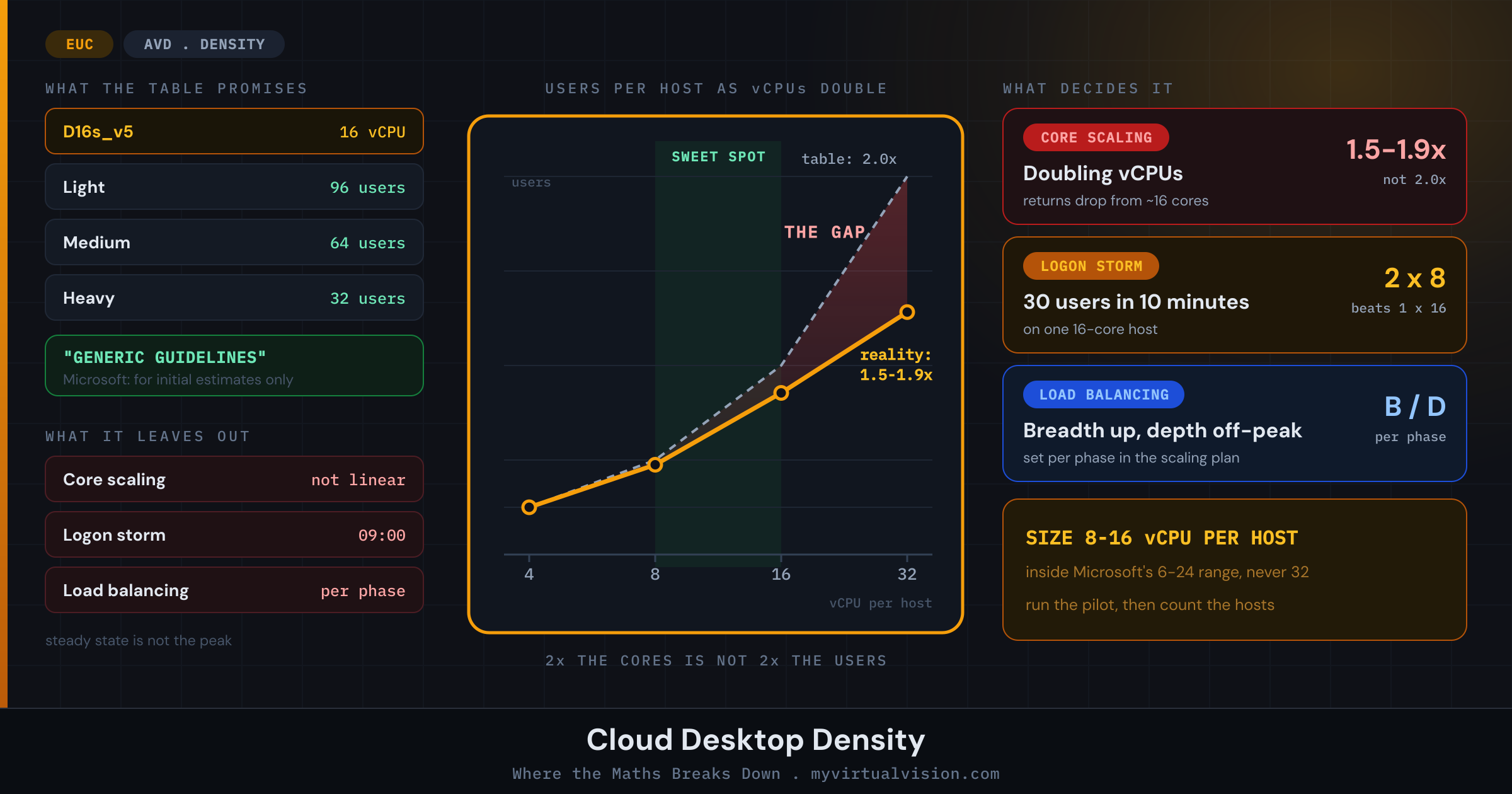
Cloud Desktop Density: Where the Maths Breaks Down
9 min read
The marketing material is confident: cloud desktops scale up or down automatically, aligning with business needs. Resource efficiency is maximised. Wastage is minimised. All you need to do is pick a VM size and let the platform handle the rest.
The reality is a set of interacting variables that a users-per-vCPU number glosses over. This post is about those variables: where the density maths starts looking optimistic, and what actually happens when you stress-test the assumptions behind it.
What the official numbers say
Microsoft publishes session host sizing guidelines for Azure Virtual Desktop and Remote Desktop Services. The multi-session recommendations are built around a users-per-vCPU model, broken into four workload types.
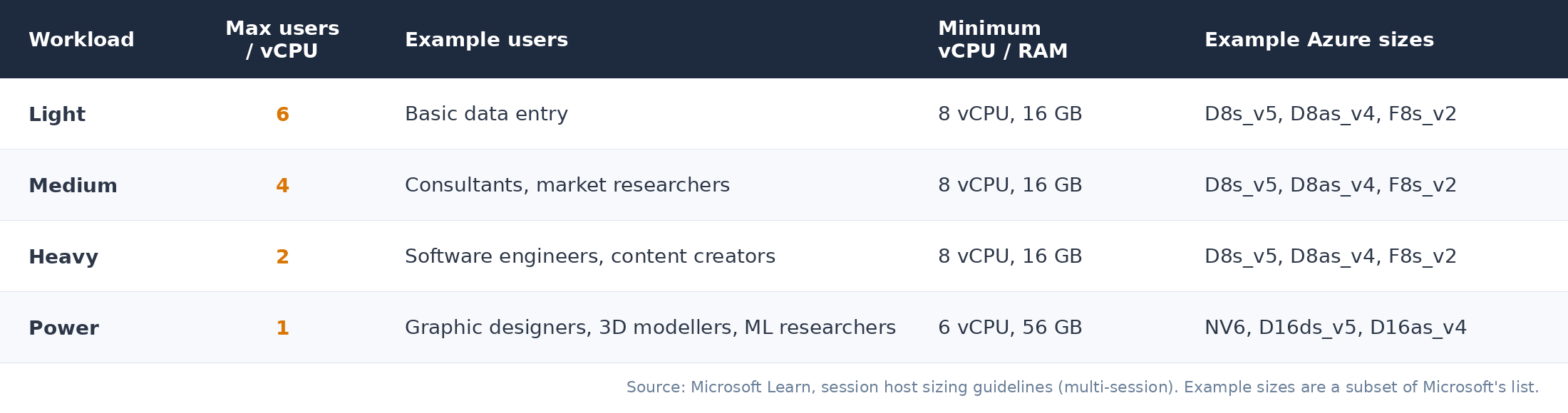
On paper, this looks reasonable. A D16s_v5 with 16 vCPUs running light workloads should handle 96 concurrent users. Medium drops to 64. Heavy to 32. Those are the numbers that tend to end up in business cases.
Microsoft is careful about what they are. The same page calls them “generic guidelines” and says “you should only use them for initial performance estimates”. Three things decide whether they survive production: how CPU capacity scales, how users log on, and how sessions get placed on hosts.
Doubling vCPUs does not double user capacity
A users-per-vCPU figure implies a linear relationship between vCPUs and users. Double the cores, double the headroom. That is not how it works in practice, and Microsoft’s own sizing documentation says so directly.
The scaling factor when doubling CPU cores typically ranges between 1.5 and 1.9, not 2.0. The return is highest when the initial core count is small and decreases as you add more. Going from 4 to 8 vCPUs gives you a meaningful gain. Going from 16 to 32 gives you much less than you would expect: Microsoft puts the inflection at around 16 cores, where the return on investment gets lower with most of the extra capacity offset by synchronisation overhead, and says VMs should not have more than 32 cores at all.
Microsoft’s recommendation is explicit: for scenarios with 20 or more users connected to a single VM, several smaller VMs perform better than one or two large ones. User experience is better with two 16-core VMs than with one 32-core VM. Microsoft’s stated range for multi-session workloads is 6 to 24 vCPUs per VM.
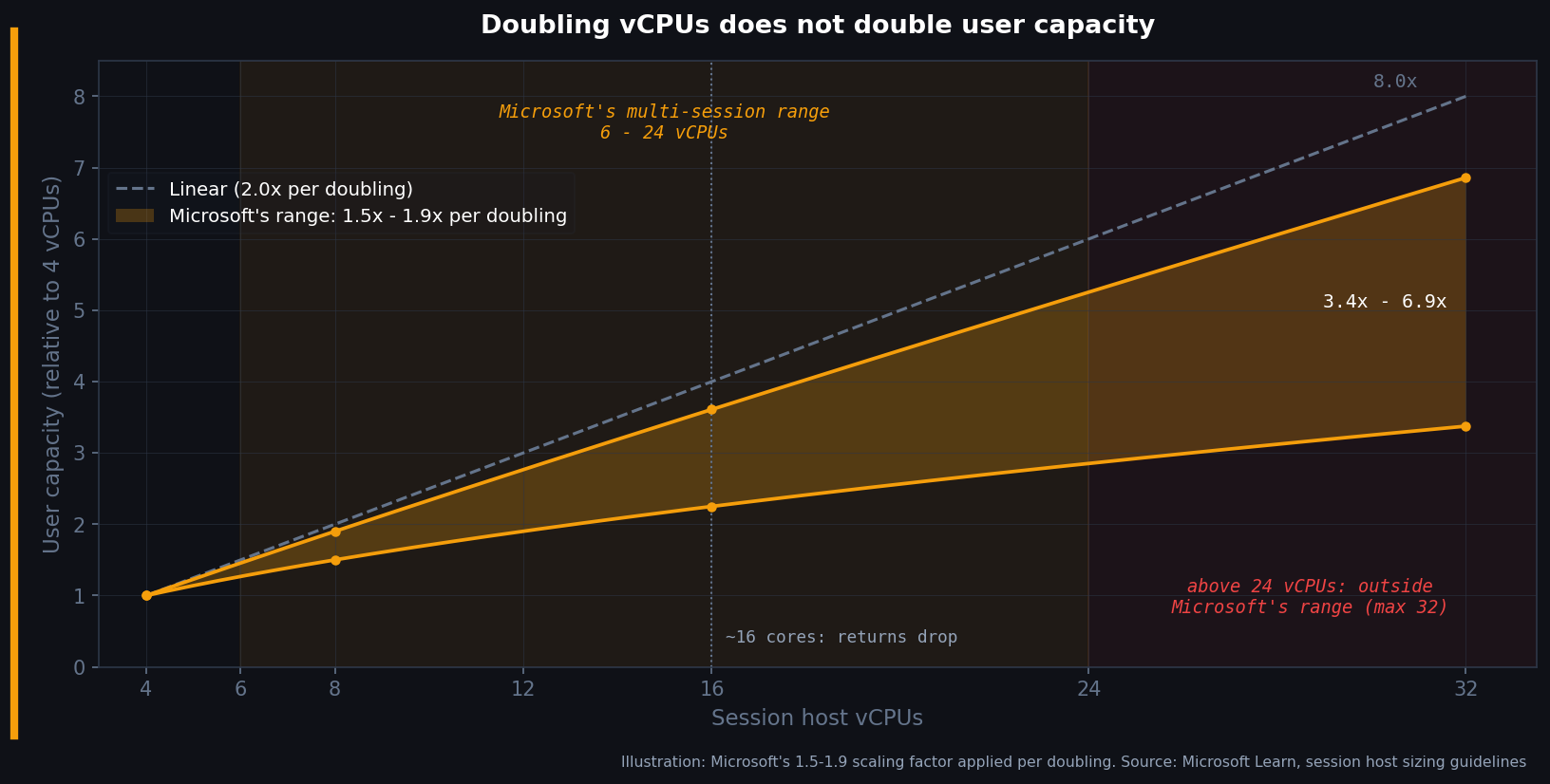
There is also a floor. Windows relies on at least two parallel threads for some of its heavier rendering operations, and on a two-core multi-session VM the UI and apps become unstable. Microsoft names 4 cores as the lowest for a stable multi-session VM, and its minimum configuration for light, medium and heavy workloads is 8 vCPUs. Your smallest efficient unit is already larger than it looks on a per-vCPU cost sheet.
The load balancing decision nobody talks about
AVD pooled host pools offer two load balancing algorithms. The choice between them is one of the more consequential decisions in an EUC deployment, and it rarely comes up in sizing conversations.
Breadth-first spreads new sessions across the session hosts. It is not a strict round-robin: it picks at random from the least-loaded half of the available hosts, so with four VMs and eight users you get roughly two sessions each. Resources are less contended and the experience is consistent.
Depth-first fills one session host to its maximum session limit before moving to the next. That is harder on users landing on a busy host, but it means some VMs stay empty, which autoscale can shut down to save cost.
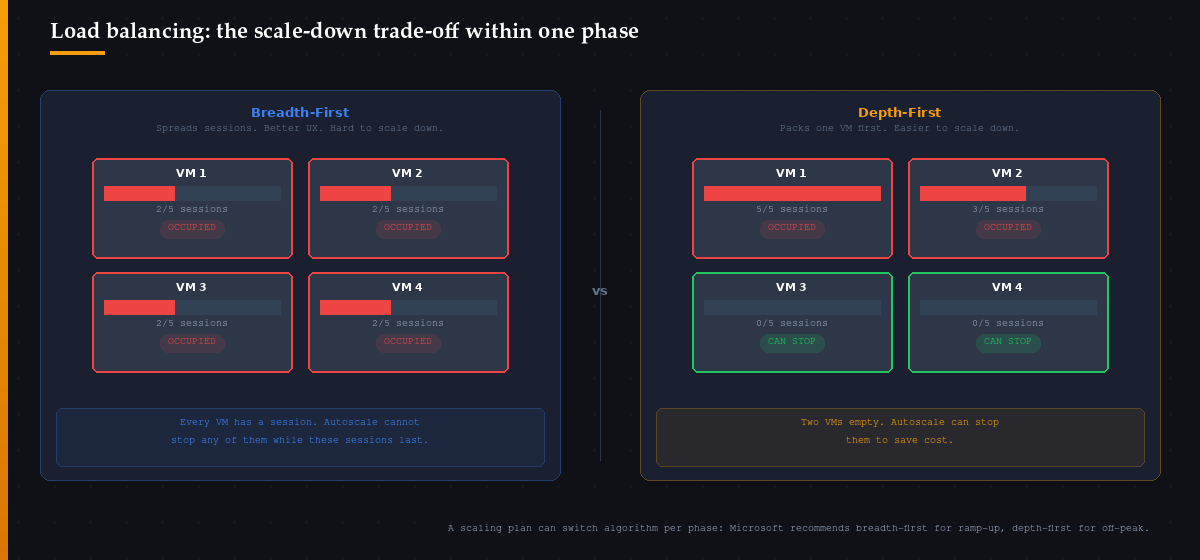
The tension is real. Autoscale only turns off session hosts with no user sessions on them, unless you are in the ramp-down phase and have enabled force logoff, which carries its own user experience cost. Run breadth-first all day and every running host tends to have someone on it, so there is little to switch off.
You do not have to pick one algorithm for the whole day, though. An autoscale scaling plan sets the load balancing algorithm per phase, overriding the host pool setting. Microsoft recommends breadth-first for ramp-up and depth-first for off-peak, to gradually reduce the number of running hosts. The real decisions are what you run during peak and ramp-down, and how you set the minimum percentage of hosts and the capacity threshold. A per-vCPU density figure does not ask any of those questions.
Host size feeds into this as well. Microsoft’s own argument for many smaller VMs is that with larger ones you are more likely to have at least one user signed in at any given time, which prevents you from shutting the VM down.
What about silicon and virtualisation?
It is tempting to stack two more penalties on top of the per-vCPU figures: virtualisation overhead and old silicon. Checked against the sources, neither one stacks that way.
Microsoft does document a 15-20% capacity cost for running on virtual machines compared to bare metal. But the multi-session figures in the table above are, in Microsoft’s words, “based on Azure VMs”. The overhead is already in them. It matters if you reuse the numbers for physical session hosts, not as a discount on top of an Azure sizing.
Silicon is a variable, but not a fixed discount either. As Your Cloud Desktop Is Running on Yesterday’s Silicon and the original and AMD editions of the CPU lottery showed, one SKU spans several CPU generations. A D16s_v5 lands on Ice Lake, Sapphire Rapids or Emerald Rapids. A Dsv4 can still land on anything from Cascade Lake through Emerald Rapids. GO-EUC’s Azure CPU Showdown measured a 26.4% OBUX system score gain from v5 to v6 on Intel and 16.1% on AMD, but on the OBUX user experience score every SKU it tested stayed above 0.89, on a scale where 1.0 is perfect. There is no published conversion from either number to users per vCPU. The only way to know what your hardware does to density is to measure it on the hardware you actually get.
The logon storm
There is one more failure mode that steady-state density figures underestimate: logon storms. User logon is a CPU-intensive operation. FSLogix profile mounting, Group Policy processing and application initialisation all hit at session start. A session host can support its user count at steady state and still not have the capacity to service those users all logging on at once.
Microsoft’s sizing guidance says so explicitly: plan for expected logon patterns, such as the start of the working day, separately from steady-state density, and plan headroom for unexpected spikes. Its own example: if you expect 30 or more users to sign in within 10 minutes of each other on one 16-core session host, two 8-core VMs would handle the workload better.
Autoscale ramp-up helps here, but only if your minimum percentage of hosts keeps enough capacity online before the wave arrives. If autoscale is too aggressive at shutdown during off-peak hours, ramp-up triggers too late and users queue. If it is too conservative, you pay for idle capacity all night. Tuning this correctly requires monitoring actual logon patterns, not guessing at them.
What good capacity planning actually looks like
The per-vCPU table is a starting point, not a deployment plan. Using it as a deployment plan is how you end up with a host pool that performs well in the demo and saturates in week two of production.
A few things the table will not tell you to do, but that you should do anyway:
- Size for 8 to 16 vCPUs per session host. Not 32. Not 4. That sits inside Microsoft’s 6 to 24 vCPU range, below the 16-core point where returns drop, and smaller VMs give you more flexibility to shut idle hosts down.
- Run a pilot. Deploy a single session host at your target size and load it with real users running real workloads. Watch CPU, memory, user input delay and logon time under both steady-state and concurrent logon conditions before you commit to fleet sizing. Microsoft describes a pilot and a simulation approach; for smaller deployments it calls piloting the more time and cost effective of the two.
- Set load balancing per phase, not per host pool. Use a scaling plan: breadth-first for ramp-up, depth-first for off-peak, and a deliberate choice for peak and ramp-down depending on whether user experience or cost matters more in those hours.
- Record the CPU you landed on. Note the processor model on every pilot host. Density measured on Ice Lake is not density on Emerald Rapids, and the SKU name will not tell you which one you got.
- Instrument logon separately from session performance. User input delay is a steady-state metric. Time to connect is a burst metric. Both need their own thresholds. Azure Virtual Desktop Insights reports both; use it.
Cloud desktops do scale. The automation exists, the tooling works, and the platform is capable of the elasticity vendors describe. The problem is not the platform. The problem is treating a generic per-vCPU figure as a plan, and skipping the questions it does not ask.
Run the pilot. Then decide how many hosts you need.
The Bottom Line
Users per vCPU is where sizing starts, not where it ends. Core scaling, logon bursts and load balancing decide what you actually get.
Microsoft’s users-per-vCPU table is the right starting point, and Microsoft itself calls it a generic guideline for initial estimates. It does not tell you how capacity scales with host size, what happens at 09:00, or whether autoscale can actually switch anything off.
Doubling vCPUs returns 1.5 to 1.9 times the user capacity, not 2.0, and returns drop from around 16 cores. Keep hosts between 6 and 24 vCPUs and never above 32.
Load balancing is the other lever. Breadth-first all day keeps every host occupied; depth-first all day degrades the users on the first host. A scaling plan lets you run breadth-first for ramp-up and depth-first off-peak, but only if you configure it that way.
Size for 8 to 16 vCPUs per host. Pilot with real users under a realistic logon wave, on the CPU you actually land on. Then decide how many hosts you need, not how many the table told you to buy.
Have you measured the gap between your sized capacity and what your host pool actually delivers under a Monday-morning logon wave? I would be interested to hear what the real numbers look like in production. Drop a comment below or find me on X at @kbaggerman.

Kees Baggerman
Latest posts by Kees Baggerman (see all)
- Cloud Desktop Density: Where the Maths Breaks Down - November 5, 2026
- Egress Is the Second Lock-In: Modeling the Real Cost of Leaving Your Cloud Provider - November 4, 2026
- Stop Renting Their VM Layer: The Case for Hybrid Multicloud Infrastructure - October 28, 2026
- The Cloud Desktop CPU Lottery, AMD Edition: Which Zen Are You Actually Running On? - October 23, 2026
- Citrix MCSIO on Nutanix AHV: A Solution to a Problem That Doesn’t Exist - June 10, 2026