The Cloud Desktop CPU Lottery, AMD Edition: Which Zen Are You Actually Running On?
15 min read
After the Intel-side breakdown, the obvious follow-up from a few of you, including Grant Colquhoun, was a single question. Does the same lottery exist on the AMD SKUs?
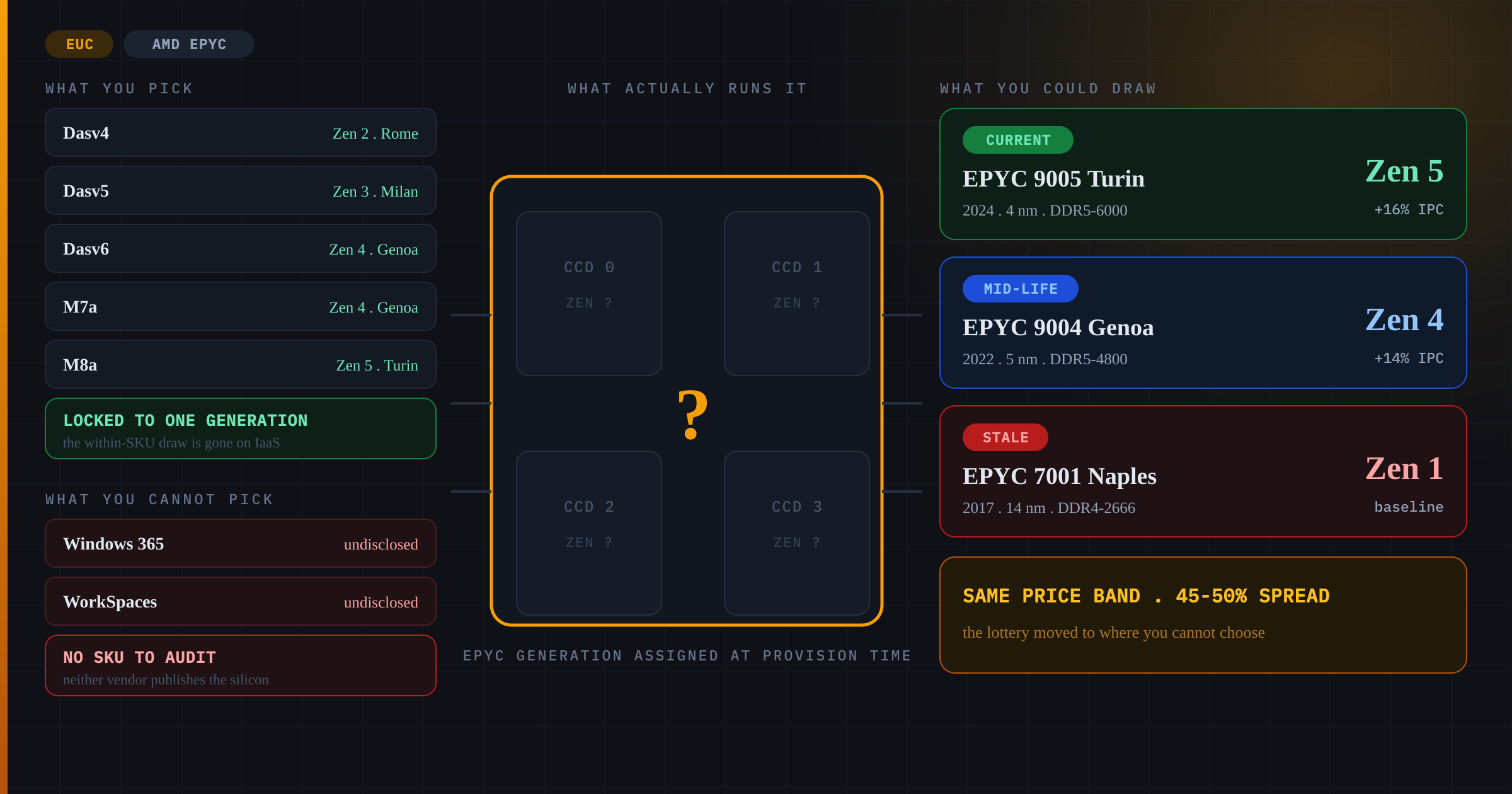
Short answer: yes, but it plays out very differently. The AMD families are younger, the generational gaps are bigger per step, and the hyperscalers have been far more aggressive about retiring old Zen cores than they ever were about retiring Haswell. The lottery is narrower, and more to the point it has moved. On the IaaS SKUs you now largely get what you picked, which makes that a procurement problem rather than a draw. The real coin flip has retreated into the managed desktops, where you are not allowed to pick at all.
The AMD Generations In Play
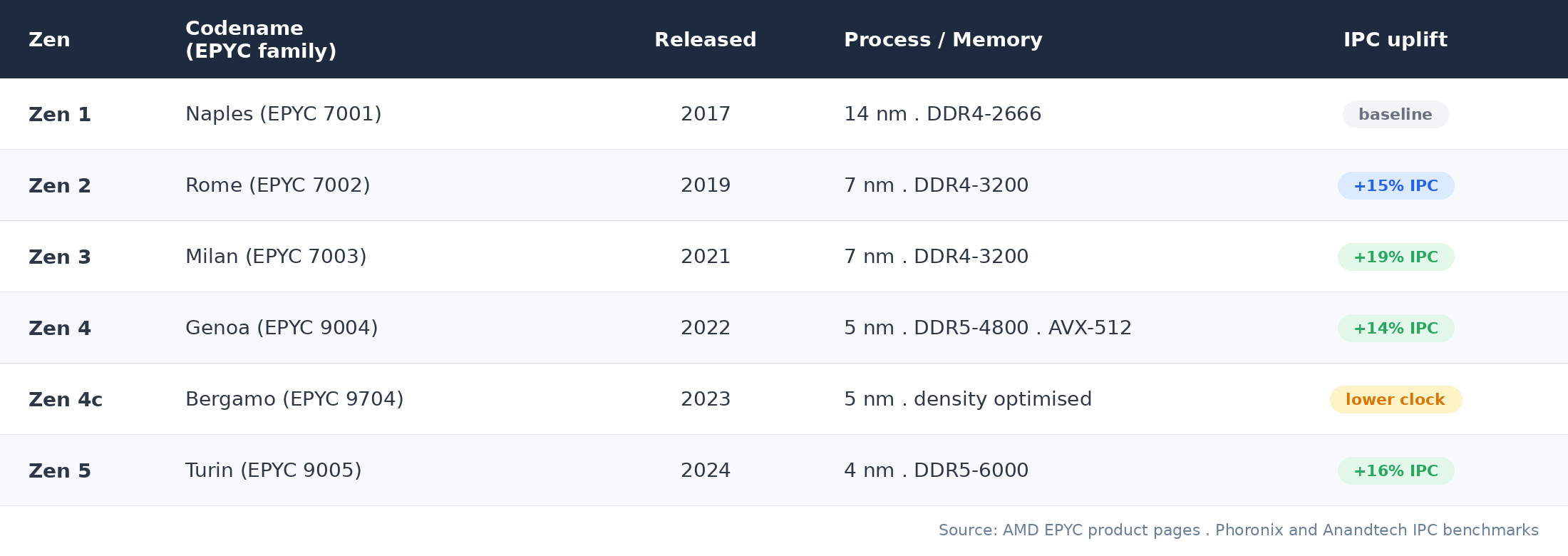
Five Zen architectures matter for cloud desktop today. Each step delivered meaningful IPC and memory-bandwidth gains, which is the part that ends up in your users’ fingertips when they double-click a 20MB Excel file. The progression from Zen 1 (Naples) to Zen 4 (Genoa) compounds to roughly a 55% single-thread IPC gain on AMD’s own per-step figures, and lands at 45 to 50 percent once you measure it as practical EUC throughput rather than clock-for-clock IPC. That is the spread everything below is measured against.
Azure: The Das and Eas Families
Azure’s AMD lineup is structurally cleaner than the Intel Dv-series mess, but the SKU naming still hides multi-generation behaviour in a couple of corners. The good news first. On Azure, almost every “v” step is locked to one Zen generation. That is fundamentally different to the Intel side, where a single Dv3 spans Haswell to Emerald Rapids.
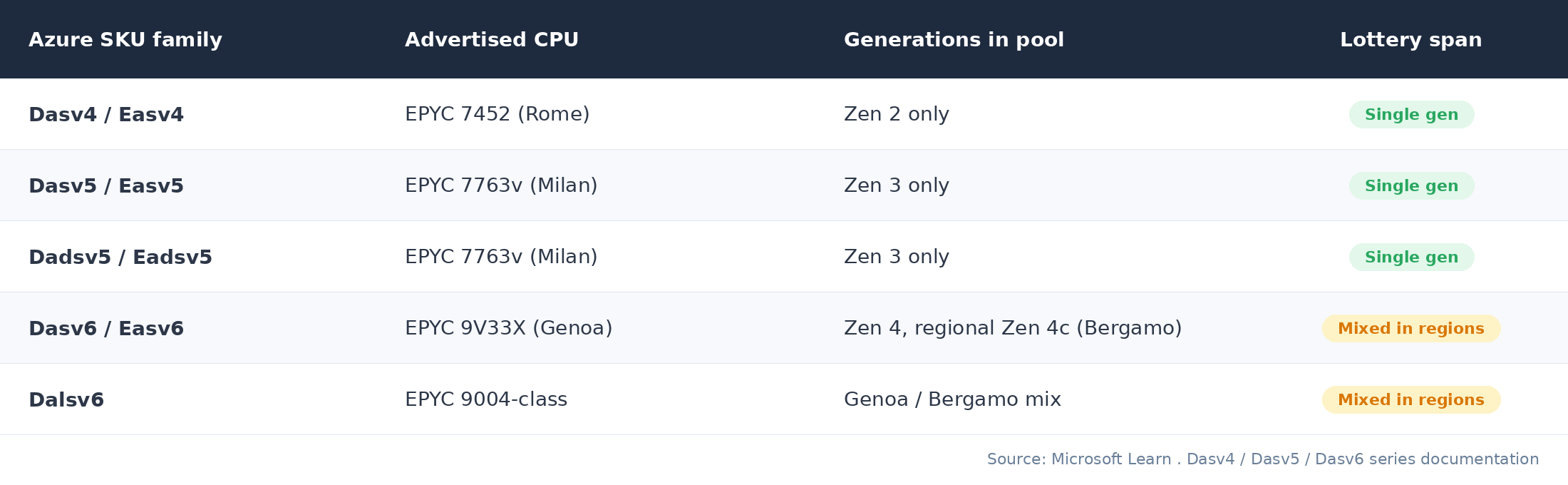
The bad news. The exposure moves up a level. An AVD tenant who standardised on Dasv4 in 2021 is still sitting on Zen 2 Rome hosts in 2026, while a colleague who reprovisioned on Dasv5 last quarter is on Milan with measurably better per-core throughput. Same product family, same price band, very different desktop.
Windows 365 is a separate case, and a worse one. You do not choose an Azure VM size there at all. You buy a Cloud PC licence described in vCPU, RAM and disk, and Microsoft decides what it runs on. There is no SKU in the portal to audit, no generation on the invoice, and no lever to pull if the answer turns out to be Rome. The only visibility you get is from inside the session, which makes the audit step below the whole of your strategy on W365 rather than the start of it.
There is also a Dasv6 caveat worth flagging, and it is one the documentation will not settle for you. Microsoft lists the host processor for both Dasv6 and Dalsv6 as AMD EPYC 9004 (Genoa), but 9004 is the family number rather than the part, and AMD builds that family with up to 128 “Zen 4” or “Zen 4c” cores. A Bergamo host therefore sits inside what the portal calls Genoa. Bergamo trades clock for density, which is great for the hyperscaler and less great for a single-session AVD user who happens to land on a 128-core part running at a lower boost. The documentation takes you as far as the generation, and the audit step below is what tells you which part you drew.
AWS: The “a” Suffix And A Hidden Naples Problem
AWS’s AMD instance naming is, mercifully, explicit. The a suffix maps cleanly to a generation. T3a is Zen 1, M6a is Zen 3, M7a is Zen 4, and M8a is Zen 5 Turin, generally available since October 2025, at launch in Ohio, Oregon and Spain and since widened to the major EUC regions, Ireland, Frankfurt and Tokyo among them, with GovCloud (US-West) following in March 2026. No multi-generation pool inside a given family. AWS has since added M8azn on the same Turin silicon at up to 5 GHz, which is the more interesting SKU if single-session desktop responsiveness is what you are optimising for.
There is a second change in the 7a generation that matters more for VDI than the IPC numbers do, and it is easy to miss. From M7a onward AWS dropped SMT entirely: every vCPU on M7a, M8a and M8azn is a physical core, where on M6a and older each vCPU is a thread. That changes what you are actually buying. A four-vCPU M6a desktop is two physical cores with hyperthreading on top; a four-vCPU M7a or M8a desktop is four real cores. For single-session interactive work, where one stalled thread is something the user feels in the same second, that is a bigger quality-of-experience step than the raw Zen 3 to Zen 4 IPC delta suggests.
That change also repriced the unit, and the sticker price hides it. On-demand in us-east-1 at the time of writing, an m6a.xlarge is $0.1728 an hour and an m7a.xlarge is $0.2318, which reads as a 34 percent increase. Per vCPU it is. Per physical core it is the reverse: the M6a’s four vCPUs are two Milan cores, about $0.086 per core-hour, while the M7a’s four vCPUs are four Genoa cores, about $0.058. A Zen 4 core costs roughly a third less than a Zen 3 half-core, before you count the IPC gain sitting on top of it. m8a.xlarge at $0.2434 works out to about $0.061 per core-hour, still comfortably under either SMT-era family. If your capacity model is denominated in vCPUs, as most AVD and Citrix sizing sheets are, the move to 7a or 8a will show up in the business case as a price rise. It is not one.
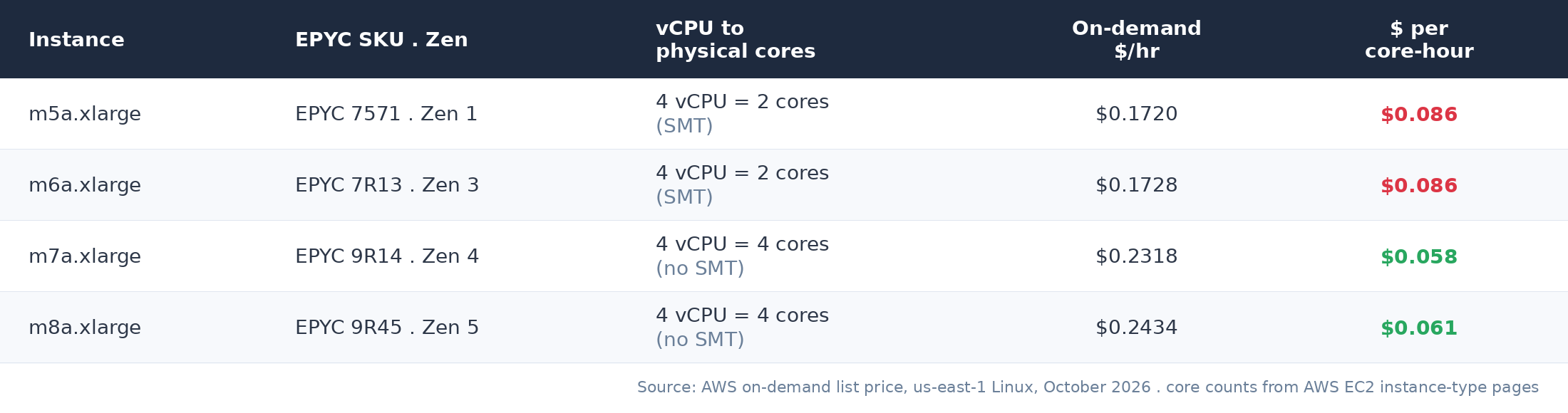
The footgun is the 5a generation. T3a, M5a, C5a and friends are still actively orderable in 2026 and still running Zen 1 Naples silicon from 2017. That is nearly a decade old. If your WorkSpaces bundle, AppStream fleet or EC2-backed Citrix farm is built on a 5a instance type because someone optimised for cost in 2020, the sticker price flatters it. That m5a.xlarge works out at about $0.086 per physical core-hour, roughly fifty percent more than an m7a.xlarge charges for a Genoa core, for IPC roughly 45 to 50 percent below it. You are paying a premium per core to run 2017 silicon.
Amazon WorkSpaces is the awkward case, because AWS simply does not say. The bundle options page gives you vCPU, memory and GPU for Value, Standard, Performance, Power and PowerPro, and nothing else. No instance family, no EPYC generation, no way to tell Zen 2 from Zen 4 before you provision. The one documented exception is the Graphics G6 bundles, which that same page describes as utilising “NVIDIA L4 GPUs with 3rd generation AMD EPYC (Milan) processors”, so Zen 3. For every other bundle the silicon underneath is undisclosed, which means you cannot plan a hardware refresh around it and you cannot price the difference. The only reliable answer is to provision one and ask it yourself, which is the audit step below.
GCP: N2D, T2D, C3D, And The Tau Wildcard
Google’s AMD lineup is the most performance-oriented of the three hyperscalers, but it is also where the “within-SKU” lottery bites hardest on the AMD side.
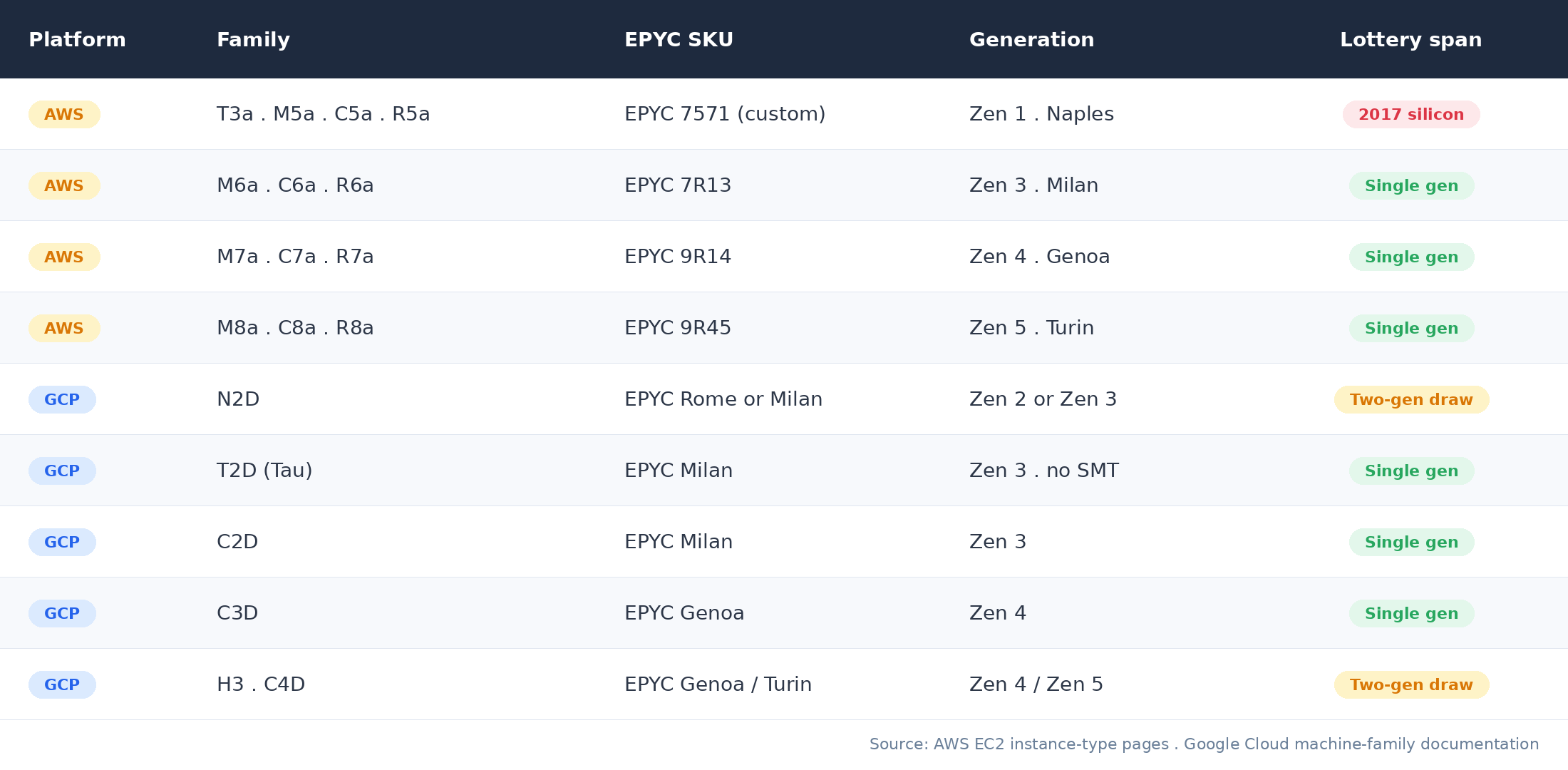
N2D is the AMD equivalent of Intel’s N1 problem. A single machine series spans Rome and Milan, and Google does not let you pin which one you get inside a regular managed instance group. For Cloud Workstations or third-party VDI builds on N2D, that is a real Zen 2 vs Zen 3 coin flip, roughly 20 to 25 percent single-thread delta between draws at the same advertised vCPU count and price.
T2D (Tau) is interesting from a VDI perspective specifically. It disables SMT and gives you physical cores, which behaves much more predictably for interactive desktop workloads than the hyperthreaded N2D does. If you are benchmarking AMD for DaaS on GCP, T2D is the SKU that actually behaves like a desktop CPU. It is the same argument as the 7a-and-later families on AWS, reached from the other direction: Google built one machine series around physical cores, while AWS made physical cores the default from M7a onward. C3D is the Zen 4 / DDR5 equivalent and is a clean single-generation pool.
So How Big Is The AMD Lottery, Really?
Pulling the per-platform variances together gives a useful side-by-side. The numbers below combine AMD’s own published IPC figures, public Phoronix EPYC benchmarks, including its EC2 M8a Turin against M7a Genoa run, and the GO-EUC OBUX methodology referenced in the Intel post.
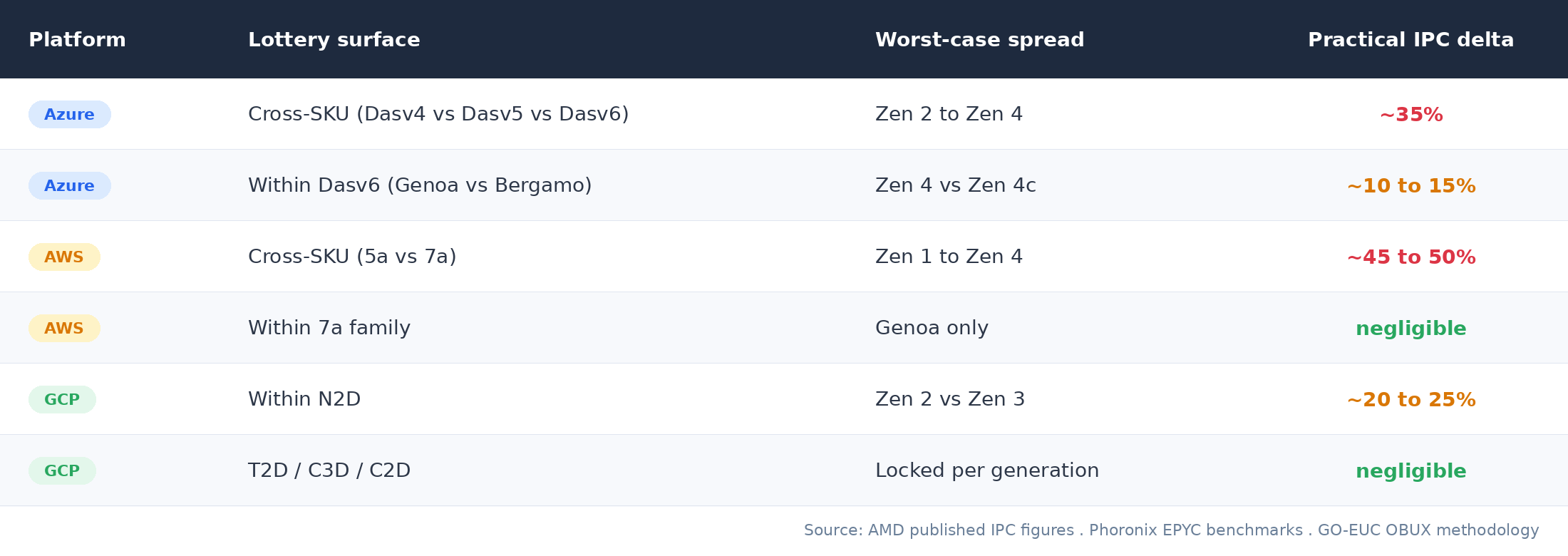
The pattern is the inverse of the Intel side. Intel’s lottery is wide within a single SKU. AMD’s is narrow within a SKU, and survives mainly where the SKU is chosen for you. What is left on the IaaS side is not a draw but a gap between SKUs that look almost identical in the portal. Dasv4 and Dasv5 are one character apart in the ARM template and an entire architecture apart in silicon. M5a and M7a are equally close in the AWS console and four EPYC generations apart on the floor.
One row is missing, and it cannot be supplied. Windows 365 and Amazon WorkSpaces belong in a table like this more than anything else here, because they are the two places where you have no say at all, but neither Microsoft nor AWS publishes the silicon behind a given Cloud PC size or bundle. There is no spread to quote because there is no disclosure to quote it from, and that absence is the measurement.
Mitigation, What Actually Works On AMD
The Intel-side playbook mostly transfers, with a few AMD-specific tweaks.
1. Audit what you’ve actually got
Same one-liner as the Intel post, deployed via logon script or Intune.
(Get-CimInstance CIM_Processor).Name
On AMD you are looking for the EPYC 7xxx series (Rome at 7002, Milan at 7003), the EPYC 9xxx series (Genoa, Bergamo, Turin), or the one to escalate on, EPYC 7571, AWS’s customised Naples part. Log the results to your monitoring platform and treat the distribution as ground truth.
2. Retire the v4 and 5a generations from your gold images
This is the single highest-impact change you can make on AMD. There is almost no scenario in 2026 where Dasv4 on Azure or M5a on AWS is the right answer for a new desktop deployment. The pricing argument works differently on each cloud, so make sure you are comparing the right unit. On Azure, where every Das generation still runs SMT, per-vCPU comparison is valid and Dasv5 and Dasv6 sit within single-digit percent of each other, and moving a Dasv4 estate up to either buys you 20 to 40 percent more EUC performance per session in the same price band. On AWS the per-vCPU comparison is actively misleading, for the reason set out above: price per physical core is the only number that survives the SMT change, and on that basis the newer family is the cheaper one.
One caveat before you put a date on it. Estates sit on v4 and 5a because of a commitment far more often than through inattention, and which commitment you hold decides whether this is a configuration change or a negotiation. AWS Compute Savings Plans float across instance families, so an M5a to M7a move is covered the day you make it. EC2 Instance Savings Plans are pinned to one family in one region and are not. Standard Reserved Instances are pinned to a family and can only be exited by selling them on the Marketplace, while Convertible RIs can be exchanged. On Azure, reservation exchanges across series are still open, but Microsoft has said that reservations bought on or after 1 February 2027 lose that right wherever a savings plan covers the service, with one final exchange for anything bought before. An Azure savings plan is series-flexible and sidesteps the question. Find out which one you are holding before you promise anyone a refresh date.
3. On Azure, move to v5 or v6, and know which one you need
Dasv5 is Milan-only. Dasv6 is documented as Genoa, with the Zen 4c caveat noted above, and Dalsv6 carries exactly the same processor line in its own documentation, so neither size lets you rule Bergamo out from the portal. For single-session AVD or latency-sensitive workloads, treat both the same way: provision one, ask it what it landed on, and standardise on what you measure rather than on what the size name implies. Dasv5 is still the newest Azure AMD family with a hard single-generation guarantee, and Proximity Placement Groups remain a useful intermediate fix to constrain placement to a single procurement wave per region.
4. On AWS, never assume the “a” is benign
The a tells you it is AMD. The number tells you whether it is 2017 silicon or 2023 silicon. WorkSpaces bundle pages do not surface this. There is no public mapping to look up, as above, so the only way to know is to provision one of each bundle you buy and ask it. Make that measurement part of your bundle approval process.
5. On GCP, prefer T2D or C3D over N2D for desktop workloads
T2D gives you a single-generation Milan guarantee and an SMT-disabled core model that behaves more like a workstation CPU. C3D gives you single-generation Genoa with DDR5. N2D is the AMD general-purpose SKU to avoid for VDI specifically, because it is the one desktop-suitable family that still draws across two Zen generations. Google’s other AMD families are each pinned to one generation, C2D to Milan and C4D to Turin, but those are compute-optimised families you are unlikely to be building desktops on.
6. The premium escape hatches still apply
Azure Dedicated Host, AWS Dedicated Hosts, and GCP Sole-tenant Nodes all let you pin to a specific CPU generation. For regulated VDI estates in finance, healthcare, or public sector, the cost delta is often worth it just for the predictability. EPYC’s higher core counts per socket cut both ways here, so do the arithmetic rather than assume. More cores per host means more desktops per host, which amortises the host fee nicely, but anything you license per core is licensed against every physical core in the box whether you light it up or not. Both clouds work that way: AWS requires BYOL Windows Server to sit on Dedicated Host tenancy and to cover every physical core, and Azure Hybrid Benefit applies your Datacenter licences to the host’s full physical core count in return for unlimited virtualisation rights. A 128-core Bergamo host is the best deal in the rack if you fill it and the worst if you do not. For AVD on Windows 11 multi-session the exposure is limited, because the desktop entitlement is per user. Windows 365 does not arise here at all, since you cannot put a Cloud PC on a host you license. For Citrix or Horizon on Windows Server session hosts, or anything with a SQL back end in the same estate, per-core licensing will usually swamp the compute saving you came for.
Closing Thought
The AMD side of the cloud desktop estate is, structurally, in better shape than the Intel side. Fewer generations crammed into single SKUs, clearer naming on AWS, single-architecture families on Azure, and Google’s T2D / C3D delivering predictability where N1 never did.
But the cross-SKU gap is brutal. A tenant still running Dasv4 or M5a in 2026 is paying current-day prices for hardware that is two or three architectures behind, often without realising it. That is not a hyperscaler problem so much as a procurement-discipline one. The SKU you specified three years ago is not the SKU you would specify today.
Same advice as last time. Audit first, then decide. The data usually tells a more uncomfortable story than the architecture diagram.
The Bottom Line
On AMD, the lottery moved from within the SKU to the products where you cannot choose.
Each AMD family on Azure, AWS, and GCP is largely locked to one Zen generation. The within-SKU coin flip that haunts Intel’s Dv3 mostly does not exist on the AMD side, with the notable exception of GCP’s N2D, and the caveat that Azure’s v6 documentation names a family, EPYC 9004, rather than a specific part.
Where you do choose the SKU, what is left is not a draw at all but a stale procurement decision, and that cross-SKU spread is wider than on Intel. A tenant still running Dasv4 or M5a in 2026 is up to 45 to 50 percent behind a current deployment, and on AWS is paying more per physical core for Naples than an M7a charges for Genoa, with no warning in the portal that the SKU has aged out.
For AVD, WorkSpaces, and Citrix on AMD, the highest-leverage action is the simplest one. Retire the v4 and 5a generations from your gold images. Then standardise on a single Zen generation per region and let Dedicated Host or Sole-tenant Nodes handle the regulated estates. On Windows 365 there is no SKU to retire, so the equivalent move is to measure what Microsoft gave you and take the distribution to your account team.
The lottery is real on AMD too. It just moved to where you have no say.
Are you running AMD-based Cloud PCs or WorkSpaces and seeing a different EPYC distribution than what is described here? I would be interested to compare notes, particularly on the WorkSpaces AMD bundles where public mapping is thin. Drop a comment below or find me on X at @kbaggerman.

Kees Baggerman
Latest posts by Kees Baggerman (see all)
- The Cloud Desktop CPU Lottery, AMD Edition: Which Zen Are You Actually Running On? - October 23, 2026
- Citrix MCSIO on Nutanix AHV: A Solution to a Problem That Doesn’t Exist - June 10, 2026
- The Cloud Desktop CPU Lottery: What Are You Actually Running On? - June 2, 2026
- Your Cloud Desktop Is Running on Yesterday’s Silicon - May 21, 2026
- When the Orchard Ships Production Software: AI-Augmented Development in the Real World - May 17, 2026