Citrix MCSIO on Nutanix AHV: A Solution to a Problem That Doesn’t Exist
9 min read
Updated October 2026: corrected how MCS base image reads stay local on AHV (per-VM clones and the Unified Cache, not shadow clones) and clarified that the oplog absorbs MCS write bursts rather than discarding them.
Earlier this week, I was lurking on one of the Slack channels I am a member of, in this particular case, World of EUC (which I can highly recommend for your chats around various EUC topics). One of the other members was asking about Nutanix AHV and Citrix MCSIO, so I figured it would be a good idea to share my explanation with a broader audience.
This post has two components: a quick explanation of what Citrix MCSIO does and why it exists on other hypervisors, and a look at how AHV’s native I/O path handles the same problem. If the immediate thought is TL;DR, here is the conclusion upfront.
MCSIO is not supported on Nutanix AHV. That is fine, because AHV’s native read and write I/O paths already handle the same problems at the hypervisor layer. The oplog absorbs the write bursts, and per-VM clones plus the Unified Cache keep base image reads local, without a guest-level driver anywhere in the picture. The one thing AHV does not do is throw temporary writes away, so size for them.
What Is Citrix MCSIO?
MCS provisions desktops by creating a master image and stamping it onto a read-only base disk shared across all VMs in the catalog. On VMware, Hyper-V and XenServer, each VM gets a thin differencing disk layered on top. All writes go into that per-VM delta disk. The base image stays untouched and shared across the entire catalog. AHV does this differently, and I will come back to that in the read path section.
Without MCSIO, every write goes directly to the storage array. In a VDI environment with hundreds of desktops booting and logging in at the same time, that is a large wall of write IOPS hitting the array at once.
MCSIO addresses this by installing a Windows kernel-mode storage filter driver inside the guest. The driver intercepts writes before they leave the VM and redirects them to an in-guest RAM cache first. If the RAM fills up, writes overflow to a local cache disk attached to the VM. On reboot, the cache is discarded. The VM starts clean from the base image again, which is the expected behavior for non-persistent desktops.
Citrix supports MCSIO on VMware, XenServer, Hyper-V, Azure, GCP, and AWS. Nutanix AHV is not on that list (Citrix docs), and the problem MCSIO solves does not exist in the same form on AHV.
AHV’s Native Write I/O Path
On AHV, every guest VM’s storage I/O goes through the Controller VM (CVM) running on the same host. The CVM is the Nutanix Distributed Storage Fabric (DSF) in action. It manages all I/O, handles replication, and abstracts the physical storage layer from the guest entirely.
When a guest issues a write, it first hits the oplog. The oplog is a staging area on the local CVM’s SSD tier, designed to absorb bursts of random writes, coalesce them, and drain them sequentially to the persistent extent store. The write path is:
- Write lands in the local CVM’s oplog on the SSD tier.
- Synchronously replicated to the oplog of one or more remote CVMs before the guest is acknowledged.
- The guest receives the written acknowledgment.
- Data is drained asynchronously to the persistent extent store in the background.
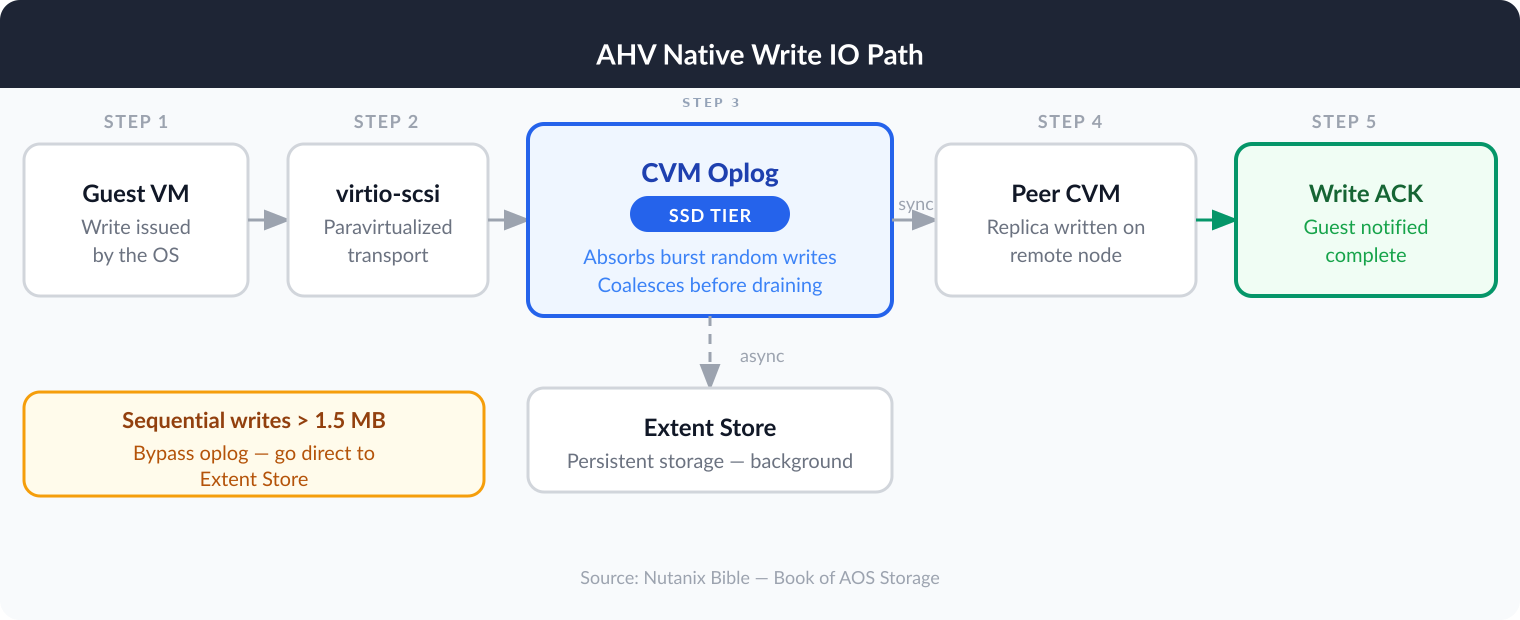
Large sequential writes above 1.5MB outstanding I/O bypass the oplog entirely and go directly to the extent store. They are already large, aligned chunks that gain nothing from coalescing. The oplog targets exactly the random, bursty write pattern that a VDI boot storm or logon storm produces.
The oplog is the closest AHV equivalent of what MCSIO provides in the guest: a fast write buffer that absorbs burst activity and decouples guest I/O acknowledgment from persistent storage writes. The difference is that the oplog does this at the hypervisor level, for every VM on the cluster, with no driver inside the guest.
It is not identical. MCSIO keeps temporary writes in guest RAM and discards them on reboot, so a large share never reaches shared storage. On AHV every write lands in the oplog, is replicated to a peer CVM before the ack, and is drained to the extent store. With RF2 that is two copies of every write and one network hop. The burst is absorbed, not removed, so size your SSD tier and node interconnect for the full write volume.
For persistent VMs, data locality adds another layer of benefit. All write I/O occurs locally on the node running the VM right away. The CVM on that node handles the write, stores the primary copy locally, and replicates to a peer. There is no unnecessary cross-node write path for a VM whose data is already local.
AHV’s Native Read I/O Path
When a guest issues a read, the CVM processes it through the Unified Cache: a two-pool LRU read cache backed by CVM memory, operating at 4K granularity in real time. Data accessed once sits in the single-touch pool. Data accessed more than once is promoted to the multi-touch pool, where it stays until evicted. No configuration is required. No guest driver is involved.
On a cache miss, the CVM checks local SSD, then local HDD. If the data lives on a remote node, the local CVM forwards the request, retrieves the data, caches it locally, and initiates a background migration to bring the physical extent group local. The migration triggers after 3 random or 10 sequential touches within a 10-minute window.
For MCS workloads, the question is how base image reads stay local when catalog VMs are spread across nodes. The answer depends on the hypervisor.
On ESXi and Hyper-V, an MCS catalog creates exactly the read pattern that shadow clones are designed for: a single read-only base disk being read repeatedly by VMs spread across multiple nodes. Without any special handling, VMs on Node B and Node C would forward base image reads across the network to Node A, which holds the primary copy. That adds latency and consumes inter-node bandwidth during a full catalog boot.
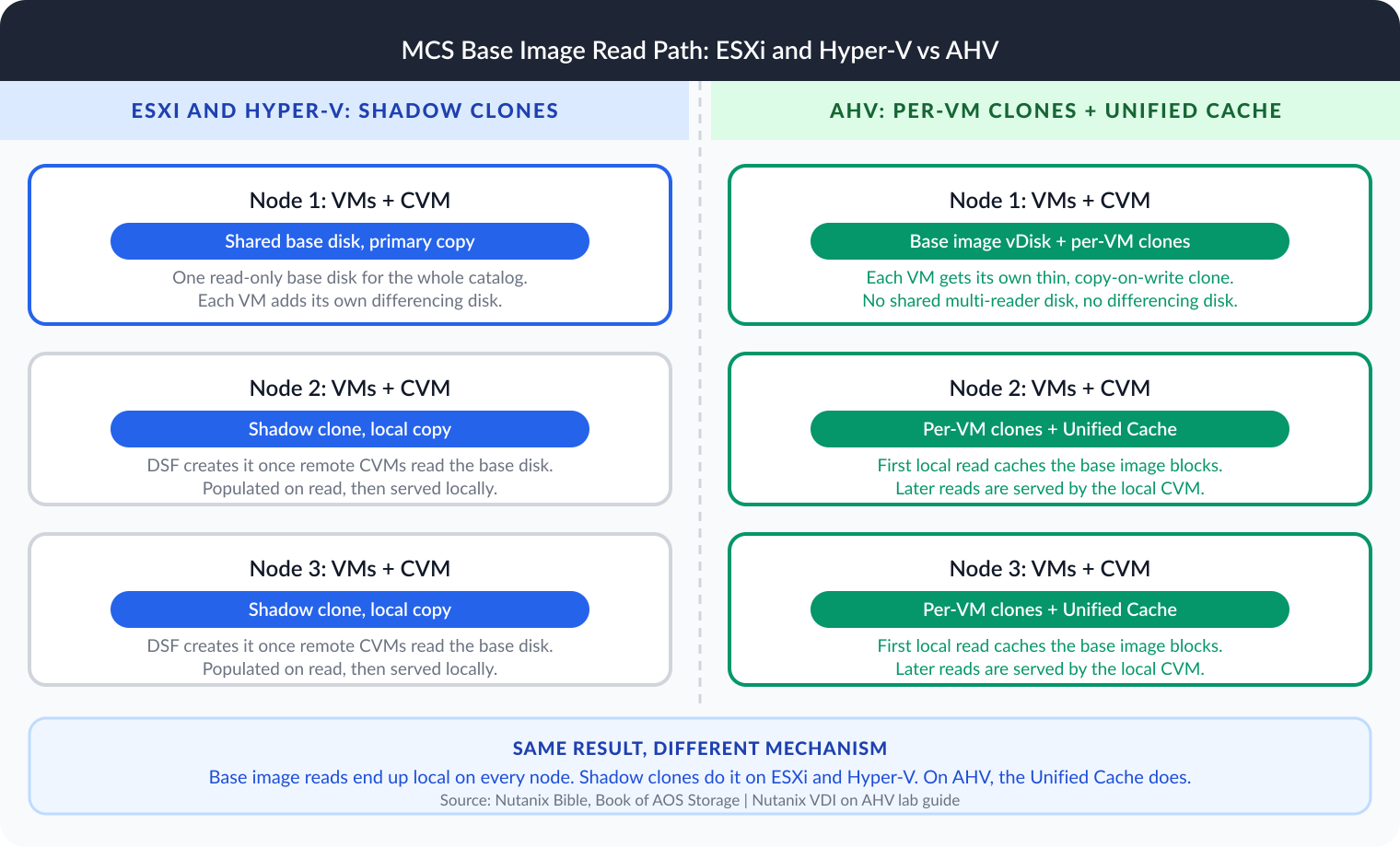
On those hypervisors, DSF detects this pattern automatically. When read requests arrive from more than two remote CVMs, and the vDisk has had no writes, DSF marks it immutable and creates shadow clones: each reading CVM gets a local copy, populated on-read rather than proactively pushed, so activation does not flood the network. Every VM on every node then reads the base image from its own CVM, with no cross-node traffic.
If the base image is modified, shadow clones are dropped, and the process starts from scratch with the new base.
AHV handles MCS differently. Instead of a shared base disk plus a differencing disk, each VM gets its own thin, copy-on-write clone of the base image vDisk (Nutanix VDI lab guide). There is no single multi-reader disk for shadow clones to act on, and there does not need to be. The Unified Cache on each node caches base image blocks the first time a local VM reads them, so after that first read every catalog VM reads the base image from its own CVM. Same result, different mechanism. I covered the AHV clone model in more detail in Citrix MCS on Nutanix AHV: Unleashing the power of clones!
For persistent VMs, shadow clones do not apply, and they do not need to. Data locality ensures that a VM’s data is stored on the same node where the VM runs. The CVM on that node serves reads from local SSD or the Unified Cache without going anywhere else on the cluster. When a VM migrates, the local CVM detects remote reads and migrates the data back in the background, restoring full local access.
Why MCSIO Is Obsolete on AHV
MCSIO exists because, on the platforms it supports, nothing beneath the guest removes temporary VDI writes before they hit storage. Writes go to the datastore or cloud disk when the guest issues them. Host and array caches (Hyper-V CSV cache, vSAN cache tiers, array controllers) help with reads and bursts, but every write still lands. MCSIO fills that gap by putting a write cache inside the guest and discarding it on reboot.
AHV’s I/O path does more of this work itself. The oplog handles write absorption at the hypervisor level. Per-VM clones and the Unified Cache keep base image reads local after the first read on each node. Data locality ensures persistent VMs read and write locally by default. The Unified Cache keeps hot data in CVM memory at 4K granularity with real-time promotion.
None of this requires a filter driver in the guest. None of it is limited to VMs with a specific Citrix feature enabled. It applies to every VM on the cluster, regardless of provisioning method.
AHV does not lack MCSIO support because it is missing something. MCSIO is unnecessary because the problems it was designed to solve are already handled at a layer that benefits the entire workload, not just the desktops with the right catalog setting.
If you are sizing Citrix on Nutanix AHV, and MCSIO was part of your I/O reduction assumptions, remove it from the equation. The oplog, the Unified Cache, and data locality are doing the work. Do size for the full write volume, because on AHV those writes are absorbed, not discarded. You will not see any of this in the Citrix console because they are infrastructure-layer features, not desktop-layer ones.
The Bottom Line
MCSIO on AHV: a solution to a problem AHV does not have
MCSIO is a guest-level write cache designed for platforms where nothing under the guest handles VDI write bursts. Nutanix AHV is not that. The oplog absorbs random burst writes in SSD at the hypervisor level and acknowledges them to the guest before touching persistent storage. Per-VM clones and the Unified Cache serve base image reads from each VM’s own node after the first read. Data locality keeps persistent VM data on the same node as the VM.
Most of the I/O benefit MCSIO provides on VMware and Hyper-V already exists in AHV’s storage fabric, applied to every VM on the cluster without a single driver installed inside the guest. Size for the writes it absorbs.
When someone in a Slack channel asks whether MCSIO works on AHV, the short answer is no. The full answer is that it does not need to.
Sources: Nutanix Bible, Data I/O Path (oplog, Unified Cache, data locality), Citrix docs, MCS storage optimization, Nutanix VDI on AHV lab guide (MCS clones on AHV).
Are you running Citrix on Nutanix AHV, and did you assume MCSIO in your sizing? Drop a comment below or find me on X at @kbaggerman.

Kees Baggerman
Latest posts by Kees Baggerman (see all)
- The Cloud Desktop CPU Lottery, AMD Edition: Which Zen Are You Actually Running On? - October 23, 2026
- Citrix MCSIO on Nutanix AHV: A Solution to a Problem That Doesn’t Exist - June 10, 2026
- The Cloud Desktop CPU Lottery: What Are You Actually Running On? - June 2, 2026
- Your Cloud Desktop Is Running on Yesterday’s Silicon - May 21, 2026
- When the Orchard Ships Production Software: AI-Augmented Development in the Real World - May 17, 2026