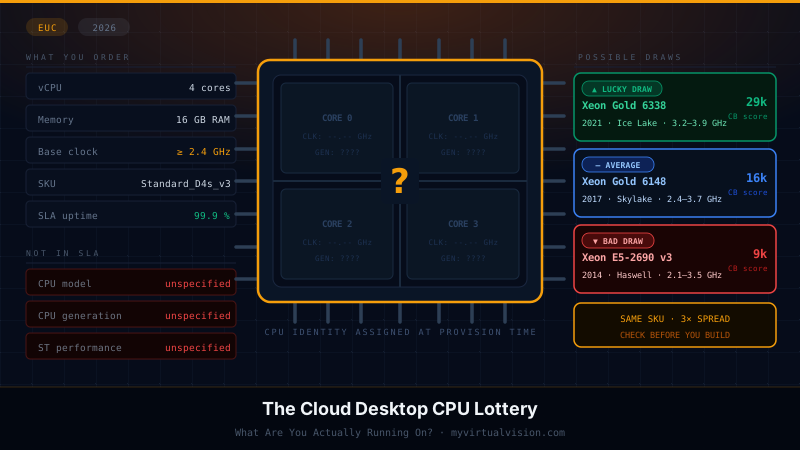
The Cloud Desktop CPU Lottery: What Are You Actually Running On?
18 min read
Update October 2026: I corrected the Dedicated Host densities and the OBUX table against Microsoft’s packing tables and GO-EUC’s measurements, reran the probability model (the odds of an older CPU went up, not down), fixed the proximity placement group and WorkSpaces advice, and renamed Windows 365 Frontline to Windows 365 Flex.
There are two ways to run a cloud desktop on Microsoft Azure. In the first, Microsoft manages the infrastructure entirely: Windows 365 delivers Cloud PCs sized in vCPUs and RAM, and the VM type, CPU generation, and physical host are Microsoft’s decisions, not yours. In the second, you provision Azure Virtual Desktop yourself: you pick the VM SKU, configure the host pool, and control the lifecycle. Both end up in the same place: you do not know which physical CPU (silicon) your session is actually running on, and neither product surfaces that information by default.
The way you lose that visibility differs in each case, and so do the options for responding. This post covers both. The root cause is the same across both products: Azure VM SKUs can span multiple CPU generations, and the one your session lands on affects performance in ways that matter for EUC workloads.
The practical effect is that two of your users on identical subscriptions, sitting next to each other in the same office, can experience performance that is measurably different throughout the working day. Picture one opening a large PowerPoint deck in 3 seconds on a 2023 host while the other waits 7 seconds on a 2014 host. Neither knows why, neither can do anything about it, and your help desk cannot reproduce it on demand.
The Multi-Generation SKU Problem
The Dv3 series is a useful worked example because its documentation is explicit and its hardware range is wide. It is largely phased out as the primary recommendation for new EUC deployments, but it remains in service in many environments built before v5 became the standard recommendation. Here is what Microsoft documents as the CPU options for a Dv3 VM (Dv3 and Dsv3-series documentation):
- Intel Xeon E5-2673 v3 (Haswell-EP), 2014
- Intel Xeon E5-2673 v4 (Broadwell-EP), 2016
- Intel Xeon 8171M (Skylake), 2017
- Intel Xeon Platinum 8272CL (Cascade Lake), 2019
- Intel Xeon Platinum 8370C (Ice Lake), 2021
- Intel Xeon Platinum 8573C (Emerald Rapids), 2023
Six CPU generations, nine years of silicon, one SKU identifier, one price.
When you request a Standard_D4s_v3, Azure assigns you to a physical host from whatever is available in the cluster at that moment. You do not choose. You cannot request a specific generation. You get one.
This is documented behavior. The Dv3 documentation lists the processors the series runs on, and Azure gives you no setting to choose between them. In one Azure Q&A thread, a customer found four CPU architectures in a single D8s_v3 node pool; the Microsoft answer was to move to a newer series, not to pick a generation.
Real-world testing by the research team at GO-EUC confirmed this. Across repeated tests of the same VM SKU, they observed different CPU models being assigned to identical Dv3-class machines. Deallocating and starting a VM is enough to land it on a different physical host with a different processor generation, with no notification to the customer that anything has changed.
Dv3 is not a unique case. The same pattern runs through most older D-series generations. Dv2 and Dsv2 carry the same six-generation list. Ev3 and Esv3 list four generations. All of them are now End of Life: Dv3, Dsv3, Ev3 and Esv3 retire on 15 November 2029. Even the Dsv5, a common choice for new AVD deployments, officially runs on three CPU generations: Ice Lake, Sapphire Rapids, and Emerald Rapids. The lottery persists, just over a narrower range.
E-series and F-series instances are also used for EUC workloads with different memory or compute profiles, and any SKU family that spans more than one CPU generation has this same property. Dv3 is an extreme case, not the only case.
Windows 365: The Lottery You Cannot Influence
Windows 365 Cloud PCs are hosted by Microsoft on behalf of customers. The underlying VM series is selected by Microsoft and is not exposed to the customer. Public Windows 365 documentation describes Cloud PC sizes only in terms of vCPU and RAM, not by VM series or CPU generation. You cannot request a specific SKU family. You cannot request a specific CPU generation. The lottery happens once, at provisioning time, and the result is what you get.
From that point, a Windows 365 user reconnects to the same underlying Cloud PC on every subsequent session. The CPU generation assigned at provisioning is the one they are on for the life of that Cloud PC, stable under normal operations, until an administrator resizes or reprovisions the machine. Azure can move VMs between physical hosts during planned maintenance events. Still, in practice, live migration preserves CPU features compatible with the source host, so a generation change is unusual but not explicitly guaranteed. There is no redraw on reconnect. The lottery was a one-time event.
What happens on deallocation is documented in core Azure VM behavior. When an Azure VM is stopped and deallocated, it loses its physical host allocation. When it starts again, Azure places it on whatever hardware is available at that moment, which may be a different physical host and potentially a different CPU generation. A VM that stops at the OS level without being deallocated remains on the same host.
The distinction matters because the Windows 365 editions behave differently. In Windows 365 Enterprise, the Cloud PC is assigned to one user and the service does not power it off between sessions, so the one-draw model holds unless an admin resizes, restores or reprovisions it. Windows 365 Flex, called Windows 365 Frontline until May 2026, is different: its Cloud PCs cycle between users or power states by design, because several users take turns on fewer licenses.
Microsoft ships Flex in two modes:
- Shared mode: after sign-out the Cloud PC resets to a clean snapshot and returns to the pool for the next user. See Snapshot-based reset for Windows 365 Flex shared mode. Users rarely get the same Cloud PC twice, so each session is effectively a new draw from the pool.
- Dedicated mode: each user gets a persistent, personalized Cloud PC. One license covers up to three Cloud PCs, one active at a time (Windows 365 Flex). The Cloud PC stays on for two hours after the user signs off, then powers off, and powers on again at the next connection (session time limits). Microsoft does not document whether that power-off deallocates the VM. If it does, every power-on is a new draw.
So plan for Flex as a recurring draw in both modes until Microsoft documents otherwise. Shared mode draws per session from the pool. Dedicated mode may redraw after every power-off. Neither mode gives you the stability of Enterprise.
Azure Virtual Desktop: The Lottery You Are Managing
AVD is a different situation because the SKU choice is yours. When you build a host pool, you choose the VM size. That choice determines which CPU generation range the pool draws from. D-series instances cover general-purpose pooled desktops. E-series suits memory-intensive workloads. F-series suits task worker and cost-optimized single-session scenarios. The choice matters for more than raw performance: it determines the span of CPU generations your users are exposed to.
Within that choice, multi-generational variance still applies. Every SKU family that spans more than one CPU generation means VMs in your host pool could be on different underlying hardware, even when they are the same VM size. Pooled host pools compound this because every full sign-out re-enters the draw.
The Physical Host Behind Your Instance
Microsoft publishes exact host specifications in its Azure Dedicated Host documentation. Dedicated Host is the product that lets enterprises buy exclusive access to a physical server, and to price it, Microsoft has to disclose the underlying hardware. That documentation is the clearest public view of what the shared tenant fleet actually looks like under the hood.
Dedicated Host covers Broadwell and newer, including Skylake (Dsv3-Type2). Haswell is the one Dv3 generation you cannot get as a dedicated host, but it is still on the Dv3 processor list.
For the D-series Intel line, the physical host specs per generation look like this:
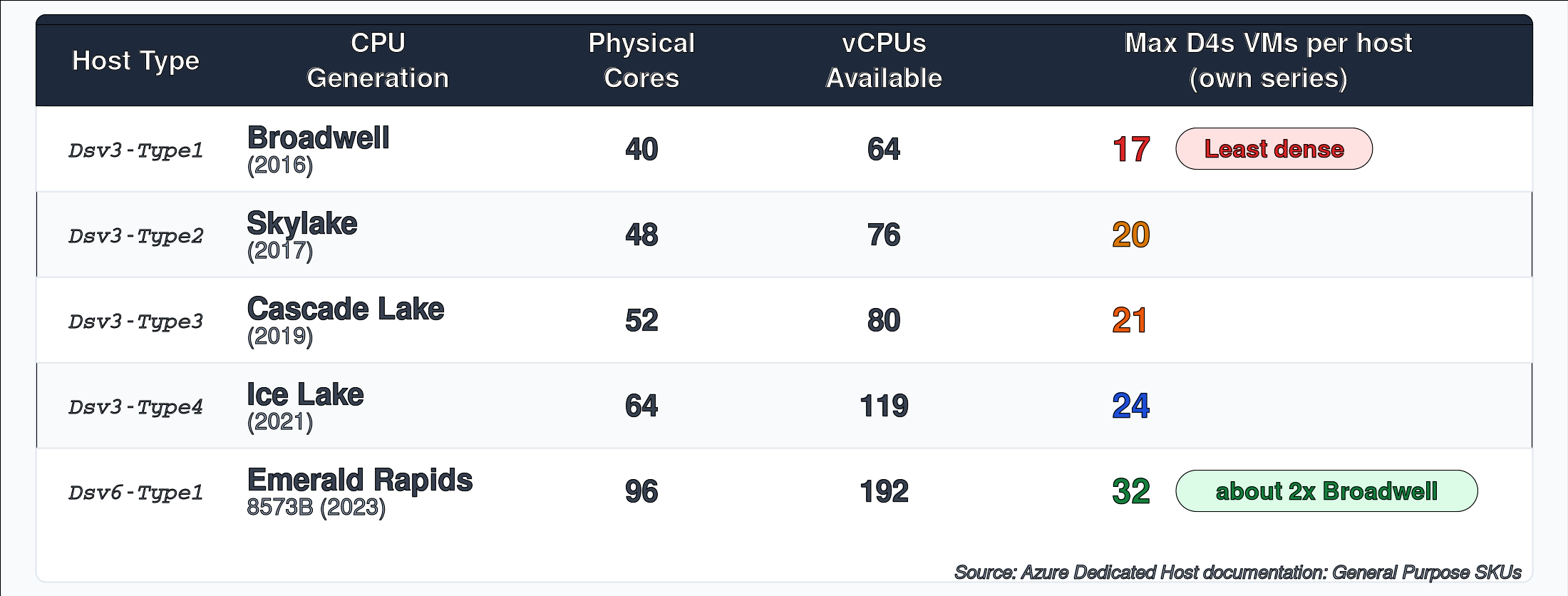
Two things stand out. First, density grows with each generation: from 17 D4s VMs on a Broadwell host to 32 on an Emerald Rapids Dsv6 host, roughly double. Second, Hyper-Threading means you get roughly 1.5–2 vCPUs per physical core, depending on the generation and host configuration. A Standard_D4s VM uses 4 vCPUs, which corresponds to 2 physical cores. Within Dv3 itself the spread is narrower: Microsoft documents 17 D4s_v3 VMs per Broadwell host, 20 on Skylake, 21 on Cascade Lake, and 24 on Ice Lake. Newer hosts carry somewhat more sessions, which nudges the odds of landing on one. Microsoft does not publish how the shared fleet is packed, so treat these as the best public proxy.
The Probability Maths
Exact fleet composition per region is not disclosed by any hyperscaler. What you can do is model the probability based on reasonable deployment assumptions.
A typical Azure region will have been built out in waves corresponding to hardware procurement cycles. Cascade Lake was the dominant server platform from roughly 2019 to 2022. Ice Lake from 2022 to 2024. Sapphire Rapids and beyond from 2024 onwards. Older generations like Broadwell and Skylake are still in service, but are no longer being added to. The Dv3 label spans all of them except Sapphire Rapids because Microsoft has never imposed a hard version boundary on that SKU family.
Model a realistic EUC-region scenario. Assume a Dv3-capable cluster in a mature Azure region has the following host composition:
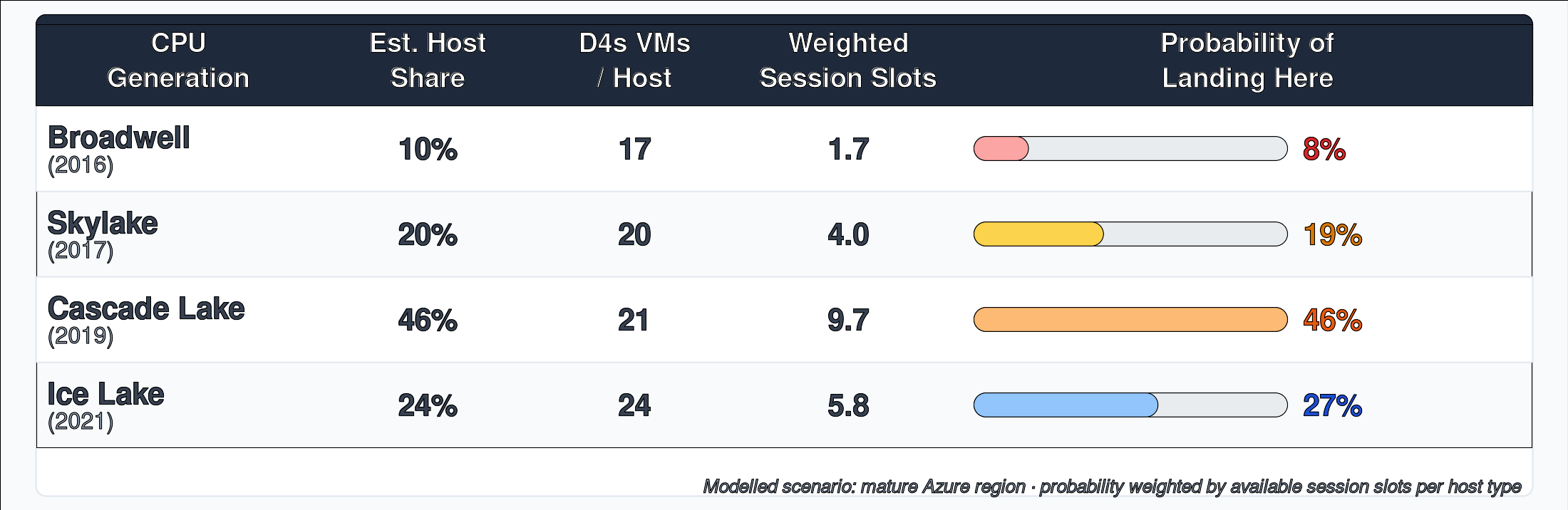
Probability follows session slots, not host count. On Dv3 the density differences are small, so the odds track host share closely: Cascade Lake at 46% of hosts gives about 46% of session slots. Older hosts are slightly underweight and Ice Lake slightly overweight.
Under this scenario, using Microsoft’s documented host densities, a user connecting to a Standard_D4s_v3 in a mature region has roughly a 73% chance of landing on a CPU from 2019 or earlier. They have about an 8% chance of landing on Broadwell hardware from 2016. Because the session assignment is stateless and load-balanced, the same user connecting the next day gets a fresh draw, provided they fully sign out. More on that below.
Run a more favorable scenario: a newer region where Microsoft has been actively deploying Ice Lake and Emerald Rapids hardware and retiring older stock. Flip the distribution so 60% of hosts are Ice Lake or newer. The odds of landing on something from 2019 or earlier drop to around 36%. Better, but still not zero, and still completely invisible to the user.
The Performance Gap Between Those Draws
The CPU generations within a single SKU do not differ by a few percentage points. They span nine years of microarchitecture development.
GO-EUC’s Azure CPU Showdown measured two of these generations directly with OBUX: Sapphire Rapids (D2s v5, 8473C) scored 561 and Emerald Rapids (D2s v6, 8573C) scored 709. Their v6 upgrade research confirmed that Dv3 VMs still land on Broadwell and Cascade Lake hosts. The older generations in the table below are my estimates, scaled from that data and public CPU benchmarks, so read them as a representative range, not measurements. Sapphire Rapids is not on the Dv3 list and is included as a reference point for Dsv5. Emerald Rapids is on both the Dv3 and Dsv6 lists.
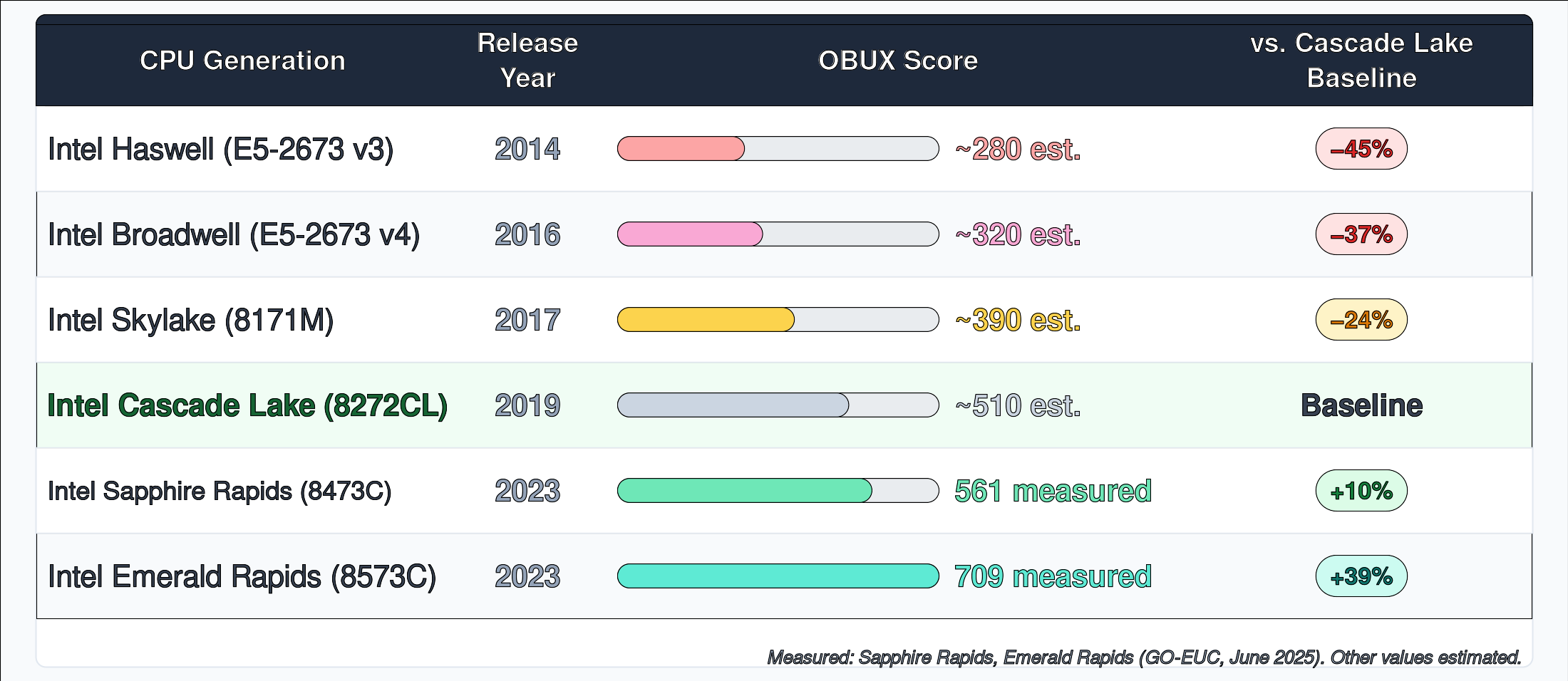
Within Dv3, the spread between the worst and best hardware draws is large. On the estimates in the table, a Haswell host delivers about 40% of the OBUX score of an Emerald Rapids host, and a Broadwell host about 45%. Haswell nodes are aging out of the fleet, but they are still on the documented Dv3 processor list today.
In practical terms, the most likely bad draw on Dv3 is Cascade Lake, which delivers roughly 70% of the performance of an Emerald Rapids draw at exactly the same hourly price. You get no visibility or control over which hardware you receive.
How Often Do You Get a New Draw
Whether a user re-enters the lottery depends on how they disconnect and what deployment model they are on.
In pooled or random non-persistent deployments, users re-enter the CPU lottery on every full sign-out. AVD’s breadth-first load balancing assigns each new session to the host with the fewest active sessions at that moment. The outcome is deterministic given the current pool state, but whichever host has the lowest session count could be any CPU generation. Most users reconnect after a full sign-out and land on a different host. In a mixed-generation fleet, that means unpredictable performance from one day to the next: sometimes better, sometimes worse, always invisible to the user. Citrix random non-persistent desktops have the same behavior: every logon is a fresh draw from the pool.
In dedicated or persistent deployments, there is no lottery on reconnect. The user always goes back to the same VM. Whatever CPU generation was assigned at provisioning is stable under normal operations.
There is a third scenario worth noting. When a user closes their laptop or locks their screen without signing out, which is the most common daily pattern for knowledge workers, AVD and Citrix both hold the disconnected session alive on the same session host. The next connection picks up on the same physical machine. No new draw occurs. The lottery outcome is effectively sticky across a working day regardless of deployment type.
The table below maps this out across the major EUC deployment models, sourced from Azure Virtual Desktop session terminology and Citrix delivery method documentation:

Read the tables together, and a clear picture forms. Dedicated and persistent users are on one CPU generation for the duration of that VM allocation. The lottery was a one-time event. Pooled and non-persistent users are re-rolling constantly, but in a mixed-generation fleet, that is not an escape route. It is just unpredictability. Neither outcome gives you confidence about what your users are actually running on at any given moment.
This Is Not Just an Azure Problem
AWS follows a similar abstraction model. The Amazon WorkSpaces bundle catalog (Value, Standard, Performance, Power, PowerPro, Graphics.g4dn, GraphicsPro.g4dn) is published in tier names rather than EC2 instance families, and AWS does not document which specific EC2 instance type underpins each bundle. The Graphics.g4dn bundle is the exception, where AWS named the underlying G4dn family directly. For the rest, the customer sees the bundle name and not the silicon underneath, mirroring the Windows 365 abstraction model. As an illustration of how wide an AWS family can range, the T3 family, which AWS markets for virtual desktop workloads, among others, officially runs on either Skylake-SP or Cascade Lake processors. Two generations, no customer choice, no visibility into which one a given instance lands on.
What You Can Do
For Windows 365 Customers
The SKU choice is not yours to make. The available mitigations mostly focus on visibility.
Start with a query. On Windows, (Get-CimInstance CIM_Processor).Name returns the physical processor model. WMIC was disabled by default from Windows 11 23H2 and has now been removed, so the CIM approach is the one that works on every current version. Running this from a logon script across your Cloud PC estate and logging the results shows which hardware generation your users are on. There is no action you can take to change it without an admin-initiated resize, but knowing the distribution is the starting point for any escalation or remediation conversation.
If your organization uses Windows 365 Flex, plan for a recurring draw in both modes: Shared mode hands users a different Cloud PC from the pool, and Dedicated mode powers the Cloud PC off after sign-off. The diagnostic script above applies equally, but reducing variance in a Flex environment means working with Microsoft on the underlying configuration rather than individual resizes.
If the CPU generation your users are on is a concern, the available path is an admin-initiated resize to a newer Cloud PC size. Whether that results in a better CPU generation depends on what Microsoft provisions at that point. There is no guarantee, but a resize to a newer Cloud PC tier is more likely to land on recent silicon than to remain on hardware provisioned years ago.
For AVD Customers
The direct fix is SKU migration. The Dsv5 on Azure runs on three CPU generations, all from 2021 or later. The Dsv6 is locked to Emerald Rapids, and the newer Dsv7 series runs on Intel Xeon 6. Moving an AVD deployment from Dv3 or Dv4 to v5, v6 or v7 improves average performance and removes the oldest hardware from the draw entirely. Dv3 retires on 15 November 2029, so this migration is coming either way. The same reasoning applies to E-series and F-series host pools: check the documented CPU generation range for your chosen SKU and decide whether the span is acceptable.
Proximity Placement Groups (PPGs) are sometimes suggested as an intermediate option, but Microsoft documents them as colocation within one datacenter and states that a PPG is not a pinning mechanism. Nothing ties a PPG to a CPU generation, so do not count on one to narrow the draw. If you cannot migrate today, segment host pools and measure instead.
For pooled deployments, consider host pool segmentation by VM generation. Running separate host pools for v4 and v5 instances, rather than mixing them, makes the performance story predictable and gives you a clean migration path: new users go into the v5 pool, existing users migrate in waves.
If you need to diagnose which CPU generation users are landing on today, deploy a logon script that runs (Get-CimInstance CIM_Processor).Name and logs the result to your monitoring platform. What most organizations find when they first do this is a wider spread than expected, and a clear correlation between the reported CPU model and the help desk tickets about session performance.
Azure Dedicated Host solves the problem completely by binding your VMs to a specific physical host type and, therefore, a specific CPU generation. It costs more, but the price is transparent, and the silicon is guaranteed. For GPU-accelerated workloads in particular, where CPU and GPU generations can diverge significantly, this is worth modeling against the performance variance you are currently absorbing.
On AWS, Dedicated Hosts provide the same guarantee for EC2: instances run on a physical server allocated to your account with a fixed processor family. That helps if you run Citrix or Horizon on EC2. It does not apply to WorkSpaces: BYOL WorkSpaces run on dedicated hardware that AWS provisions and manages, and you cannot pick the host or the CPU.
Google Cloud gives you two options. On machine series that span several CPU platforms, such as N1, you can set a minimum CPU platform on the VM itself, which removes the oldest generations from the draw without dedicated capacity. If you need one fixed platform, Sole-tenant Nodes pin your instances to a node with a specific CPU platform, at dedicated capacity pricing.
The version number on a cloud instance SKU does not guarantee a CPU generation. It is a feature set boundary. The hardware underneath it spans whatever the provider had in the rack when your session started. For most workloads, that variance is an acceptable trade-off. For EUC, where session performance is directly felt by the person sitting at the keyboard, it is worth understanding exactly what lottery you are buying into, and how often that ticket gets redrawn.
The Bottom Line
The lottery is real and invisible.
A SKU version number is a feature-set boundary, not a CPU-generation guarantee. The hardware underneath spans whatever the provider had available in the rack when your session started, and that can mean a nine-year spread on a single instance family.
For Windows 365 Enterprise users, the draw occurs at provisioning and stays stable for the life of that Cloud PC. For Windows 365 Flex users, plan for a new draw in both modes. For AVD users on pooled host pools, the draw happens on every full sign-out. In a mixed-generation fleet, none of these outcomes gives you confidence about what your users are actually running on.
For EUC, a bad draw on an older SKU such as Dv3 can mean a Cascade Lake host at roughly 70% of the performance of the best current option, or a Haswell or Broadwell host at under half, for the same hourly price, with no visibility into which one you received.
The fix starts with visibility. Query the CPU model from within sessions, segment AVD host pools by generation, and consider whether the SKU family you are on still falls within an acceptable range. The lottery will not stop, but you can start reading the ticket.
Have you run CPU queries across your host pool and found a wider spread than expected? I would be interested to hear what the distribution looks like in real environments. Drop a comment below or find me on X at @kbaggerman.

Kees Baggerman
Latest posts by Kees Baggerman (see all)
- Citrix MCSIO on Nutanix AHV: A Solution to a Problem That Doesn’t Exist - June 10, 2026
- The Cloud Desktop CPU Lottery: What Are You Actually Running On? - June 2, 2026
- Your Cloud Desktop Is Running on Yesterday’s Silicon - May 21, 2026
- When the Orchard Ships Production Software: AI-Augmented Development in the Real World - May 17, 2026
- Nutanix Documentation Script v5.0: Visual Reports, Brand Templates, and Seven Embedded Diagrams - May 15, 2026