
Your Cloud Desktop Is Running on Yesterday’s Silicon
8 min read
A LinkedIn post last week sparked a question I have been thinking about for a while: are hyperscaler price increases really imminent, and what does that mean for virtual desktops and cloud-delivered EUC? The short answer is yes, there will be a substantial impact, and the reason is baked into the economics of server hardware depreciation. To understand why, you need to know exactly which CPUs run your cloud desktops, when those chips were made, and what the lifecycle math looks like.
Let me pull back the curtain.
The Top EUC Instances Across the Big Three
For Azure, AWS, and GCP, there are three instance families each that dominate real-world EUC deployments covering everything from Windows 365 and AVD knowledge workers through to GPU-accelerated creative workstations. Here is what is actually running under the hood.
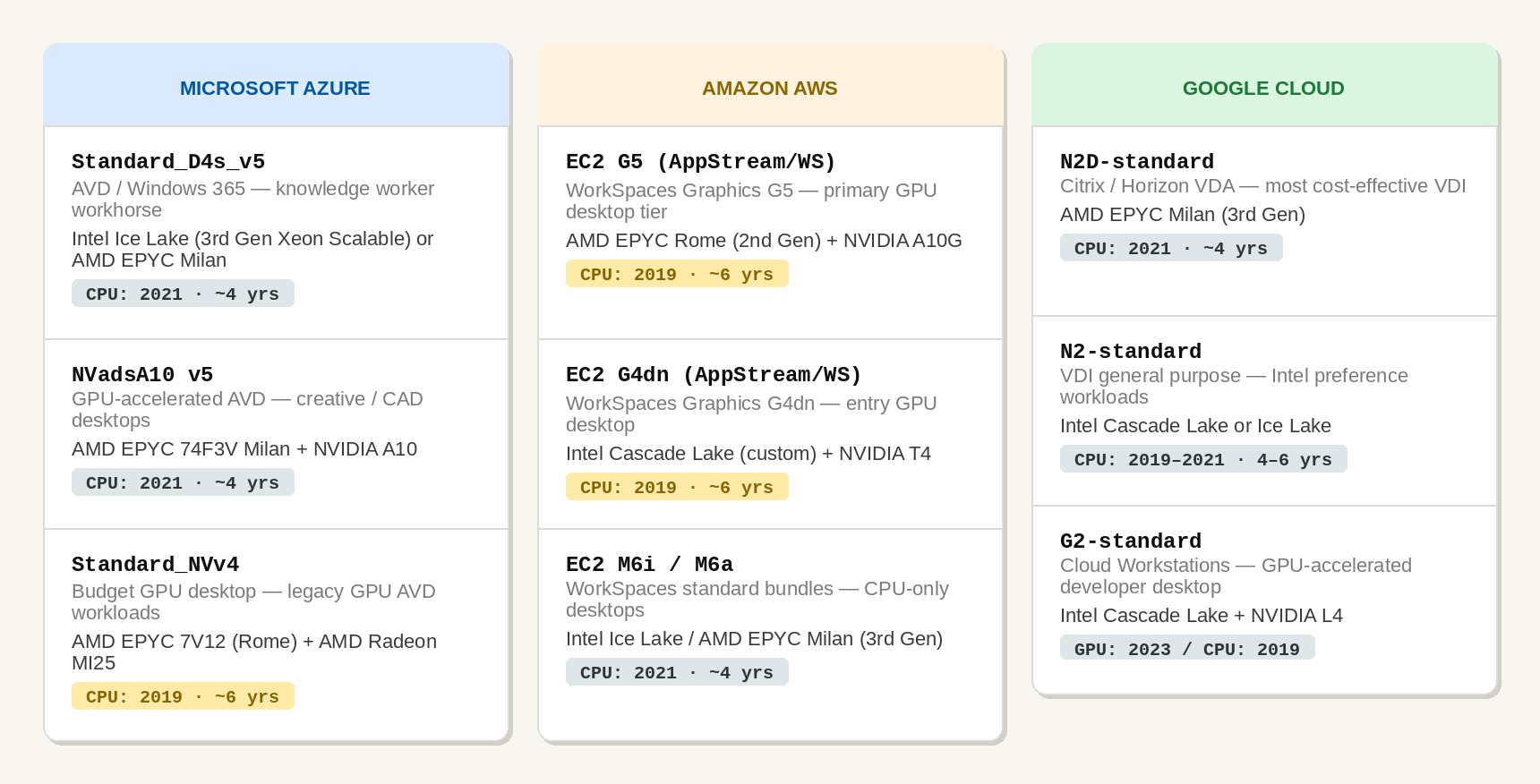
Notice anything? With one or two exceptions, the CPUs powering the most common EUC instances across all three hyperscalers were designed and manufactured between 2019 and 2021. Some of the most widely used GPU instances, AWS G4dn and G5, Azure NVv4, are running on the same Cascade Lake and EPYC Rome chips that arrived when on-premises VDI was still the default conversation.
How Old Is Old? A CPU Timeline
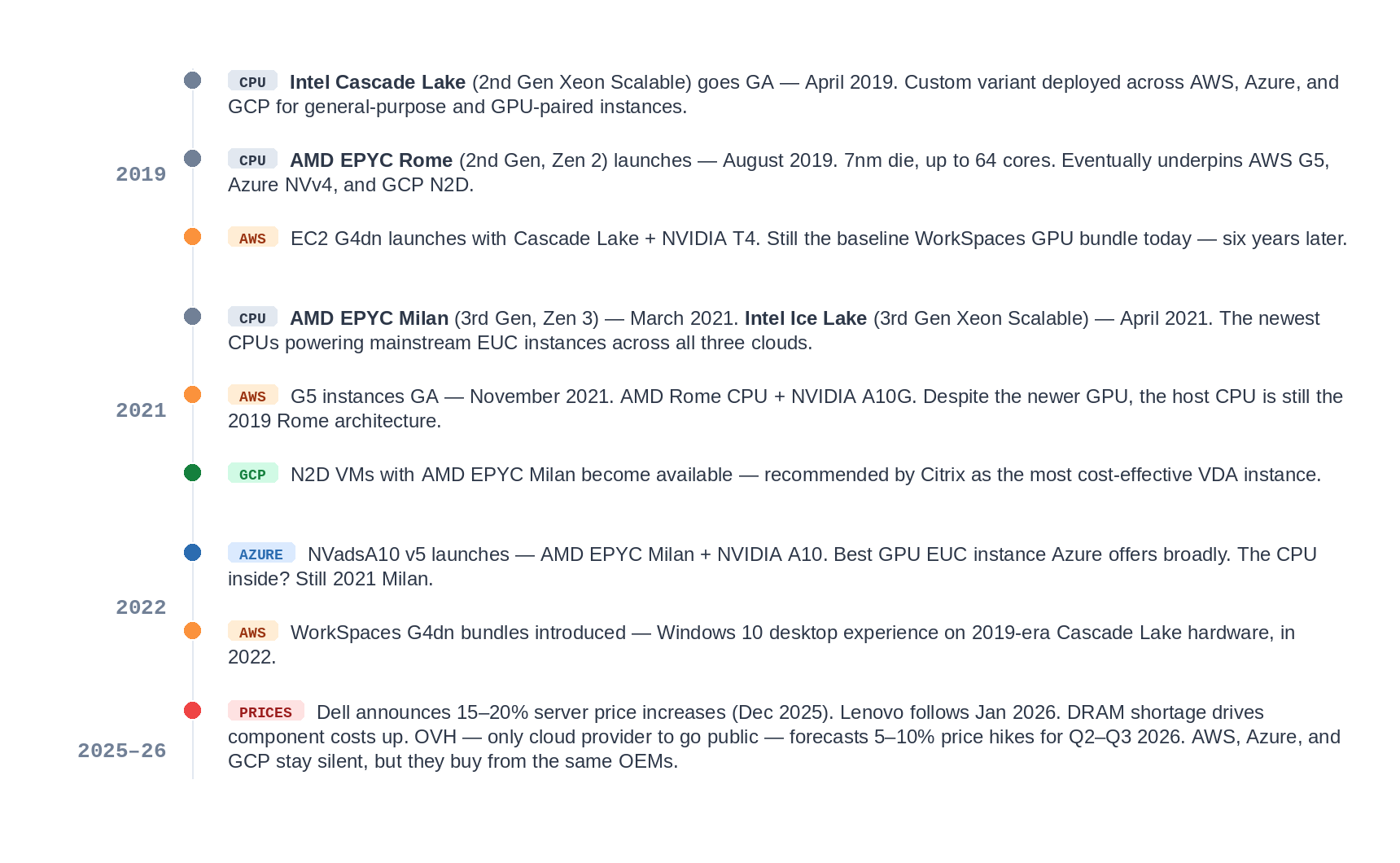
To understand why this matters, let me be precise about when these processor generations came to market, when they landed in cloud instances, and where they sit in the depreciation cycle today.
The Depreciation Math
Here is where the hyperscaler business model becomes legible. Servers are typically depreciated over five to seven years on a straight-line basis. A rack of Cascade Lake servers purchased in 2019 for say $30,000 per unit would be fully written off by 2024–2026. After that point, the hardware runs at near-zero book value. Every dollar of compute revenue from that rack is almost pure margin.
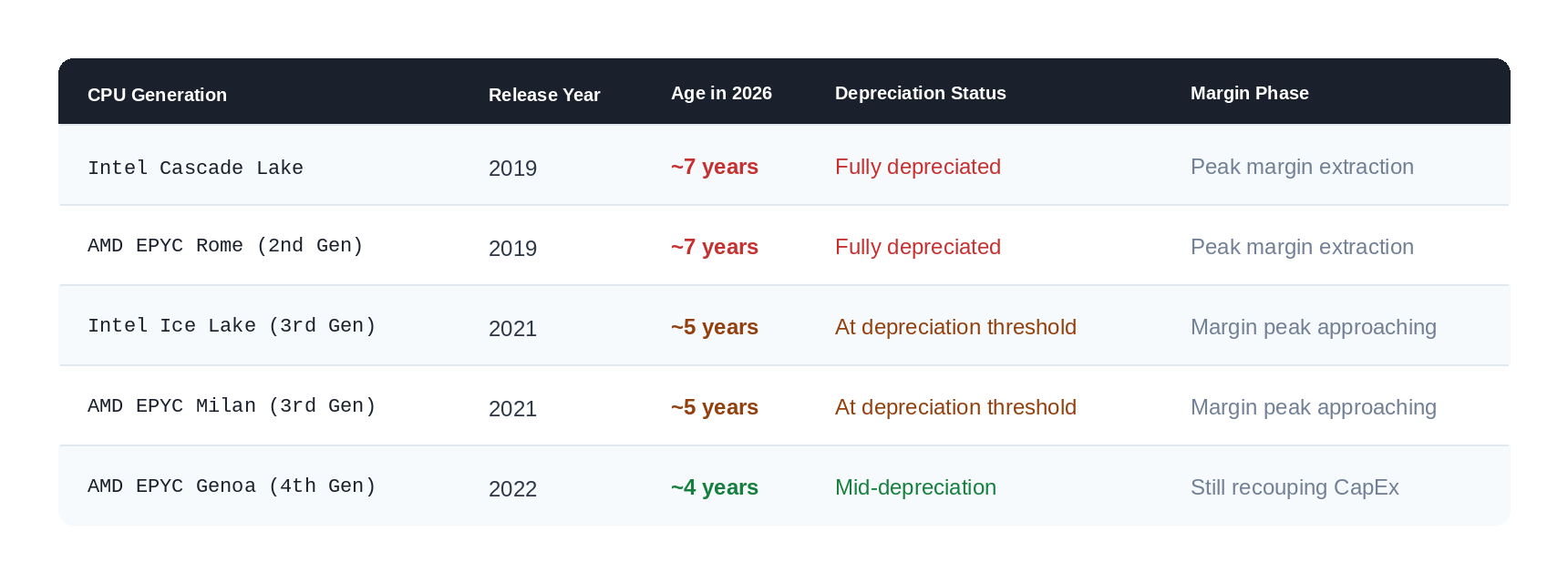
The pattern is stark. Cascade Lake and Rome, the CPUs used in the most common EUC instances, are at or beyond full depreciation. Hyperscalers have been running those boxes as pure profit machines for one to two years already. And they have not dropped the price to reflect the declining book value of the underlying hardware.
Analysis from 2022 to 2024 shows that cloud prices rose faster than inflation, while what customers receive for their money remained unchanged. That is not an accident. It is the model.
What happens next is the squeeze. When hyperscalers are finally forced to refresh because older silicon starts failing, power draw becomes untenable, or customers demand newer hardware, they will be deploying far more expensive AMD Genoa/Turin or Intel Sapphire Rapids/Emerald Rapids servers. The hardware cost resets upward. And those costs get passed to you.
The Performance Reality
There is a second dimension here that does not get discussed enough: not all cloud CPUs are equal, and the newest-generation silicon rarely lands in EUC-optimized instance families first. It goes to AI, HPC, and high-margin compute workloads.
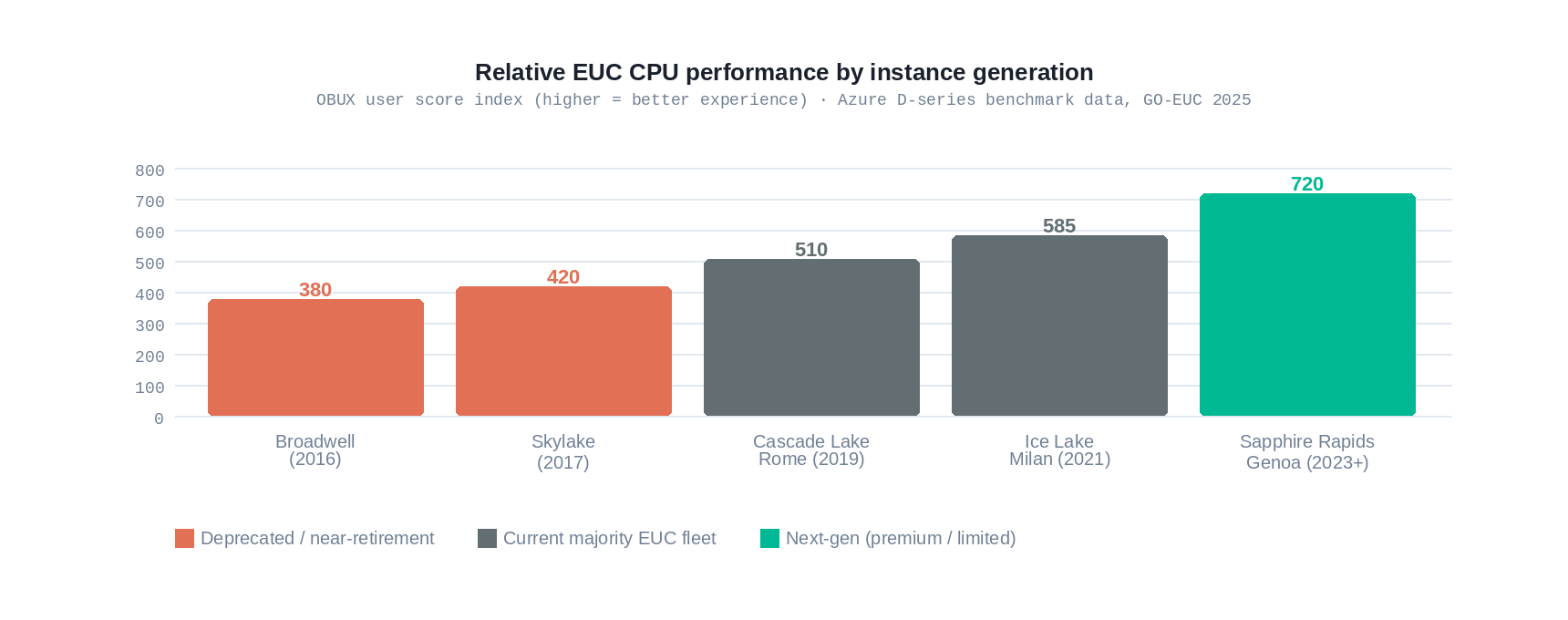
GO-EUC benchmarking has documented this clearly for Azure. The D-series v6 (Intel Sapphire Rapids/AMD EPYC Genoa) delivers 26% better EUC performance than v5, but v5 remains the default recommendation for AVD and Windows 365 deployments due to familiarity and pricing. Most organizations are running their users on v5 or even v4 instances without realizing the performance gap they are leaving on the table.
For GPU-accelerated desktops, the situation is even more pronounced. The NVIDIA A10 found in Azure NVadsA10 v5 and AWS G5 is a 2021-era GPU. Consumer GPU cards today are considerably faster. Yet you will pay a significant EUC premium for what, in silicon terms, is a four-year-old graphics card.

The Hidden Cost: What Slow Silicon Does to Knowledge Workers
A fair challenge to everything above is: Does CPU generation actually affect knowledge workers? Unless you are rendering video or running finite element analysis, does a 2019 Cascade Lake versus a 2023 Sapphire Rapids chip really change your day?
The honest answer is: not in the way most people assume, but yes, in a way that is harder to measure and arguably more damaging.
The common mental model is linear: slow computer equals wasted minutes, wasted minutes equal lost salary dollars. That model is too simple. Knowledge workers do not bank saved seconds into extra deliverables. A 2-second faster app launch does not produce two extra seconds of output.
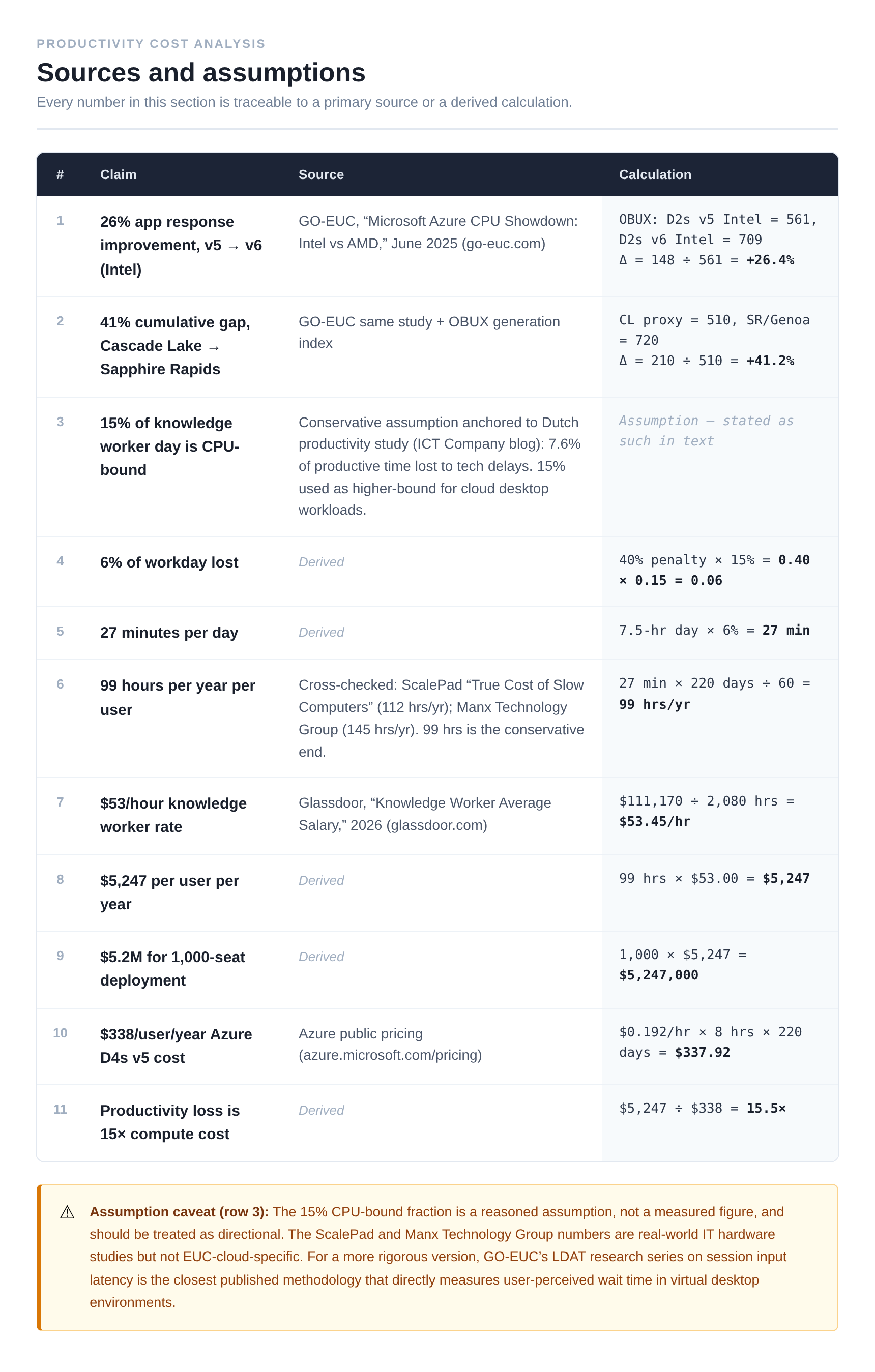
But that is not the real cost. The real cost is cognitive interruption. Research by Gloria Mark at UC Irvine found it takes an average of around 23 minutes to return to deep focus after a significant interruption. A sluggish VDI session on older silicon does not usually cause a single big interruption; it creates a persistent, low-grade friction: a slight lag when switching applications, a stutter when scrolling through a large spreadsheet, a visible rendering delay during a Teams screen share. None of these individually breaks your flow. Cumulatively, across a workday, they keep pulling your attention back to the machine and away from the problem you were solving. The cost is not minutes lost; it is the depth of thinking degraded. GO-EUC’s Azure CPU Showdown (June 2025) measured application response time improvements of 26% from v5 to v6 instances, and approximately 41% from Cascade Lake to Sapphire Rapids, using the OBUX methodology, which specifically captures the time between user input and application response, not boot times or synthetic benchmarks, but the interactive feel of the session. That gap does not vanish because users are knowledge workers. It shows up as the difference between a session that feels native and one that feels like a remote desktop.
If you want a ceiling-case number: if a conservative 15% of an 8-hour knowledge worker day involves moments of active CPU-bound wait application renders, file opens, browser tab loads, spreadsheet recalculations, a 40% processing penalty on that fraction costs roughly 27 minutes per day per user, or around 99 hours per year. At an average US knowledge worker salary of approximately $53/hour, that is a theoretical upper bound of $5,247 per user per year. For a 1,000-seat deployment that is over $5 million, against a compute cost of roughly $338 per user per year on a standard D4S v5. The 15% CPU-bound assumption is exactly that, an assumption, and the translation of wait time to lost output is not one-to-one. But even at one-tenth of that figure, the productivity drag exceeds the compute bill. The real cost of old silicon is not the price increase you will see on your cloud invoice in 2027. It is the one you are already absorbing, invisibly, in your workforce today.
When Will You See Price Increases?
Based on OEM cost increases, hardware lifecycle analysis, and the depreciation model above, here is my read on the timing across the big three.
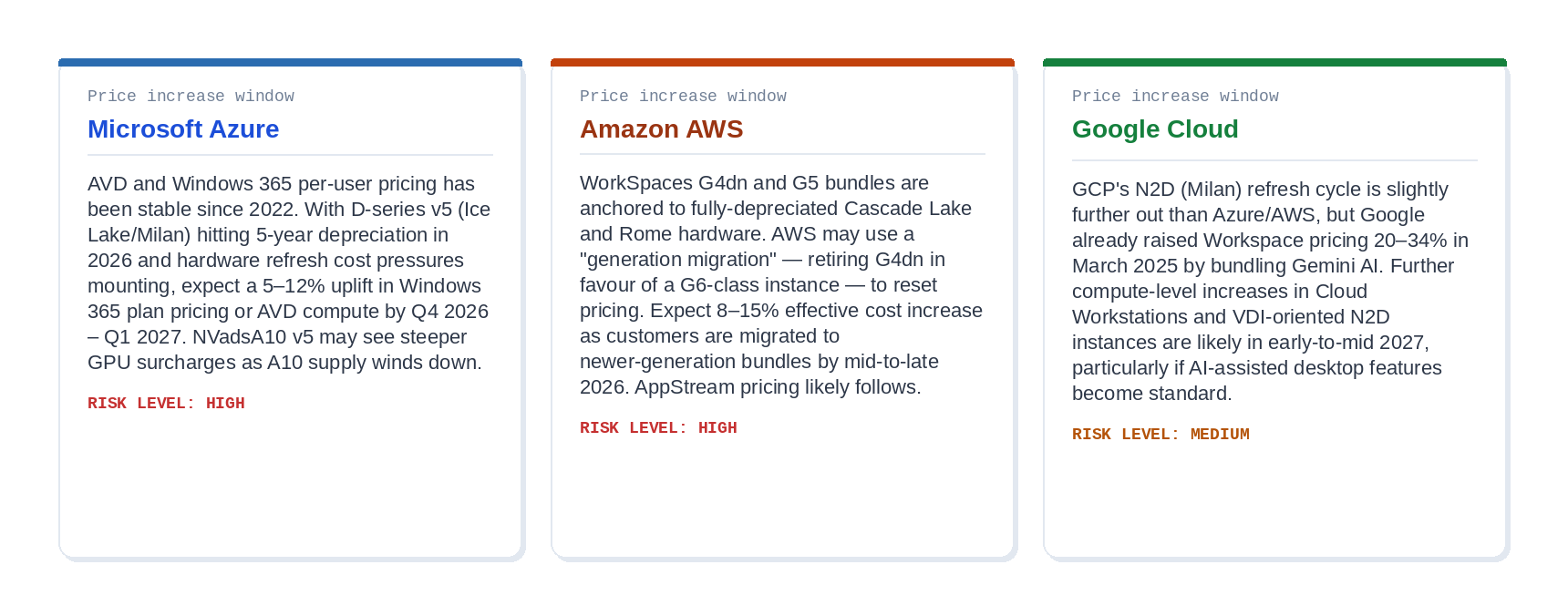
The common driver across all three: Dell announced 15–20% price hikes on servers in December 2025. Lenovo followed in January 2026. Cloud providers typically lag OEM cost changes by three to six months before passing them through. That window closes in mid-2026.
What This Means for EUC Strategy
A few practical positions are worth taking now.
Audit your current instance vintage. If you are on Azure NVv4, AWS G4dn, or GCP N2 (Cascade Lake), you are on hardware designed in 2019. Demand gen-refresh timelines from your cloud CSP and model what migration to newer instances looks like for both performance and cost. The answer may surprise you.
Lock in reserved pricing now. One- and three-year reservations or committed use discounts taken before mid-2026 will insulate you from the first wave of price increases. This is especially important for Windows 365 and WorkSpaces flat-rate bundles, which are harder to renegotiate once pricing changes.
Reopen the on-premises conversation. When hyperscalers are charging cloud premium pricing for 2019-era silicon, the economics of modern on-premises or co-location hardware start to look very different. A Nutanix cluster on EPYC Genoa or Intel Sapphire Rapids delivers significantly newer silicon than the average EUC cloud instance, and you control the depreciation cycle yourself.
Push for CPU generation transparency. Unlike physical servers, cloud instance documentation rarely leads with CPU stepping, errata revision, or microarchitecture generation. That is intentional. Demand it from your vendors, particularly for GPU-accelerated workloads where the GPU and CPU generations can diverge significantly. The GCP G2 is a perfect example: a 2023 NVIDIA L4 GPU sitting on a 2019 Cascade Lake CPU.
The Bottom Line
The hyperscaler model, plainly stated
Cloud providers build their margins into the lifecycle of the hardware, not just the headline per-vCPU rate. They buy Cascade Lake and Rome servers in 2019–2020, depreciate them over five to seven years, and collect full rack-rate pricing throughout, including years when the hardware’s book value is zero.
Your cloud desktop is, quite literally, running on the cheapest possible silicon the market will accept.
The coming price increases are not about greed alone. Real hardware cost inflation is arriving through the supply chain. But they will land on customers who have been quietly cross-subsidizing hyperscaler margins for the past two years through fully amortized infrastructure.
High-performing CPUs in public cloud are rare and significantly more costly. The business model of modern EUC in the public cloud is built on you not noticing the vintage of the silicon underneath. Now you do.
Have you audited the CPU generation of your current EUC instances? Is the on-premises conversation reopening in your organization? Drop a comment below or find me on X at @kbaggerman.

Kees Baggerman
Latest posts by Kees Baggerman (see all)
- Citrix MCSIO on Nutanix AHV: A Solution to a Problem That Doesn’t Exist - June 10, 2026
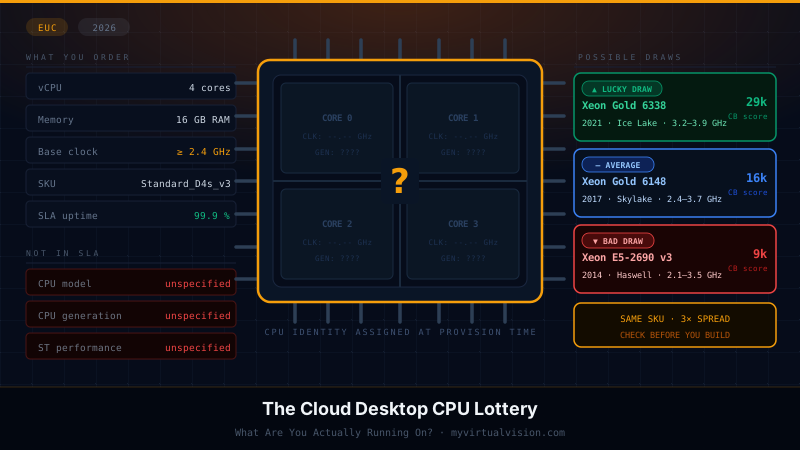
- The Cloud Desktop CPU Lottery: What Are You Actually Running On? - June 2, 2026
- Your Cloud Desktop Is Running on Yesterday’s Silicon - May 21, 2026
- When the Orchard Ships Production Software: AI-Augmented Development in the Real World - May 17, 2026
- Nutanix Documentation Script v5.0: Visual Reports, Brand Templates, and Seven Embedded Diagrams - May 15, 2026

I loved this article and it highlights even more plainly how much more expensive the cloud is than an on-premises solution. While this focused on the CPU which is obviously the main focus, I also shudder to think of the price increases that will be seen soon as cloud providers start to refresh their hardware and have elevated memory pricing. I feel fortunate that we’re primarily using m7i which is Sapphire Rapids, but the base clock of 2.4GHz still leaves a bit to be desired for overall ‘feel’ of the VM. Interestingly, the published pricing for M8i.xlarge (Intel 6 procs) is only 1 penny an hour more than m7i.xlarge, but it doesn’t appear the M8i series is available for workspaces or workspaces core yet. If that gets made available in Workspaces, it’s definitely the go-to choice.
Your point about the hardware refresh memory tax is sharp. Cloud providers have to absorb or pass down the costs of high-speed DDR5, and that rarely swings in the customer’s favor over a multi-year cycle, and I fear we will likely be looking at a major TCO shock once those refresh cycles hit the billing console.