With the announcement of Citrix supporting Nutanix’s Acropolis Hypervisor in August 2015 we’ve started developing the first integration points for XenDesktop 7.6 FP3 (first supported VDA on AHV) and we started of with phase 1 (and yes, there’s more to come!) which is Citrix Power Management on AHV.
Logically we started working on some integration points and that’s what I’m showing in this video, what we’re seeing here is a Citrix XenDesktop 7.6 Feature Pack 3 environment running on Nutanix Acropolis Hypervisor, two VMs in a Machine Catalog are running on AHV and in this demo you can see that we’re able to do power management on these VMs.
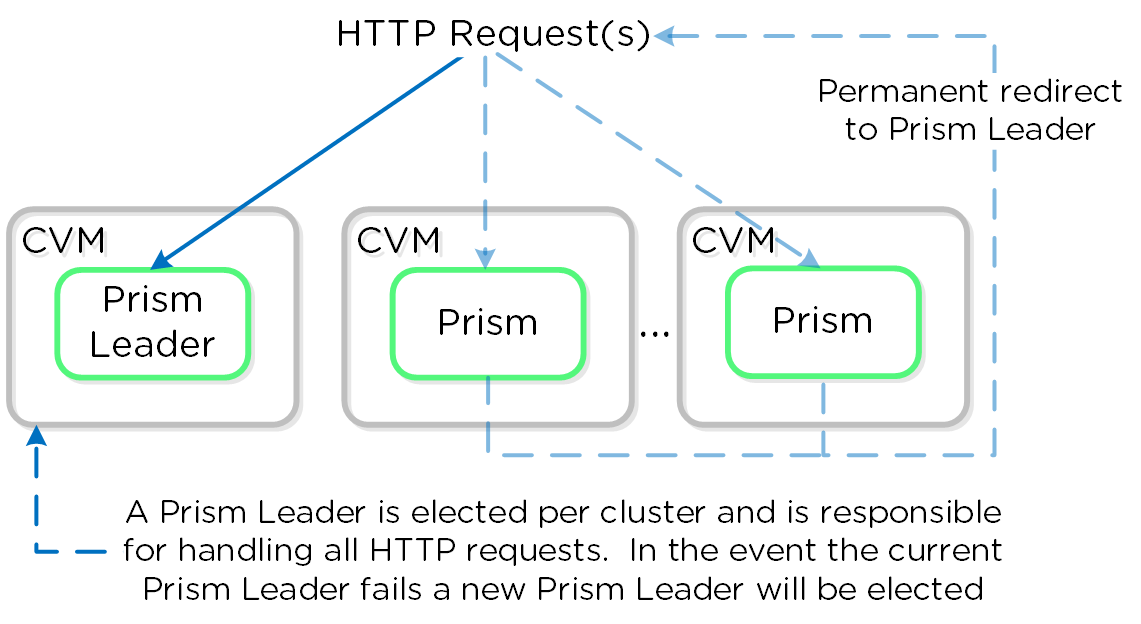
On of the things I really like in this video is that this integration allows us to utilize the Nutanix Cluster IP address, this cluster IP address is able to talk to the Prism service on the CVM that is elected as Prism leader, to clarify this I’ve included some of the wise words from the Nutanix bible:
A Prism service runs on every CVM with an elected Prism Leader which is responsible for handling HTTP requests. Similar to other components which have a Master, if the Prism Leader fails, a new one will be elected. When a CVM which is not the Prism Leader gets a HTTP request it will permanently redirect the request to the current Prism Leader using HTTP response status code 301.
Here we show a conceptual view of the Prism services and how HTTP request(s) are handled:
Prism Services – Request Handling
When using the cluster external IP (recommended), it will always be hosted by the current Prism Leader. In the event of a Prism Leader failure the cluster IP will be assumed by the newly elected Prism Leader and a gratuitous ARP (gARP) will be used to clean any stale ARP cache entries. In this scenario any time the cluster IP is used to access Prism, no redirection is necessary as that will already be the Prism Leader.
By using this mechanism you won’t have the dependency that you would normally have with vCenter or SCVMM where that specific instance can become a single point of failure in your design. Because of the ‘distributed by nature’ architecture of Nutanix you don’t have to worry about that anymore.
Kees Baggerman is Senior Technical Director — Performance & Solutions Engineering R&D at Nutanix, where he leads a global team responsible for defining how enterprise applications are delivered on the Nutanix platform. A former Citrix Technology Professional and NVIDIA Enterprise Platform Advisor, he has spent 15+ years driving EUC strategy and technical direction across architecture, product, and customer success. He has been writing here since 2011 — sharing what he learns at the intersection of platform engineering and enterprise IT.
Senior Technical Director at Nutanix - Former Citrix CTP - NVIDIA Enterprise Platform Advisor - 15+ years in EUC
Kees Baggerman is Senior Technical Director — Performance & Solutions Engineering R&D at Nutanix, where he leads a global team responsible for defining how enterprise applications are delivered on the Nutanix platform. A former Citrix Technology Professional and NVIDIA Enterprise Platform Advisor, he has spent 15+ years driving EUC strategy and technical direction across architecture, product, and customer success. He has been writing here since 2011 — sharing what he learns at the intersection of platform engineering and enterprise IT.
Recently I participated in a project in which a new Citrix XA5 for 2008 farm was build and PowerFuse 2010 was used for ‘user workspace management’. They had thin clients which connected to their old Citrix farm by using a distributed ICA file. In the new farm we created a setup with two Citrix Web…
At one of my current projects we’ve encountered the situation were people had non domain joined machines (corporate owned), those machines were deployed via an external deployment mechanism but we discovered that a lot of the machines had duplicate hostnames. Not a big deal as the machines…
At one of my current projects I was asked to take a look at a Citrix XenApp 6.5 server that couldn’t be loaded into a vDisk. When I ran the wizard to create a vDisk from the XenApp machine to a newly installed Citrix PVS 6 server I got the following error: “Server did not respond to a request in…
One of the sys admins at a customer attended me to the following problem and solution (Thanks Niek!) RES Workspace Manager can be used to provide data to configure Outlook, when this is done the user normally gets his own mailbox and have to connect other mailboxes manually. But the User Settings…
Here I found myself wondering around the twitter sphere where I found this little gem posted by Aaron Parker: “Out-HtmlView – HTML alternative to Out-GridView # PowerShell https:// buff.ly/2UBPq6x “. This made me modify the current VM Reporting script for AHV and now the script will output…
In my recent blogpost on ” NetScaler, WI and the Citrix Receiver 5.7.. “The gateway settings are incorrect ” you could read how I configured the Citrix NetScaler for mobile devices (ICA Proxy) and laptops (SSL VPN). During the project new requirements came up and I had to do an End Point Analysis…
I hoped that Citrix Nutanix integrated the hypervisor in XenDesktop . But can also be seen in Version 7.8 to anything yet. Unfortunately, there is therefore no MCS.




I hoped that Citrix Nutanix integrated the hypervisor in XenDesktop . But can also be seen in Version 7.8 to anything yet. Unfortunately, there is therefore no MCS.
Remember this will be a first phase, you’ll never now what will happen in the future