
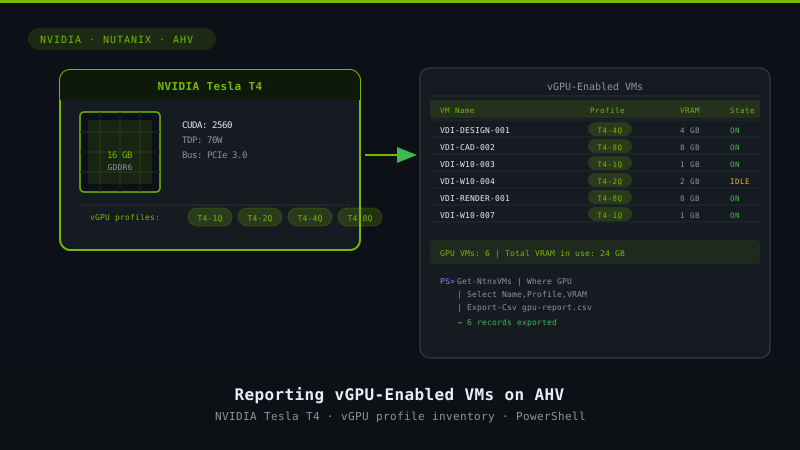
Reporting vGPU enabled VMs on AHV
5 min read
 After writing the script to create VM on AHV with a vGPU profile I was wondering what else I could do with the code I had written. When I was looking at some of my older blogposts I realized I had a VM inventory script and wanted to update that to include the GPU profiles. Before I could update the inventory script I had to gobble together the code to actually report the VMs that are vGPU enabled and the configured profiles.
From that older blog, the following interfaces are available:
- REST API
- HTML5 GUI
- CLI – ACLI & NCLI
- Scripting interfaces (PowerShell)
The following definitions are from the Nutanix Bible as Steve Poitras already explained this:
| REST API The REST API exposes every capability and data point of the Prism UI and allows for orchestration or automation tools to easily drive Nutanix action. This enables tools like Saltstack, Puppet, vRealize Operations, System Center Orchestrator, Ansible, etc. to easily create custom workflows for Nutanix. Also, this means that any third-party developer could create their own custom UI and pull in Nutanix data via REST. HTML5 GUI (Prism UI) The HTML5 UI is a key part to Prism to provide a simple, easy to use management interface. However, another core ability are the APIs which are available for automation. All functionality exposed through the Prism UI is also exposed through a full set of REST APIs to allow for the ability to programmatically interface with the Nutanix platform. This allow customers and partners to enable automation, 3rd-party tools, or even create their own UI. CLI – ACLI & NCLI The Acropolis CLI (ACLI) is the CLI for managing the Acropolis portion of the Nutanix product. These capabilities were enabled in releases after 4.1.2. The Nutanix CLI is the CLI for managing the Nutanix product and is more heterogeneous across hypervisors. PowerShell Windows PowerShell is a powerful shell (hence the name ;P) and scripting language built on the .NET framework. It is a very simple to use language and is built to be intuitive and interactive. |
As a reminder, when creating a VM via ACLI all you’d need is a few lines to create a VM, assign a nic to the VM on a specific network and do the same with a disk (create/assign). Now adding a GPU is another oneliner. Searching for them turned out to be more difficult, there’s no direct command in ACLI to do this but here’s how I managed to do it with Powershell:
# kees@nutanix.com
# @kbaggerman on Twitter
# https://blog.myvirtualvision.com
# Created on March 13, 2019
# With great help of Michell Grauwmans and Dave Brett


# Setting parameters for the connection
[CmdletBinding(SupportsShouldProcess = $False, ConfirmImpact = "None") ]
Param(
    # Nutanix cluster IP address
    [Parameter(Mandatory = $true)]
    [Alias('IP')] [string] $nxIP,
    # Nutanix cluster username
    [Parameter(Mandatory = $true)]
    [Alias('User')] [string] $nxUser,
    # Nutanix cluster password
    [Parameter(Mandatory = $true)]
    [Alias('Password')] [string] $nxPassword
)

Function write-log {
    <#
.Synopsis
Write logs for debugging purposes
.Description
This function writes logs based on the message including a time stamp for debugging purposes.
#>
    param (
        $message,
        $sev = "INFO"
    )
    if ($sev -eq "INFO") {
        write-host "$(get-date -format "hh:mm:ss") | INFO | $message"
    }
    elseif ($sev -eq "WARN") {
        write-host "$(get-date -format "hh:mm:ss") | WARN | $message"
    }
    elseif ($sev -eq "ERROR") {
        write-host "$(get-date -format "hh:mm:ss") | ERROR | $message"
    }
    elseif ($sev -eq "CHAPTER") {
        write-host "`n`n### $message`n`n"
    }
}
$nxPasswordSec = ConvertTo-SecureString $nxPassword -AsPlainText -Force
# Adding PS cmdlets
$loadedsnapins = (Get-PSSnapin -Registered | Select-Object name).name
if (!($loadedsnapins.Contains("NutanixCmdletsPSSnapin"))) {
    Add-PSSnapin Nutanix*
}
if ($null -eq (Get-PSSnapin -Name NutanixCmdletsPSSnapin -ErrorAction SilentlyContinue)) {
    write-log -message "Nutanix CMDlets are not loaded, aborting the script"
    break
}

# Connecting to the Nutanix Cluster
$nxServerObj = Connect-NTNXCluster -Server $nxIP -UserName $nxUser -Password $nxPasswordSec -AcceptInvalidSSLCerts
if ($null -eq (get-ntnxclusterinfo)) {
    write-log -message "Cluster connection isn't available, abborting the script"
    break
}

$debug = 2


Function Get-Hosts {
    <#
.Synopsis
This function will collect the hosts within the specified cluster.
.Description
This function will collect the hosts within the specified cluster using REST API call based on Invoke-RestMethod
#>
    Param (
        [string] $debug
    )
    $credPair = "$($nxUser):$($nxPassword)"
    $encodedCredentials = [System.Convert]::ToBase64String([System.Text.Encoding]::ASCII.GetBytes($credPair))
    $headers = @{ Authorization = "Basic $encodedCredentials" }
    $URL = "https://$($nxIP):9440/api/nutanix/v3/hosts/list"
    $Payload = @{
        kind   = "host"
        offset = 0
        length = 999
    }
    $JSON = $Payload | convertto-json
    try {
        $task = Invoke-RestMethod -Uri $URL -method "post" -body $JSON -ContentType 'application/json' -headers $headers;
    }
    catch {
        Start-Sleep 10
        write-log -message "Going once"
        $task = Invoke-RestMethod -Uri $URL -method "post" -body $JSON -ContentType 'application/json' -headers $headers;
    }
    write-log -message "We found $($task.entities.count) hosts in this cluster."
    Return $task
}
Function Get-VMs {
    <#
.Synopsis
This function will collect the VMs within the specified cluster.
.Description
This function will collect the VMs within the specified cluster using REST API call based on Invoke-RestMethod
#>
    Param (
        [string] $debug
    )
    $credPair = "$($nxUser):$($nxPassword)"
    $encodedCredentials = [System.Convert]::ToBase64String([System.Text.Encoding]::ASCII.GetBytes($credPair))
    $headers = @{ Authorization = "Basic $encodedCredentials" }
    write-log -message "Executing VM List Query"
    $URL = "https://$($nxIP):9440/api/nutanix/v3/vms/list"
    $Payload = @{
        kind   = "vm"
        offset = 0
        length = 999
    }
    $JSON = $Payload | convertto-json
    try {
        $task = Invoke-RestMethod -Uri $URL -method "post" -body $JSON -ContentType 'application/json' -headers $headers;
    }
    catch {
        Start-Sleep 10
        write-log -message "Going once"
        $task = Invoke-RestMethod -Uri $URL -method "post" -body $JSON -ContentType 'application/json' -headers $headers;
    }
    write-log -message "We found $($task.entities.count) VMs."
    Return $task
}
Function Get-DetailVM {
    <#
.Synopsis
This function will collect the speficics of the VM we've specified using the Get-VMs function as input.
.Description
This function will collect the speficics of the VM we've specified using the Get-VMs function as input using REST API call based on Invoke-RestMethod
#>
    Param (
        [string] $uuid,
        [string] $debug
    )
    $credPair = "$($nxUser):$($nxPassword)"
    $encodedCredentials = [System.Convert]::ToBase64String([System.Text.Encoding]::ASCII.GetBytes($credPair))
    $headers = @{ Authorization = "Basic $encodedCredentials" }
    $URL = "https://$($nxIP):9440/api/nutanix/v3/vms/$($uuid)"
    try {
        $task = Invoke-RestMethod -Uri $URL -method "get" -headers $headers;
    }
    catch {
        Start-Sleep 10
        write-log -message "Going once"
    }
    Return $task
}
Function Get-DetailHosts {
    Param (
        [string] $uuid,
        [string] $debug
    )


    $credPair = "$($nxUser):$($nxPassword)"
    $encodedCredentials = [System.Convert]::ToBase64String([System.Text.Encoding]::ASCII.GetBytes($credPair))
    $headers = @{ Authorization = "Basic $encodedCredentials" }
    $URL = "https://$($nxIP):9440/api/nutanix/v3/hosts/$($uuid)"
    try {
        $task = Invoke-RestMethod -Uri $URL -method "get" -headers $headers;
    }
    catch {
        Start-Sleep 10
        $task = Invoke-RestMethod -Uri $URL -method "get" -headers $headers;

        write-log -message "Going once"
    }
    Return $task
}


# Selecting all the GPUs and their devices IDs in the cluster
$GPU_List = $null
$hosts = Get-Hosts -ClusterPC_IP $nxIP -nxPassword $nxPassword -clusername $nxUser -debug $debug
Foreach ($Hypervisor in $hosts.entities) {
    $detail = Get-DetailHosts -ClusterPC_IP $nxIP -nxPassword $nxPassword -clusername $nxUser -debug $debug -uuid $Hypervisor.metadata.uuid
    [array]$GPU_List += $detail.status.resources.gpu_list
}


write-log -message "Collecting vGPU profiles and Device IDs"
# Grabbing the VMs with a GPU and reporting back

$VMs = Get-NTNXVM | Where-Object {$_.gpusInUse -Match "true"}

Foreach ($vm in $VMs) {
    $myvmdetail = Get-DetailVM -ClusterPC_IP $nxIP -nxPassword $nxPassword -clusername $nxUser -debug $debug -uuid $vm.uuid
    $newVMObject = $MyVMdetail
    $devid = $newVMObject.spec.resources.gpu_list
    $GPUUsed = $GPU_List | Where-Object {$_.device_id -eq $devid.device_id}
    $VMGPU = $GPUUsed | select-object {$_.name} -unique
    $VMGPU1 = $VMGPU.'$_.name'

    write-log -message "Found $($VM.vmName) with $VMGPU1"
}

Disconnect-NTNXCluster *
write-log -message "Disconnecting from the cluster"
Hopefully this helped you guys as I’m off to my next challenge (Thanks Dave) to write my previous script into a C# application which turns out to be even more challenging than I thought.

Kees Baggerman
Latest posts by Kees Baggerman (see all)
- Citrix MCSIO on Nutanix AHV: A Solution to a Problem That Doesn’t Exist - June 10, 2026
- The Cloud Desktop CPU Lottery: What Are You Actually Running On? - June 2, 2026
- Your Cloud Desktop Is Running on Yesterday’s Silicon - May 21, 2026
- When the Orchard Ships Production Software: AI-Augmented Development in the Real World - May 17, 2026
- Nutanix Documentation Script v5.0: Visual Reports, Brand Templates, and Seven Embedded Diagrams - May 15, 2026

One Comment