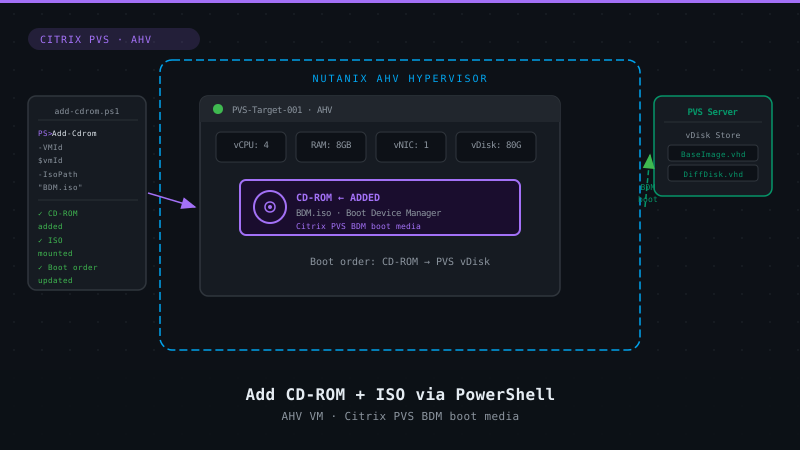
Nutanix AHV and Citrix MCS: Adding a persistent disk via Powershell – v2
4 min read
Archive notice (October 2026): This post is from 2019. The Nutanix script uses the legacy NutanixCmdletsPSSnapin. Snap-ins only run in Windows PowerShell 5.1, and the legacy Prism APIs behind these cmdlets are deprecated starting with the AOS and Prism Central release planned for Q4 2026. For new automation, use the Nutanix v4 API or the v4 PowerShell modules such as Nutanix.Vmm (PowerShell 7). The in-guest disk script below still works on current Windows versions. For the current view on MCS storage on AHV, read Citrix MCSIO on Nutanix AHV: A Solution to a Problem That Doesn’t Exist.

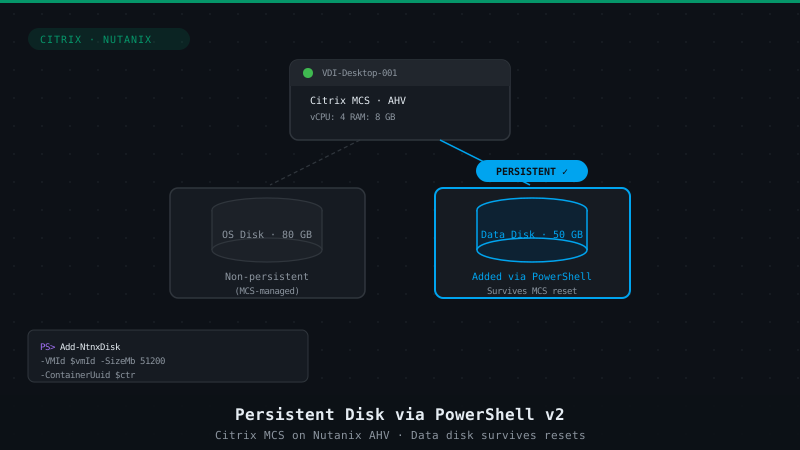
After writing this blogpost on Adding a persistent disk via Powershell with Citrix MCS running on Nutanix AHV I got an email from one of our senior system architects, he asked me about this configuration so I shared the blogpost with him and his customer to find out that this customer enhanced the scripting part by using powershell and ControlUp to initialize format and assign a drive letter to the disk. Smart usage of available tools!
While this customer has ControlUp in the environment (which integrates with Nutanix AHV, see How To Manage and Monitor Nutanix AHV With ControlUp) you might not be so lucky to have these tools available. Does that mean you’re left out? Nah, you can easily run the script with a login script or via GPP/GPO so using this script might still be feasible for you!
The new script
Here’s the script Andrew Gresbach has kindly offered to share in this post, it’s simple but immensely effective:
$newdisk = @(get-disk | Where-Object partitionstyle -eq 'raw')
$Labels = @('Logs')

for($i = 0; $i -lt $newdisk.Count ; $i++)
{

    $disknum = $newdisk[$i].Number
    $dl = get-Disk $disknum |
       Initialize-Disk -PartitionStyle GPT -PassThru |
          New-Partition -AssignDriveLetter -UseMaximumSize
    Format-Volume -driveletter $dl.Driveletter -FileSystem NTFS -NewFileSystemLabel $Labels[$i] -Confirm:$false
New-Item -ItemType Directory -Path "$($dl.DriveLetter):\Logs" -Force | Out-Null

}
From Andrew:
Here is the contents of the 2nd script that I threw together that I am running through ControlUP (which basically just runs the powershell commands on the end point Windows vm through their agent). Where the disk add script runs via the Nutanix commandlets at the hypervisor level, this one has to run on the vm level (to simulate like you would do it in Windows)
This one does 3 things basically:
- Initializes the newly added disk
- Formats the disk and assigns the next free drive letter (D: on most images, unless a CD-ROM drive already holds it)
- Creates the folder “Logs” on the new drive (since Windows can’t write event logs to the root of a drive it needs a folder)
And the last part is following any one of the steps in this article to hide the new drive from Windows Explorer: How to hide a drive in Windows 11 or Windows 10 (The Windows Club)
The previous script
Just for completeness, here’s the script previously mentioned:
# kees@nutanix.com
# @kbaggerman on Twitter
# https://blog.myvirtualvision.com
# Created on March 4, 2019


# Setting parameters for the connection
[CmdletBinding(SupportsShouldProcess = $False, ConfirmImpact = "None") ]

Param(
    # Nutanix cluster IP address
    [Parameter(Mandatory = $true)]
    [Alias('IP')] [string] $nxIP,
    # Nutanix cluster username
    [Parameter(Mandatory = $true)]
    [Alias('User')] [string] $nxUser,
    # Nutanix cluster password
    [Parameter(Mandatory = $true)]
    [Alias('Password')] [System.Security.SecureString] $nxPassword
)


# Adding PS cmdlets
$loadedsnapins=(Get-PSSnapin -Registered | Select-Object name).name
if(!($loadedsnapins.Contains("NutanixCmdletsPSSnapin"))){
   Add-PSSnapin -Name NutanixCmdletsPSSnapin
}

if ($null -eq (Get-PSSnapin -Name NutanixCmdletsPSSnapin -ErrorAction SilentlyContinue))
{
    Write-Host "Nutanix CMDlets are not loaded, aborting the script"
    break
}


Function write-log {
    <#
       .Synopsis
       Write logs for debugging purposes

       .Description
       This function writes logs based on the message including a time stamp for debugging purposes.
    #>
  param (
  $message,
  $sev = "INFO"
  )
  if ($sev -eq "INFO"){
    write-host "$(get-date -format "hh:mm:ss") | INFO | $message"
  } elseif ($sev -eq "WARN"){
    write-host "$(get-date -format "hh:mm:ss") | WARN | $message"
  } elseif ($sev -eq "ERROR"){
    write-host "$(get-date -format "hh:mm:ss") | ERROR | $message"
  } elseif ($sev -eq "CHAPTER"){
    write-host "`n`n### $message`n`n"
  }
}

# Connecting to the Nutanix Cluster
$nxServerObj = Connect-NTNXCluster -Server $nxIP -UserName $nxUser -Password $nxPassword -AcceptInvalidSSLCerts

if ($null -eq (get-ntnxclusterinfo))
{
    write-log -message "Cluster connection isn't available, aborting the script"
    break
}

## VM Creation
# Setting Variables
$VMPrefix = Read-Host -Prompt 'Input your VM Prefix including the wildcard (*)'

# Searching for the VM defined
write-log -message "Searching for VMs with the prefix $VMPrefix"
$vminfo = Get-NTNXVM | Where-Object {$_.vmName -like $VMPrefix}

# Looping thru all VMs starting with the prefix and adding a disk
Foreach ($vm in $vminfo) {
        Try
        {
        $vmId = ($vm.vmid.split(":"))[2]
        write-log -message "VM found matching the naming: $($vm.vmName) and VM ID $($vmID)"
            ## Disk Creation
            Try
            {
            # Setting a SCSI disk of about 12GB (sizeMb 12400, use 51200 for 50GB) on Container ID (get-ntnxcontainer -> ContainerId)
            $diskCreateSpec = New-NTNXObject -Name VmDiskSpecCreateDTO
            $diskcreatespec.containerid = 1265
            $diskcreatespec.sizeMb = 12400

            # Creating the Disk
            $vmDisk =  New-NTNXObject –Name VMDiskDTO
            $vmDisk.vmDiskCreate = $diskCreateSpec

            # Adding the Disk to the VM
            Add-NTNXVMDisk -Vmid $vmId -Disks $vmDisk | out-null

            write-log -message "Adding a 2nd disk to $($vm.vmName)"
            }
            Catch
            {
            write-log -message "Failed to add a 2nd disk to $($vm.vmName)"
            }
        }
        Catch
        {
        write-log -message "Could not find a VM with the name $($vm.vmName)"
        }

}

Disconnect-NTNXCluster *

write-log -message "Disconnecting from the cluster"
Hopefully this helps you when configuring a persistent disk for non-persistent desktops provisioned with Citrix MCS on Nutanix AHV.

Kees Baggerman
Latest posts by Kees Baggerman (see all)
- Citrix MCSIO on Nutanix AHV: A Solution to a Problem That Doesn’t Exist - June 10, 2026
- The Cloud Desktop CPU Lottery: What Are You Actually Running On? - June 2, 2026
- Your Cloud Desktop Is Running on Yesterday’s Silicon - May 21, 2026
- When the Orchard Ships Production Software: AI-Augmented Development in the Real World - May 17, 2026
- Nutanix Documentation Script v5.0: Visual Reports, Brand Templates, and Seven Embedded Diagrams - May 15, 2026