Storage features in XenDesktop 7.9
3 min read
 Citrix just released XenDesktop 7.9, one of the things that caught my eye during the installation was the option to leverage/utilise local storage of your virtualisation hosts.
The new XenDesktop 7.9 installation is similar to what we already know in the previous versions except for one thing that obviously caught my eye.
New storage features?
After you create the hosting connection in Citrix Studio the wizard will prompt you for the following additional configuration:
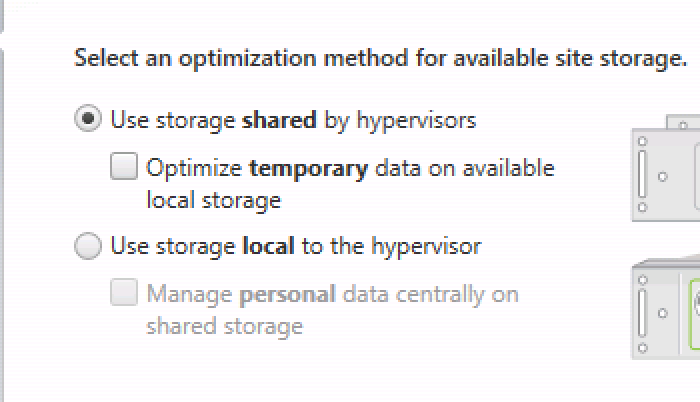
This new option offers you two main configuration items:
- Use storage shared by hypervisors
- Use storage local to the hypervisor
Both options have an additional check box as you can see, as my test environment already offers all the combined benefits of local storage and shared storage I’ve tested the first option and enabled the second tickbox and this resulted in the following configuration of the Resources section in my Hosting connection:
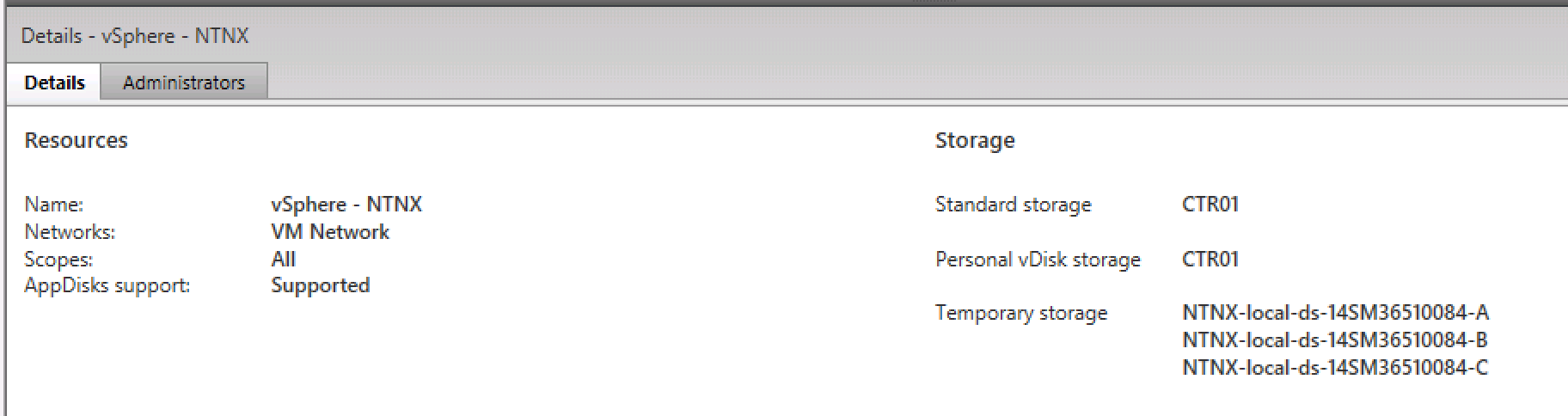
As you can see the Resources section is using my CTR01 VMFS datastore for both shared storage and Personal vDisk storage and my local servers as temporary storage. With this combination Citrix is able to utilise the local storage of the virtualisation host for temporary files, this could be SSD or NVME-like technology where Citrix is able to speed up their IO/bring down their latency because of that.
The proof is in the pudding!
When I was testing this feature it was just still in beta phase so I wanted to find out if/what was written to local disks from a VM perspective so I created a Machine Catalog with 2 VMs in it and pinned down the host of one of the VMs, when I listed the VMFS volumes I got the following result:
[root@NTNXKB-B:/vmfs/volumes] ls
CTR01 -> 888f9061-e499f73b
HeartBeat -> d8d59338-65b2ce49
NTNX-NFS-DEFAULT -> a522cc1c-4ff41119
NTNX-local-ds-14SM36510084-B -> 54e1ee13-2917d673-0c86-0cc47a46b1de
a522cc1c-4ff41119
d8d59338-65b2ce49
54e1ee13-2917d673-0c86-0cc47a46b1de
888f9061-e499f73b
There were a few other directories that I sanitised for readability; looking at the NTNX-local-ds-14SM365§0084-B directory (which is the local datastore of this host) I found the following listing:
[root@NTNXKB-B:/vmfs/volumes/54e1ee13-2917d673-0c86-0cc47a46b1de] ls
ServiceVM_Centos      diagnostics_lock.iso
Concluding
This is what I would expect here but no traces of any temporary data on the local sata dom which I, at this point, blame to the very early build I got installed. It would certainly be an interesting move to see what’s going on in the development of MCS to be a first class citizen in Citrix’s portfolio as PVS is often considered as complex and hard to manage.

Kees Baggerman
Latest posts by Kees Baggerman (see all)
- Citrix MCSIO on Nutanix AHV: A Solution to a Problem That Doesn’t Exist - June 10, 2026
- The Cloud Desktop CPU Lottery: What Are You Actually Running On? - June 2, 2026
- Your Cloud Desktop Is Running on Yesterday’s Silicon - May 21, 2026
- When the Orchard Ships Production Software: AI-Augmented Development in the Real World - May 17, 2026
- Nutanix Documentation Script v5.0: Visual Reports, Brand Templates, and Seven Embedded Diagrams - May 15, 2026